Analyze the data › Analysis Workspace
Sharing and Collaboration
A weekly project has been running for about a year. Four people open it every Monday, the numbers in it get quoted in a meeting, and over time it has become the thing everybody means when they say "the weekly numbers". Nobody thinks of it as infrastructure, but that is what it has become.
Then somebody new joins, asks for access, and is given it in the ordinary way, by opening the share dialog and typing their name. A fortnight later the Monday meeting starts with two people disagreeing about a figure, and it turns out that the new joiner had been exploring, had changed a segment on the second panel to something more relevant to their own team, and had saved. The project everybody depends on is now a slightly different project, and no version of it exists anywhere that says what it used to be.
Nothing malicious happened, and nobody did anything the interface told them not to. The share dialog offered a choice, the choice was made in about two seconds by somebody who wanted to be helpful, and the difference between the option chosen and the one beside it was the difference between a reader and a co-owner.
Which is why this section spends most of its length on three options in one dropdown.
Three roles, and what each one really hands over
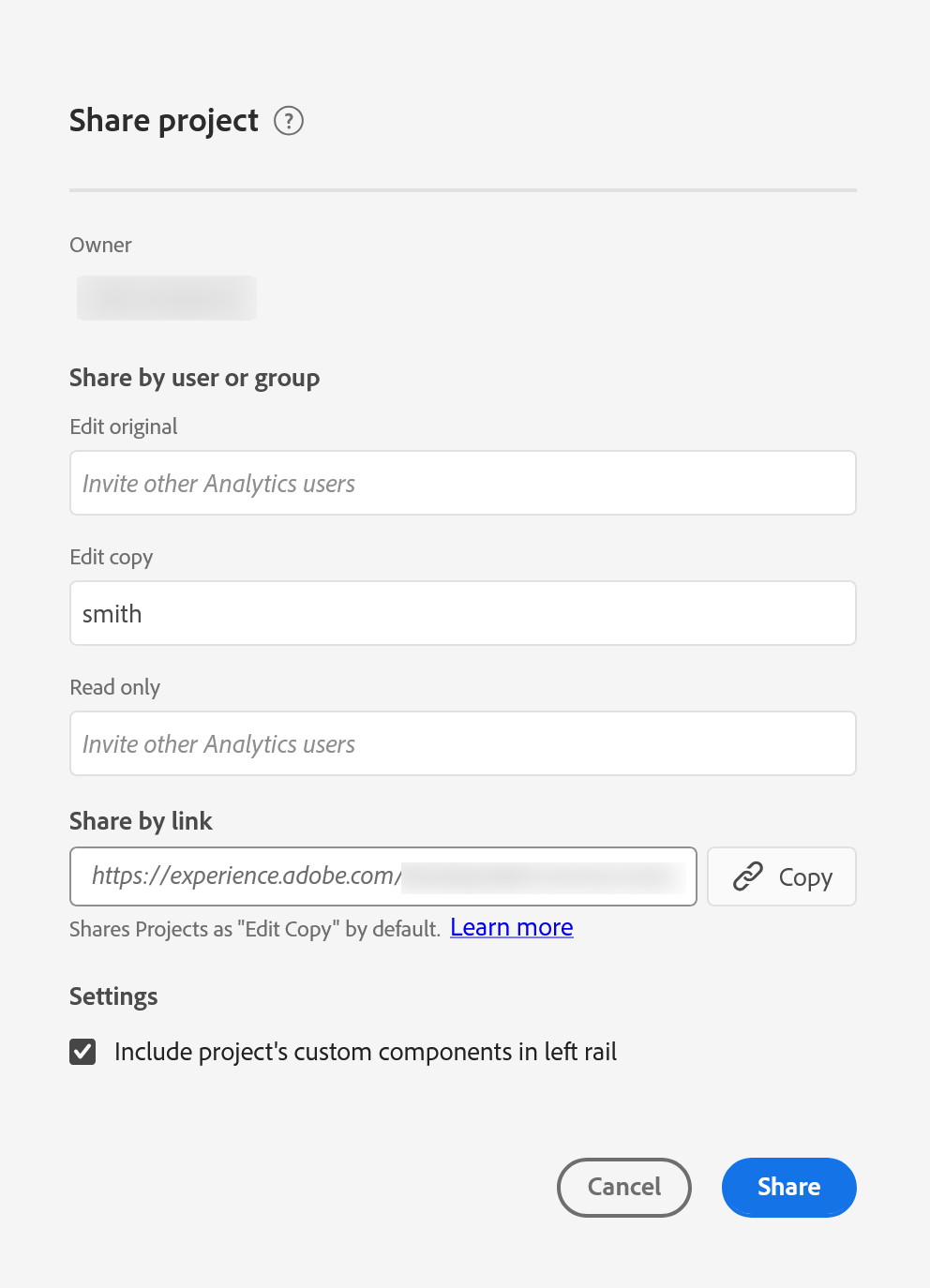
When you share a project with somebody inside your organization, you choose the role they get, and the three are genuinely different in kind rather than in degree.
Edit original makes them a co-owner of the original. They can change it, save over it, and in most respects manage it the way you can. That is the correct choice for an analyst you are genuinely working with, and the wrong one for almost everybody else, because it is also the choice that lets a well-meaning person permanently alter a report four other teams read.
Edit copy lets them do everything except save over your version. They open it, work in it, break things, rearrange it, and when they want to keep what they have done they save their own copy. For a colleague who understands the data and wants to take your analysis somewhere of their own, this is almost always the right answer, and it is the option most people should be choosing when they reflexively choose the first one. Adobe agrees, incidentally: the share dialog states that projects are shared as Edit copy by default, so the safer answer is already the one sitting there until somebody changes it.
Read only gives them the project as a reader. They cannot save, and they do not get the left rail, which means they cannot drag new components in and build something that was never intended. They can still read, filter within what is there, and take the numbers away. For a stakeholder who wants the answer rather than the tool, this is both safer and kinder, because a person who does not build reports is not helped by being handed a component library.
One detail is worth holding on to, because it makes permissions behave in a way people do not expect. Where a person ends up with more than one role, through a group as well as directly for instance, they get the most permissive of them. So adding somebody as a viewer does not take away edit rights they already had through a team, and a project that appears carefully locked down can be wide open to half its audience for reasons that are not visible in the share dialog.
Two people with edit rights can open the same project and work in it simultaneously, and the product will not tell either of them. There is no lock, no presence indicator, and no merge. Whoever saves last writes their version over the other, and the work that disappeared leaves nothing behind to recover. This is the strongest practical argument for leaving the default alone and handing out Edit copy: the moment more than one person can save over a shared project, the number of ways to lose an afternoon goes up considerably, and none of them announce themselves.
Sharing with people who do not have Adobe Analytics
Some of the people who need the answer do not have a login, and were never going to get one. Adobe handles this with links rather than accounts.
A project can be shared as a read-only link to somebody inside the organization who has no Analytics access, and it can be published as a public link for people outside it entirely. Both give a view of the project without a login, both can be disabled or regenerated at any time, and the public one has a throughput limit measured in the region of a couple of hundred people every few minutes, which matters only if a link ends up somewhere it was not meant to go.
That last clause deserves more attention than it usually gets. A public link is a URL that shows your data to anybody holding it, and URLs travel: pasted into a chat, forwarded, included in a deck that gets emailed onward. Before creating one it is worth asking what is actually visible through it, which is exactly what curation controls, and worth deciding who owns the job of turning it off when the campaign it was made for is over.
| Recipient | Use | Watch for |
|---|---|---|
| Another analyst you are working with | Edit original | Two people saving over each other, silently |
| A colleague who wants to take it further | Edit copy | Their copy drifts from yours, which is usually fine |
| A stakeholder who wants the answer | Read only | They have no rail, so anything missing is missing for good |
| Somebody internal without Analytics | Read-only link | Curate first, since the link is the whole project |
| Somebody outside the company | Public link | It is a URL. Assume it will be forwarded. |
Scheduling, and why an emailed report gets read
The other half of sharing is the version nobody has to open anything to receive. A project can be scheduled to send itself, as a file, to a list of people, on a rhythm you choose.
It is worth being clear-eyed about why this matters, because it is not convenience. A project that has to be opened competes with everything else somebody could do with those two minutes, and loses most weeks. A file that arrives on Monday morning in front of somebody who was going to read their email anyway does not have to win that competition. The same numbers, delivered rather than published, get looked at several times more often, and the difference is entirely about whose effort it costs.
Two things go wrong with scheduled projects and both are quiet. The first is that a schedule outlives its reason: the campaign ends, the team reorganizes, and the report keeps arriving for another year, read by nobody and trusted by everybody who sees the subject line. The second is the interaction with dynamic rows described in Freeform Tables, where a table showing the top ten of something silently shows a different ten each month, which is precisely the wrong behavior in a report whose entire purpose is comparison over time.
When a scheduled delivery is created, give it an end date somewhere within the next few months rather than leaving it running indefinitely. If it still matters when the date arrives, renewing takes seconds and somebody has actively confirmed the report is still wanted. If it does not, it stops on its own without anybody having to notice, which is the part that never happens otherwise. Organizations accumulate scheduled reports the way they accumulate segments, and unlike segments these arrive in people's inboxes every week carrying the implication that somebody is watching.
Follow along: hand the same project over three different ways
The roles are easier to hold on to once you have seen what each one actually produces, and the fastest way to see that is to look at your own project through somebody else's eyes.
- Part one, look before you share
- Open a project you would realistically hand to somebody.
-
Choose
Share›Curate project data, and reduce the rail first. Sharing an uncurated project is the default, and it is the thing this whole module has been arguing against. - Part two, the roles
-
Choose
Share›Share projectand read the three roles properly:Edit original,Edit copy,Read only. Decide which one you would actually have picked before reading this section. -
Share with a colleague as
Read onlyand ask them what they see. No left rail. That is the difference, and it is much bigger in practice than it sounds on paper. -
Now share the same project as
Edit copy. Ask them to change something and save, then check your original. It is untouched, and they have their own. - Part three, the link
-
Choose
Share, get a read-only link, and open it in a private window. This is exactly what somebody with no Adobe login sees. Look at it as a stranger and ask what is visible. - Disable the link again when you are done looking.
- Part four, the schedule
- Schedule the project to yourself, weekly, with an end date. Setting the end date is the step. It takes two seconds now and saves somebody deleting a zombie report in a year.
- Before scheduling anything for real, go back to the tables and pin the rows. A scheduled comparison report with dynamic rows compares different things each month, which defeats the point.
There is nothing else to configure. Three roles, two kinds of link, and a schedule. The judgment is entirely in which role, and most people give away more than they meant to.
There is more to sharing than this, and this is the part that decides whether it goes wrong. Step 4 is the one that changes behavior, because seeing a project without the left rail is what makes the difference between the roles concrete rather than theoretical.
The whole of the handover problem
Sharing a project means choosing between Edit original, which makes a co-owner who can save over your work, Edit copy, which lets somebody do anything except that, and Read only, which gives a reader the answers without the toolbox. The middle option is right far more often than it gets chosen, and it is already the default, the most permissive role wins wherever somebody holds more than one, and two people editing the same project at once will overwrite each other with no warning of any kind. Links extend all of this to people without Adobe logins, and a public link is a URL that should be assumed to travel. Scheduling is the version that actually gets read, and it needs an end date and pinned rows or it becomes a zombie report comparing different things every month.
Set alongside curation, that is the whole of the handover problem: curate so a reader cannot pick the wrong metric, annotate so nobody investigates the same dip twice, and share at the level that matches what the person is really being asked to do.
There is one thing left that decides whether any of this works at all, and it has nothing to do with permissions. A project that four teams depend on, holding twenty tables across eight panels with a year of data behind it, has to actually open in front of somebody who is presenting in ninety seconds. Workspace Performance and Limits covers what makes a project slow, what the real ceilings are, and why the project everybody relies on is usually the one that takes longest to load.
Everything in this section lives under Share in the menu bar of an open project: Share project for named recipients and roles, the read-only and public link options beneath it, and Curate project data which should be used before any of them.
Scheduling is under Share > Send file on schedule. Existing schedules are managed from Analytics > Components > Scheduled projects, which is also the only place to find the ones nobody remembers creating.
This article focuses on the concepts, architecture, and practical guidance behind the topic. For the latest UI walkthroughs and step-by-step implementation instructions, use the links below. They leave this site and open Adobe's own documentation in a new tab.