Start with the foundations › Variables: Props, eVars, and Events
Props (Traffic Variables)
Two modules in, one line has been settled: Adobe Analytics is a machine for turning behavior into data. But data has to live somewhere. Ask where, and the answer names itself: data is stored in variables. The word is a small piece of computing history. Early programmers needed a name for a slot in memory whose contents could change from one moment to the next, and since the value was variable, that is what they called it. Adobe Analytics, like any platform, has its own set of variables, and this module is a tour of them: how Adobe stores what your visitors do. And because report suites sit at the center of collection, each report suite carries its own set of these variables.
Adobe Analytics has a handful of variable types, each with a job:
This section is about the first of them: the prop.
Why two kinds of variable exist at all
To understand why props exist, rewind to the early 2000s, when this product was born. Websites then were simple: server-rendered HTML pages, no single-page apps, no client-side frameworks quietly re-rendering the screen. In that world, the product's designers saw a need for two different kinds of variable. One would describe the page in front of the visitor right now, true for this moment and no longer. The other would need to outlive a single page, following the visitor so it could take credit for something that happened later: a download, a purchase, a form submission. The first kind became the prop; the second became the eVar, the conversion variable. The split is about scope: describe now, or persist and attribute later.
"Prop" is short for property. A prop captures a property of the current page or interaction: its name, its type, the site section, an internal search term, the login status. It answers "what is true about this hit?" and nothing more.
A prop is written in pencil
That "nothing more" is the whole point. A prop records a value on the single hit it rides in on, and then it is erased. It has no memory. To see this concretely, picture Adobe's raw data, where every server call your site sends becomes one row (the full structure is Data Feeds). A prop's value lives in its own row and never reaches across to the next one. Set a prop on this hit, and the next hit starts blank. An eVar, by contrast, can carry its value forward from row to row according to its persistence settings. That single difference, carry-over or not, is the root of everything else.
On the hit where you did not set it, the prop is simply empty. An eVar set to "Homepage" on hit 1 would still be reporting "Homepage" on hits 2 and 3; a prop will not. If you need the value to travel with the visitor, you are describing an eVar, not a prop.
The prop is not the weaker sibling
It is tempting to conclude that the eVar is simply more powerful and the prop a lesser tool. Not so. There are cases where persistence is exactly what you do not want, because it would distort the report. Say you capture the type of a form in a variable. Once the form is submitted, its job is done. You do not want that form type clinging to every action the visitor takes afterward, quietly attributing later outcomes to a form they already finished. Here, a variable that forgets after one hit is not a limitation, it is the correct behavior. That is a prop's moment.
Capacity and limits
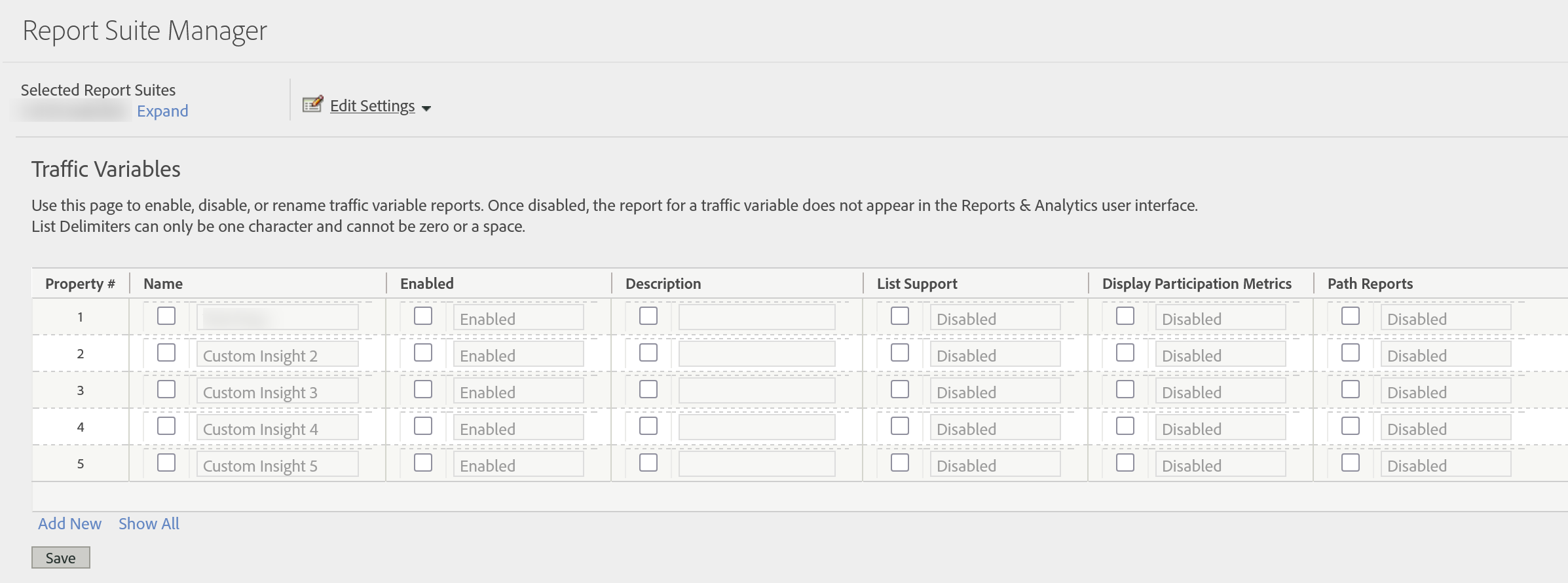
Every report suite gives you up to 75 props (the exact number depends on your Adobe contract), and each prop holds up to 100 bytes; anything longer is truncated when it reaches Adobe, silently, with nothing in the interface marking that it happened. The symptom is worth recognizing on sight: a prop report full of rows that look identical, because the values differ only past the cut. Long URLs, breadcrumb strings and concatenated page hierarchies all cross 100 bytes routinely. That is notably tighter than an eVar's 255 bytes, so props reward short, disciplined values. With only 75 to spend, plan what earns a slot.
Two things props are quietly good at
List props. A prop can hold more than one value on a single hit. Say you run a survey with four options and a visitor can pick any combination. You want to know how often each option was chosen on its own, not as a tangle of combinations like "option 1 and option 3." Store the selections in one prop, separated by a delimiter, and switch that prop to list mode in the report suite settings. Adobe then reports each value independently, and if the same value appears twice on a hit, it is de-duplicated.
// A prop describes the current hit
s.prop1 = "Homepage";      // page type
s.prop2 = "logged-in";     // login status

// A list prop holds several values on one hit (comma delimiter)
s.prop3 = "option1,option3,option4";
Two cautions with list props: Adobe sets no default delimiter, so you must choose one (a comma, pipe, or colon) and configure it in settings, and the 100-byte limit applies to the entire list, every value and delimiter combined, so list props truncate easily. Where values are long, a common trick is to store short codes and expand them with classifications. The fuller treatment, including the dedicated list variables, is its own section.
Pathing. Props have a historical claim to fame: they were once the only variables that could power path reports. In the classic Reports and Analytics interface, if you wanted to see the sequence of values a visitor moved through, you enabled pathing on a prop, and eVars could not do it at all. That has changed. In Analysis Workspace, the Flow and Fallout visualizations accept any dimension, prop, eVar, or default, and even work across events, so the old prop-only pathing toggle is now largely a legacy setting. If you inherit an implementation with pathing switched on for certain props, that is why. Analysis Workspace has a module of its own.
The clean split, props are hit-scoped traffic and eVars are persistent conversion, is an AppMeasurement-era distinction. Adobe now recommends eVars for most cases, because they have grown to cover almost everything a prop can do. In Customer Journey Analytics the distinction disappears entirely: every field is just a dimension you attribute however you like. For classic library-based implementations the split still matters and you should know it cold, but treat it as a product-era artifact, not a law of nature, and one that is fading.
So the rule of thumb for a classic implementation stays simple. Reach for a prop when you want to describe a hit or analyze a path, and you do not need the value to follow the visitor or credit a later outcome. The moment you need persistence or attribution, that is an eVar.
Props tend to surface in reporting quickly and cleanly, which makes them handy for near-real-time, page-level monitoring. If you catch yourself wanting a prop that also persists, that is your signal you actually want an eVar, or both.
Which is the natural next question. A prop is written in pencil and forgets everything the moment the hit ends. So what does the other kind of variable do differently, and why does that one difference make it the workhorse of nearly every implementation? eVars (Conversion Variables) answers it.
Configure Props: Admin → Report Suites → Edit Settings → Traffic → Traffic Variables
Enable List Props / Pathing: Edit Settings → Traffic → Traffic Variables (per-prop columns)
This article focuses on the concepts, architecture, and practical guidance behind the topic. For the latest UI walkthroughs and step-by-step implementation instructions, use the links below. They leave this site and open Adobe's own documentation in a new tab.