Start with the foundations › Variables: Props, eVars, and Events
eVars (Conversion Variables)
If a prop is written in pencil, an eVar is written in permanent marker. Set a prop and it is erased on the next server call; set an eVar and the value stays, riding along with the visitor from hit to hit until you decide it should expire. That one property, persistence, is what makes the eVar the engine of real reporting. When you ask "which campaign actually drove this revenue?" or "what search term led to this signup?", you are asking an eVar. Props describe traffic; eVars assign credit. Almost every KPI worth reporting runs through one.
Formally, eVars are conversion variables. The nickname's origin is folklore rather than official: the most repeated story traces the "e" to "eCommerce variable," from the product's commerce roots, though eVars long ago outgrew commerce and now carry every kind of attribution. The name to hold onto is the formal one, conversion variable, because that is exactly the job: connecting a cause to a later conversion.
Why persistence is the whole point
To feel why persistence matters, follow a real journey. A visitor arrives from an email campaign, and your implementation captured the campaign's ID from the URL into an eVar. But they do not buy on that first page. They browse three or four more pages, maybe leave, and come back two days later to submit a lead form. In a world without persistence, that conversion would be an orphan: the form submission happens on a page that knows nothing about the email that started it all, and the campaign gets no credit. That is the wrong answer, because the email clearly did its job.
The eVar fixes this. Because you set the campaign eVar to persist, Adobe keeps that campaign ID attached to the visitor, hit after hit, until the conversion happens or the value expires. When the form is finally submitted, the campaign ID is still there to receive the credit. Multiply that across thousands of visitors and your report finally tells the truth: campaign 123 drove 100 form submissions, campaign 456 drove 20. That single capability, carrying a cause forward to meet its effect, is most of why eVars exist.
Capacity, and what the numbers tell you
Adobe gives you plenty of room for eVars, and the numbers themselves tell a story. A report suite supports up to 250 eVars (the exact number depends on your contract), each holding up to 255 bytes, more than double a prop's 100. Set that against just 75 props and the asymmetry is deliberate: as businesses' data needs grew, Adobe kept raising the eVar allotment while leaving props where they were, because the eVar is the more capable variable and the one worth investing in. The extra length means eVars comfortably hold long values like full URLs or concatenated identifiers. Still, 250 is not infinite, so each one should earn its place, which is exactly what variable planning is about.
Persistence is not a single on/off switch. Two settings define how each eVar behaves, and getting them right is the difference between attribution that tells the truth and reports that quietly mislead.
Expiration: how long the value sticks
Expiration is the attribution window: how long an eVar's value stays eligible to receive credit for a later event. The options run from short to effectively forever: visit, visitor, a set number of days, weeks, months, quarters, or years, until a specific success event (for example, expire the moment a purchase happens), or never. A campaign eVar expiring at "visit" credits only same-session conversions; the same eVar set to "30 days" keeps crediting that campaign for a month. Same data collected, very different story. You can also force an eVar to expire immediately by resetting it, which is how you cleanly repurpose a variable for a new use.
The word "cleanly" in that last sentence is carrying a lot of weight. Point an eVar at a new meaning without retiring the old one and both meanings now live in a single dimension. Run a report over any range spanning the changeover and campaign codes sit in the same list as product categories, sorted together, summed together, with nothing in the interface hinting that the values above and below a certain date are different kinds of thing. No error appears, because as far as Adobe is concerned these are all just values of eVar 12.
The repair is procedural rather than technical. Retire the old use, take a fresh slot if the suite has one to spare, and write down the changeover date somewhere a future analyst will actually look. Knowing that date is the only thing that lets somebody split their analysis at the right point, and it is invariably the thing nobody recorded. If the slot genuinely cannot be spared, the changeover date belongs in the variable's own documentation and in an annotation on the reports that use it, not in the memory of whoever made the change.
One of those expiration options deserves singling out, because it is the one most often chosen by accident rather than decided. Never sounds like the safe, generous setting. It is the opposite.
An eVar that never expires holds its value for the entire life of the visitor cookie. A campaign code picked up fourteen months ago is still sitting there when somebody buys today, and that purchase is credited to it. The report is not broken and nothing warns you: every number is exactly what the configuration asked for. It simply overstates that campaign, permanently, and the overstatement is invisible unless somebody thinks to ask how old the attributed touches are. Reserve never for attributes that are genuinely permanent properties of a visitor, and treat anything acquisition-related as needing a written justification before it gets that setting.
Allocation: who gets the credit
Allocation decides which value is credited when an eVar is set more than once before a conversion. There are three modes: Original Value (First Touch), Most Recent (Last Touch), and Linear (split evenly across all values). One subtlety worth internalizing: every value you send is always stored, regardless of allocation; allocation only governs which stored value gets credit for events. Here is one journey credited three ways:
Nothing about the visitor changed across those three rows, only the allocation setting did, yet each tells a different story about what your marketing is doing. That is why this setting deserves a deliberate decision, not a default.
First, expiration and allocation shape how data is credited, but changing them does not fix the past, history stays as it was processed (the forward-only rule from report suites). Second, Linear has a sharp edge: it is only accurate within a visit, so Adobe pairs it with Visit expiration, and switching an eVar to or from Linear hides that eVar's historical data in the interface to prevent mixing incompatible models. The safe move when you need a new allocation is to use a new eVar, not to flip an existing one.
One more setting worth knowing is an eVar's type. Most eVars are Text String, the default, holding values like a campaign name or a search term. But an eVar can instead be a Counter, which counts how many times something happened before a conversion rather than storing text, for example how many internal searches a visitor ran before they bought. It is a niche mode, but exactly right when the question is "how many times" rather than "which value."
Merchandising eVars: crediting products, not visitors
A standard eVar attaches its value to the visitor. A merchandising eVar instead binds the value to a specific product, which unlocks a whole class of ecommerce questions a normal eVar cannot answer, like "how much revenue did each product earn, broken down by the on-site search term that surfaced it?" It comes in two flavors, product syntax (the value is set in the products string) and conversion syntax (set as a normal eVar but bound to a product by a chosen binding event), and its allocation controls whether the first or most recent value binds to the product. It is genuinely advanced; for now, just know it exists and what it is for. It depends on the products string.
eVars, events, and the old dividing line
A piece of history still shapes how people think about eVars. In the classic Reports and Analytics interface, success events and conversion metrics could only be broken down by eVars, never by props; props paired only with baseline traffic metrics like page views and visits. So if you wanted "orders by campaign," the campaign had to live in an eVar. Analysis Workspace erased that wall: today any dimension, prop, eVar, or default, can be combined with any metric, traffic or custom event alike. The old pairing rule is worth recognizing when you inherit an older implementation, but it no longer limits what you can analyze. Analysis Workspace has a module of its own.
One modern caveat ties it together. The allocation setting still governs how your processed data is stored, but the attribution models in Analysis Workspace now let analysts re-attribute at analysis time, applying first, last, linear, U-shaped, time-decay and more on the fly. So allocation is increasingly a sensible default rather than a permanent commitment, though it still matters for classic reporting and downstream data feeds.
Expiration works the same way. Inside Workspace a model rebuilds persistence from the hits themselves, so it can reach back past the point where your eVar expired. Everywhere else, in classic reports and data feeds, both settings still decide the answer. What Is Attribution covers when the models apply and when they refuse to run.
And when you inherit an implementation carrying unusual allocation settings, check whether they exist only because report-time attribution did not when they were configured. Several of them will.
When you are unsure, the most common safe starting point for a campaign-style eVar is "Most Recent" allocation with an expiration that matches your real sales cycle. And when stakeholders argue about first-touch versus last-touch, that is your cue to lean on Workspace's attribution models to show them both, rather than re-litigating a variable setting.
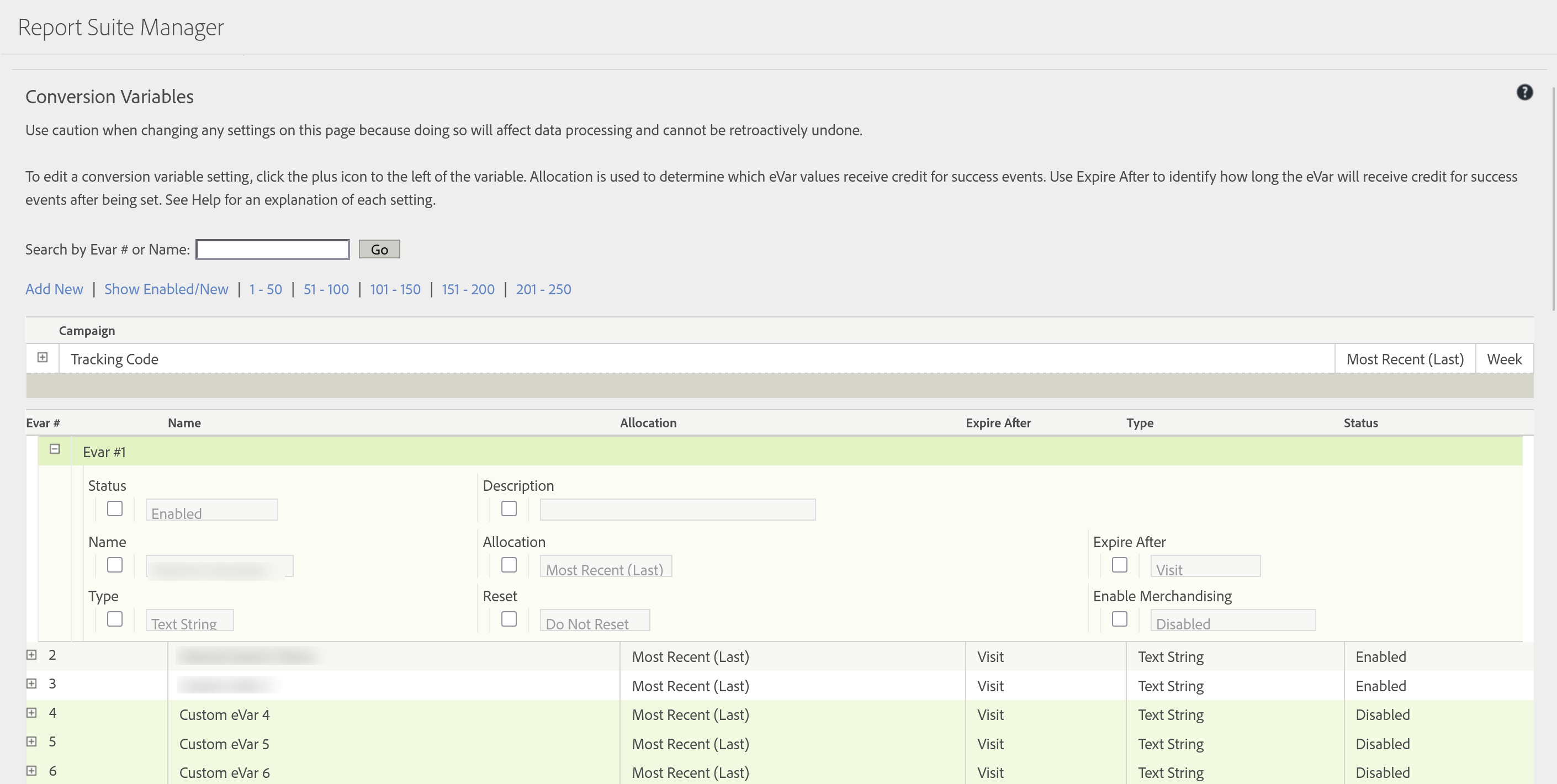
Configure eVars: Admin → Report Suites → Edit Settings → Conversion → Conversion Variables
Set Expiration & Allocation: Conversion Variables → (select eVar) → Expire After / Allocation
This article focuses on the concepts, architecture, and practical guidance behind the topic. For the latest UI walkthroughs and step-by-step implementation instructions, use the links below. They leave this site and open Adobe's own documentation in a new tab.