Collect the data › Adobe Launch (Tags)
Publishing Workflow
Publishing comes after the heavy lifting. The property exists, its library is hosted on the site, the extensions are installed, the data elements are built, and the rules are ready to tell AppMeasurement how to construct the image request. What is left is not difficult, you are past the hard part, but it is not something you do on the fly either, because it involves testing, approval, and the discipline of moving work safely from your screen to a live site. That is the publishing workflow.
Here is the question that exposes why it exists: right now all your changes are sitting in Launch, but are they on any environment yet? No. Nothing reaches a page until you deliberately bundle it and build it. The unit you bundle it into is a library, and a library is best understood as a single set of changes that you test, approve, and publish together. You create libraries, move them through stages, and edit them, all inside the publishing workflow.
The four states a library moves through
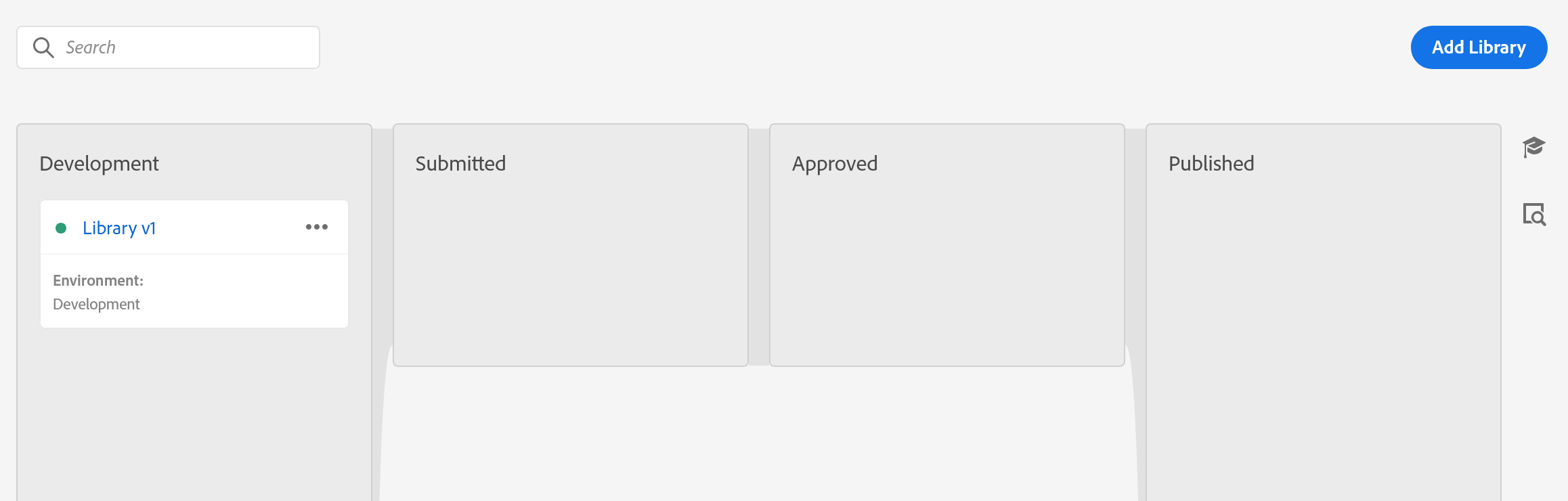
Every library lives in one of four states, shown as the four columns of the Publishing Flow tab. A library moves left to right through them, and a specific action carries it across each boundary.
One rule about these states matters more than any other, so hold onto it: changes can only be made while a library is in Development. Once it has been submitted, approved, or published, it is a snapshot you can no longer edit. If a library further along needs a change, it gets rejected back to Development, fixed there, and sent through again.
Build and name your first library
With everything ready, go to the publishing workflow and create your first library. Assign it to your development environment, add your changed resources, and build it. Then comes one of the genuine pleasures of a tag management system: the moment that build completes, the change is live on whatever page carries your development embed script. Open that page, hard reload it with Shift+Ctrl+R, and your work is right there to test. No deployment ticket, no waiting on a release window.
Before you start: open Data Collection › Tags › Club Web › Publishing Flow. Each stage below needs a different right.
- Development — needs the Develop right
- Choose
Add Library. SetNametoFoundation Library v1.0andEnvironmenttoDevelopment. -
Choose
+ Add All Changed Resources. It picks up the rule, the data element, and the Core and Analytics extensions you just created. -
Choose
Save & Build to Development. A status dot appears. Wait for it to turn green. Red means the build failed, and it almost always failed because a rule depends on something you left out. - Now go and test. Load your site with the development embed code and watch the network tab. Do not skip this. It is the only stage where a mistake costs nothing.
- Choose
Submit for Approval. - Submitted — needs the Approve right
-
Choose
Build to Staging. QA tests here, on the real site. - Choose
Approve for Publishing. - Approved — needs the Publish right
-
Choose
Build & Publish to Production. The production build is now live on every page carrying the production embed code. There is no undo button.
Published. The library is now the baseline. Every library you create after this inherits it automatically, so the next one only carries your changes.
Before you build, give the library a real name. It feels trivial on day one, when you have exactly one library. It stops feeling trivial the day you have eighty, and you are trying to find which one changed the tracking code last March.
Pick a naming convention and keep it. A first library can simply be Foundation Library or SiteName Analytics v1.0. After that, name by intent, Exclude downloads from articles, Added APAC countries to Meta pixel, or stamp them with dates, Download changes 22/Jun/2026, Disabled old product string 04/May/2025. Versioning, dates, or plain-English intent all work. A pile of libraries called "Library 1" through "Library 80" does not.
QA in the lower environment
What follows is a working introduction to QA in the publishing flow; the discipline in full, the tools, the systematic test approaches, and the debugging workflow, is the subject of its own module, Testing and Debugging. Now the library is on your development environment, and the real work of this stage begins: quality assurance. Good QA does not start by clicking around. It starts by building use cases, and the difference between testing one thing and testing the right things is where most data quality is won or lost.
Say you need to test a download rule. Do not check a single download and call it done. Think about the full surface: there may be several places on the site where downloads happen, several ways a visitor can trigger one, several file types that can be downloaded, and several paths a visitor takes to reach the download. List all of those, build the permutations, and that set of permutations is your test plan. A typical testing document captures, for each case:
- The requirement, what the business asked for.
- What you are testing, the specific case.
- Findings, what actually happened.
- Error details, when something is wrong.
- The URL and the component where the issue was found.
- A screenshot, so anyone reading it later sees exactly what you saw.
It also helps to categorise what you find, because "it's broken" is not actionable. Common categories: the variable is not available at all, available but in the wrong format, carrying unexpected values, a direct call that double-fires, or a server call that should fire once but fires more. Naming the failure mode is half of fixing it.
QA realistically runs in several rounds, back and forth between you and the web developer, until both sides agree the data is right. And when you reach that point, do one more thing that people routinely skip.
Once the analytics developer and the web developer are satisfied, get explicit sign-off from everyone involved. It has no technical effect at all, which is exactly why people overlook it. But the day someone asks why the numbers changed, or whether a thing was ever agreed, that sign-off is what protects you. Be disciplined about the paperwork, not just the code.
The workflow is a single lane, not a queue. While one library is waiting for approval, nobody else can submit. On a small team that is invisible. On a team of six, all shipping in the same week, it becomes the thing everyone is waiting on, and the temptation is to bundle unrelated changes into one library to get them through together. Resist it: a library is the unit you roll back, and a library carrying four teams' work is a library you cannot roll back.
The single lane is the constraint you can see. There is a second one underneath it that is invisible, and it catches the same teams.
Rules, data elements and extensions belong to the property, not to a library. A library holds a revision of each resource it touches. So two people can open two libraries in Development, edit the same rule in each, and neither is told the other exists. Both build. Both pass QA, because each library contains its own author's version and behaves exactly as that author intended.
When the second one reaches production it carries its own revision of that shared rule, and that revision replaces the first team's. Their change is gone from the live site while their library still shows as published, which is precisely why nobody thinks to look there. The symptom arrives days later as a report that stopped populating, and the team who lost the work is the least likely to suspect a publish they had nothing to do with. Keep libraries small, keep them short-lived, and publish them quickly, for the same reason short-lived branches are the rule in every other codebase.
The approval gates, and why they exist
The move from Development to live is deliberately gated, and the gates map to three separate rights. They are not bundled together: a person has each one only if it is granted to them.
Develop lets someone create libraries, build for development, and submit for approval. Approve lets someone build to staging and approve a staged build. Publish lets someone publish an approved library to production. They are not inclusive, so for one person to run the whole flow alone, they need all three. This separation is the point: it lets an organisation keep the person who builds, the person who approves, and the person who ships as different people, which is how you stop a single mistake from walking straight onto the live site.
So the path is: you submit the development library for approval, an approver tests it in staging and approves it, and a publisher pushes the approved library to production. At any gate a library can be rejected, which sends it back to Development for changes before the flow starts again.
Publishing, and the days after
When QA is signed off, ask whoever holds the approve and publish rights to move the library to production. Production deserves its own high-level check once the library lands. And then the part people get wrong: do not celebrate early.
A clean QA does not guarantee clean production data. Watch your reports for the first two or three days, or however long your plan calls for. If the numbers look factual and correct after that window, that is your real first win. The beacon firing in a debugger and the data being right in a report are two different confirmations, and only the second one counts.
When production goes wrong
Suppose the reports show something off, and you trace it to a bug in the production library that slipped past QA. First, do not panic, and second, understand the real constraint: a published library is a snapshot, so you cannot edit it in place. That sounds alarming the first time you hit it, but you are not stuck. You have two clean routes out.
You can fix forward: make the correction in a new library back in Development, test it, take it through approval, and publish it. Or you can roll back: republish a previous, known-good library. Launch keeps your published history, the currently live library is marked with a green dot, and republishing an earlier one restores it. Either way the situation is recoverable.
A library is not a complete copy of your whole implementation. A library in Development, Submitted, or Approved inherits the rules, data elements, and extensions of the libraries upstream as its baseline. So each new library is really just a set of changes laid on top of what is already live. That is why a small fix can ship as a small library, and why republishing an old one cleanly returns you to a known state.
That is the publishing workflow. It is fairly simple once the shape is clear, but it is important, and worth one last observation. This flow does not belong to Adobe Analytics. It is product-independent, exactly like Launch itself. Tomorrow your work might be the Web SDK, or AEP and its relatives like CJA, but all of it ships through this same Launch publishing workflow. Learn it once, and you have learned how everything in this world reaches a live site. Environments looks more closely at the places these libraries are built and published to, and the embed codes that carry them.
Inside a property, open Publishing Flow, then Add Library to create one. The four columns are Development, Submitted, Approved, Published.
This article focuses on the concepts, architecture, and practical guidance behind the topic. For the latest UI walkthroughs and step-by-step implementation instructions, use the links below. They leave this site and open Adobe's own documentation in a new tab.