Sequential Segments
Segment Logic and Operators closed on a promise. It showed how And and Or combine conditions, and admitted the one thing they cannot see: the difference between "saw the demo and then bought" and "bought and then saw the demo." To And, both are simply two things that happened. But those are opposite stories. One is a demo that earns a sale. The other is a customer being onboarded after they already paid. Same two events, reversed order, entirely different meaning, and a segment built on And would fold them together and hide the distinction completely.
Order is often the whole point. Did they read the pricing page before starting a trial, or stumble onto it afterward? Did they abandon the cart before the discount banner appeared, or after? Questions like these are not about whether events occurred. They are about the direction of the journey. Answering them needs a third join operator and a different way of thinking.
THEN: putting events in order
Where And and Or sit between conditions and ask "both?" or "either?", THEN sits between them and asks "this, and then that?" A segment of Page A THEN Page B returns the visitors who saw Page A and later saw Page B, in that order, in that direction. Reverse the two checkpoints and the group changes. THEN is the operator that finally lets a segment express a path rather than a pile.
Two details matter from the outset. A sequence needs at least two checkpoints, since a single event has nothing to follow. And the first checkpoint is part of the result, not merely a trigger. Page A THEN Page B does not return only the Page B moment; it returns the matched journey that began at Page A.
Why a sequence cannot live at Hit scope
A sequential segment must be scoped to Visit or Visitor. It can never be a Hit-scoped segment, and the reason follows directly from what a hit is. A hit is a single server call, one moment, as defined in Segment Containers. A single moment has no "later." For "A then B" to mean anything, there has to be room for B to happen after A, which means the segment must span at least a visit. So the top of a sequence is always a Visit or a Visitor. Individual Hit checkpoints can still sit inside that sequence, marking specific moments along the way, but the sequence as a whole lives at the wider scope.
The greedy default, and how to rein it in
Sequential segments are greedy by design. Left alone, a sequence returns the largest set of data that matches the pattern, and Adobe labels this default "Include Everyone." For Page A THEN Page B, Include Everyone hands back the entire matched journeys: everything from before A, between A and B, and after B, for every visitor who followed the path. That is often far more than the question wanted, and it is the most common reason a sequential segment comes back looking bloated.
Two options carve it down. "Only Before Sequence" keeps the sequence and everything leading up to it, the run-up. "Only After Sequence" keeps the sequence and everything that followed, the aftermath. Both include the matched sequence itself; they differ only in which side of it they keep. To learn what visitors did on their way to starting a trial, use Only Before. To learn what they did once they converted, use Only After.
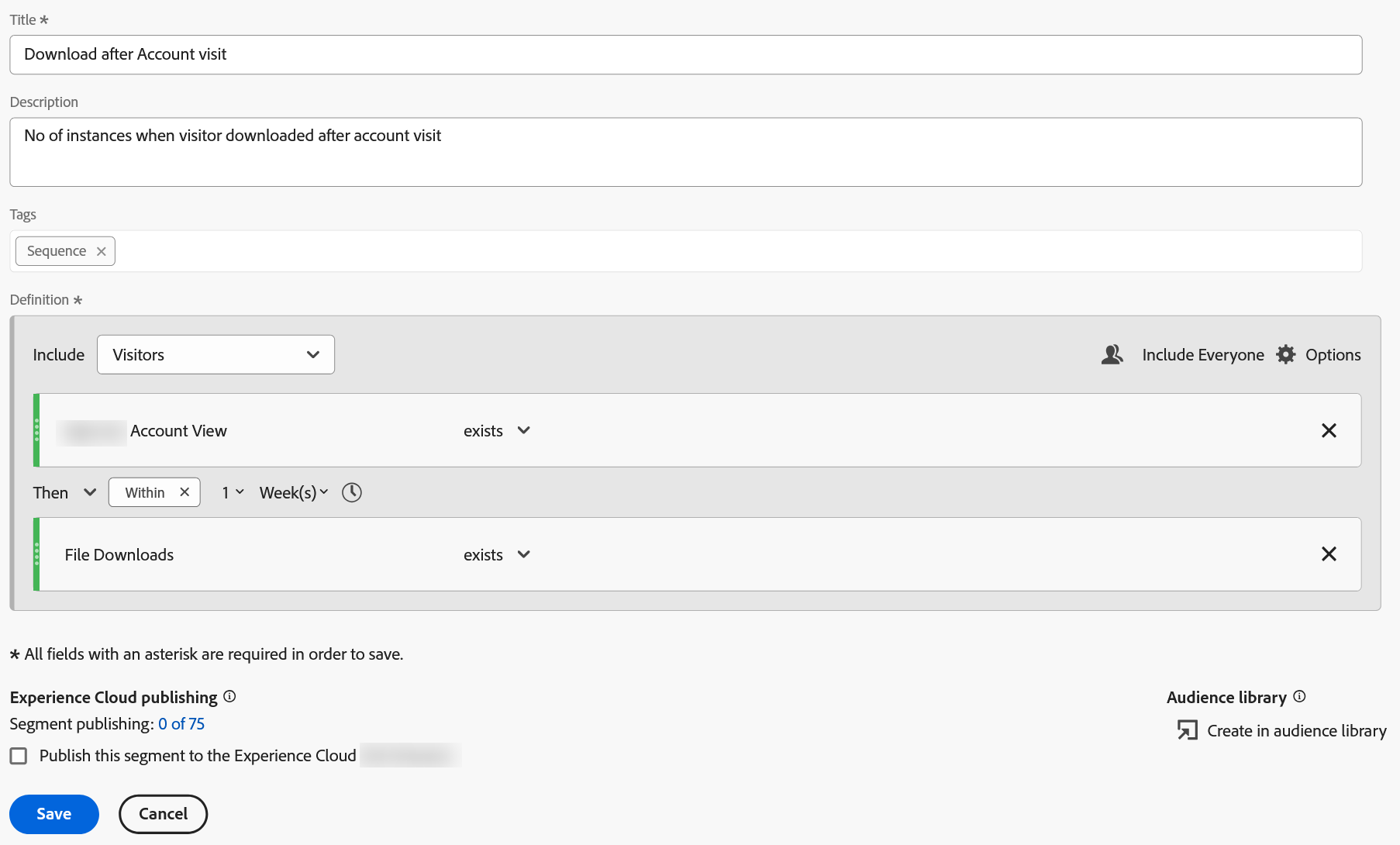
Then makes the order compulsory: the account view has to come before the download, not merely somewhere in the same person's history. Now look above the checkpoints at the container, because the two settings are really one decision. It reads Visitors, not Visits, and that is what allows the sequence to cross from one visit into another, which is the only reason the window beside Then can say Within 1 Week and mean anything. Set the container to Visits and a week-long window quietly describes something that can almost never happen.Tightening the gap: After and Within
By default, "then" is patient. Page A THEN Page B matches whether B came one hit later or three months later. Sometimes that is fine. Often it is not: a trial that starts within a day of reading the pricing page is a different signal from one that starts a quarter later. Two modifiers on the THEN put limits on the gap. "Within" caps it, so THEN within 7 days or THEN within 1 hit requires B to arrive inside that window. "After" sets a floor, so B must come at least a stated interval later. Used well, these turn a loose "eventually" into a precise "soon after," which is usually what the business question actually meant.
| Control | What it does | Example |
|---|---|---|
| THEN | the next checkpoint must occur after this one | Pricing THEN Trial start |
| THEN within | caps the gap between checkpoints | Cart THEN within 1 hour Purchase |
| THEN after | sets a minimum gap | Trial THEN after 7 days Purchase |
| Only Before Sequence | keeps the sequence and the run-up to it | behavior before reaching checkout |
| Only After Sequence | keeps the sequence and the aftermath | behavior after registering |
| Exclude checkpoint | requires a step to not happen at that position | checkout, then never confirmation |
- Where
Components›Segments›Add- Title
Pricing page, then a trial start- Top container scope
Visitors- Checkpoint 1
PageequalsPricing- Join
THEN› within7days- Checkpoint 2
Trial Startexists- Sequence returns
Only After Sequence— keeps the pricing-to-trial sequence and what followed, instead of the defaultInclude Everyone- Finally
Save
Reads as: visitors who viewed Pricing and then, within 7 days, started a trial, plus everything they did afterward.
Excluding a step: the drop-off question
Some of the most valuable journeys are defined by what did not happen. A checkout funnel's real question is usually "who started but never finished." A sequence answers this with an Exclude checkpoint, and where the exclusion sits changes its meaning. Placed in the middle, it means "A then C, but never B in between," the visitors who skipped a step. Placed at the end, it means "did A, then never did B afterward," the classic drop-off. This is a truer way to build a funnel drop-off than a "does not equal" condition, which, as Segment Logic and Operators showed, negates a single hit rather than the whole step.
- Where
Components›Segments›Add- Title
Started checkout, never confirmed- Top container scope
Visits- Checkpoint 1
PageequalsCheckout- Join
THEN- Checkpoint 2
PageequalsOrder Confirmation, with theEXCLUDEoperator set on this checkpoint- Finally
Save
Reads as: visits that reached Checkout and then never reached Order Confirmation afterward. A real funnel drop-off.
Logic Group: an unordered step inside an ordered sequence
Real journeys are not always strictly ordered end to end. Often part of a path is fixed and part is loose: a visitor must arrive from a campaign first and reach the order page last, but the two things they do in between, viewing a demo and viewing a coupon, can happen in either order. Expressing that needs a way to say "these steps, in any order, but as a group in this position." That is the Logic Group container, and it appears nowhere else in the segment builder: it exists only inside a sequence.
The reason a Logic Group exists rather than an ordinary container is subtle and easy to get wrong.
It is tempting to drop an ordinary Hit or Visit container into a sequence to hold two order-independent steps. Do not. A non-sequential container does not require its conditions to fall inside the sequence, so the two grouped steps can be satisfied anywhere in the visitor's history, before the sequence, after it, or scattered apart, and the segment quietly returns more than intended. The Logic Group container is built precisely to prevent this: it holds unordered steps while still forcing the group as a whole to sit in its place in the sequence.
Before you start: open Components › Segments › Add, set the Title to Campaign, then demo and coupon in any order, then order, and set the top container scope to Visitors.
- Set Checkpoint 1 to
Marketing ChannelequalsPaid Campaign, and the join toTHEN. - Add the two middle steps:
PageequalsDemo, andPageequalsCoupon. - Select both, then choose
Options›Add container from selection. -
Change the container type to
Logic Group. Inside a Logic Group the two may occur in any order, which is the whole reason for this step. - Set the next join to
THEN, and the last checkpoint toPageequalsOrder Confirmation. - Choose
Save.
Reads as: arrived from a paid campaign, then viewed the demo and the coupon pages in either order, then reached order confirmation.
What to watch for
Three mistakes account for most sequential-segment trouble. The first is forgetting the greedy default: a sequence set to Include Everyone returns the whole matched journey, so a segment that looks far too large usually just needs Only Before or Only After. The second is confusing THEN with stacking. Stacking two saved segments together behaves like And, both must be true, in any order, while a sequence uses THEN to demand order. Teams sometimes stack segments and expect an ordered result, or build a sequence when they only needed co-occurrence, and then puzzle over why two reports disagree. If order matters, the segment needs THEN. If it does not, And or stacking is simpler and lighter.
The third is cost. A sequence is more expensive to process than a plain condition, because the engine has to evaluate order across a visitor's timeline rather than check each hit in isolation. That is a fair price for the questions only a sequence can answer, but it is a reason to reach for one on purpose, not by habit.
Sequential logic is easy to get subtly wrong, and a segment that returns a plausible number is not the same as a correct one. The reliable way to trust a sequence is to build and test it against a small, known data set first, where the right answer is already obvious, before turning it loose on the full report. It is the fastest way to catch a greedy default or a misplaced checkpoint before it reaches a stakeholder.
From building to sharing
A segment can now express three things: how wide it reaches, through the container; what must be true, through the logic and operators; and in what order events must occur, through the sequence. That is the full grammar of a definition. What remains is everything that happens around the definition: the different kinds of segments Adobe offers, how a segment is saved, shared with a team, reused across projects, and even published as an audience to other tools. That is Segment Types and Sharing.
Sequences are built in the same Segment builder (Analytics > Components > Segments > Add). Drag two or more checkpoints onto the canvas, then change the join between them from And to THEN. The Within and After limits attach to each THEN, and the Only Before / Only After Sequence options sit on the sequence itself. To group unordered steps, select them and choose Options > Add container from selection, then set the container type to Logic Group.
This article focuses on the concepts, architecture, and practical guidance behind the topic. For the latest UI walkthroughs and step-by-step implementation instructions, use the links below. They leave this site and open Adobe's own documentation in a new tab.