Shape the data › Processing Rules
Conditions and Actions
The What Are Processing Rules section left the mechanism deliberately closed. It described a processing rule as a condition, which decides when to act, and an action, which decides what to do, and promised to take the two apart here. Open the box now, because everything you will ever build with processing rules, in this module and in a real project, is assembled from just those two ideas.
Start with a concrete problem. Your developers send the page type on every hit as a context data variable, c.pagetype. It reaches Adobe, but context data is not something a report can chart directly; it has to be routed into an eVar or a prop first. You want to route it, but only when it actually arrived, because writing an empty value would wipe out whatever eVar1 already held, and you want every other hit left untouched. Read that requirement back slowly and you will hear its two halves: a when (only if c.pagetype is present) and a what (put its value into eVar1). That is a condition and an action. The whole feature is nothing more than a disciplined way to write sentences of that shape.
The anatomy of a rule
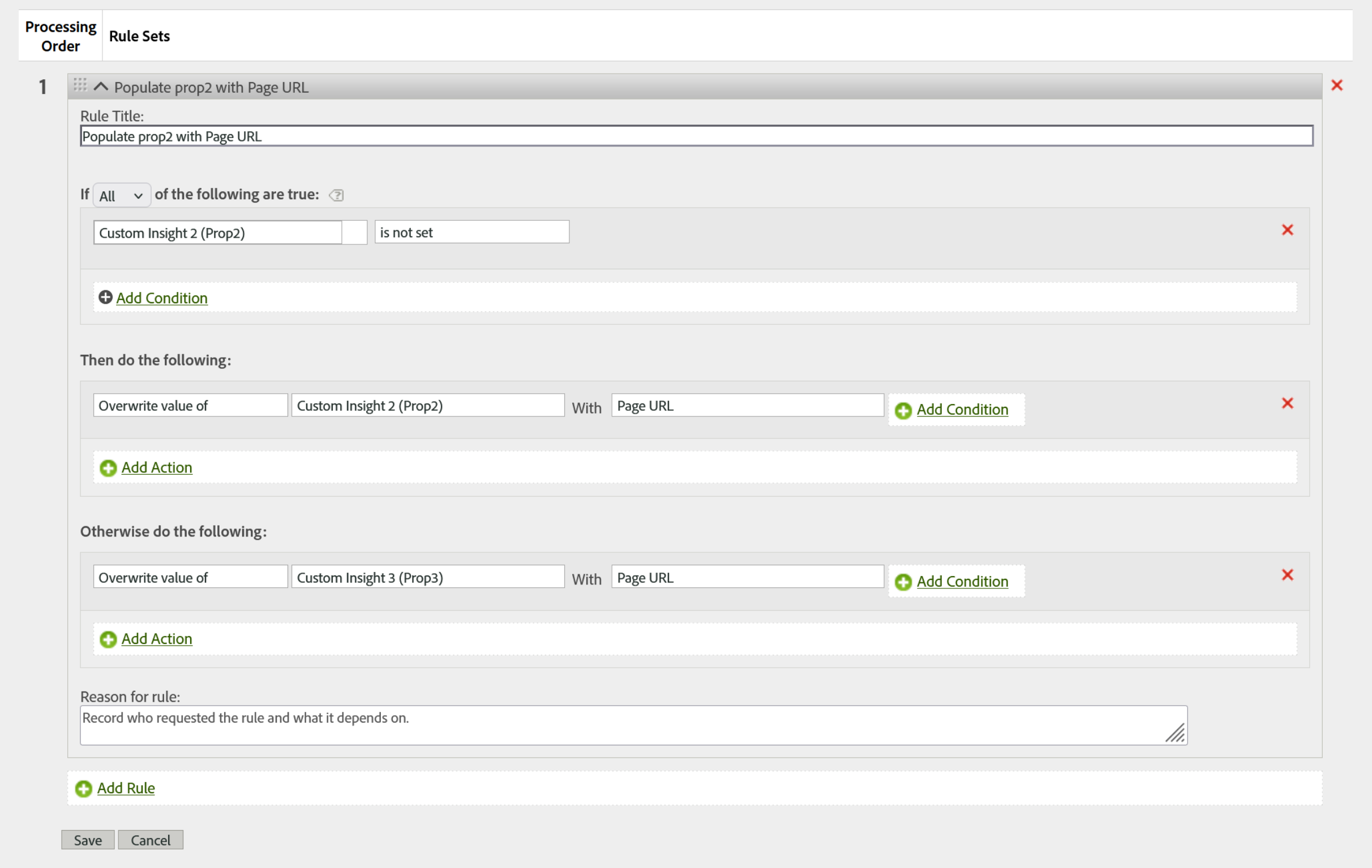
A processing rule is usually drawn as a simple "if this, then that." That picture is not wrong, it is just missing half the parts. In the actual interface, each rule has five sections, and the two that people forget are the two that separate a careful implementer from a careless one.
- Rule title: a plain label. It changes nothing about how the rule runs, but it is the first thing the next person sees, so a vague title is a small act of sabotage.
- Condition: the header reads "if any or all of the following are true." Leave it empty and the rule runs on every single hit, with no exceptions.
- Then do the following: the actions that fire when the condition is true.
- Otherwise do the following: the actions that fire when the condition is false. This is the part most people never notice, and it matters, because it turns one rule into a complete either/or. You do not need a second, mirror-image rule for the "did not match" case.
- Reason: a free-text note recording who requested the rule and what it depends on. It has no effect on logic, and it is the most undervalued field in the whole feature, because processing rules have no undo. When a rule quietly does the wrong thing months later, the reason field is the only thing standing between you and a guess.
Conditions: deciding when a rule acts
A condition inspects a value that arrived in the hit and asks one of two kinds of question. The first is whether a value matches a pattern: does it equal a string exactly, contain it, start with it, or end with it. The second is simpler: is the value there at all, tested as is set or is not set. String comparisons here are not case-sensitive, so "Product" and "product" are treated as the same value, which saves you from chasing capitalization bugs but can also mask them if you were relying on case to tell two values apart.
Two behaviors of the condition block are where most logic errors are born. The first is the little toggle in the header, "if any" versus "if all." Choose "all" and every condition must be true together, the logical AND: c.pagetype is set AND c.pagetype equals "product" matches only product pages that actually carried the value. Choose "any" and a single true condition is enough, the logical OR: page name contains "cart" OR page name contains "checkout" catches either. Picking the wrong one is how a rule ends up firing on far more, or far less, than you intended.
The second is that conditions live at two levels. There is the rule-level condition that gates the whole rule, and there is a smaller condition you can attach to an individual action. That second level is quietly powerful: a single rule can map c.pagetype into eVar1 for every hit that carries it, and inside that same rule, one action can set an event only when c.pagetype equals "product." Without action-level conditions you would be writing a separate rule for every small variation.
One boundary is worth stating plainly. You can only build a condition on a variable you have Read access to. Access is not just about who can see reports; it decides which variables you can even reference here, a point that ties back to how permissions were framed in the variables work.
Actions: deciding what happens
Here is the correction that reshapes how most people think about this feature. There are exactly three actions, not the longer menu you might expect, and the first one carries more weight than its single name suggests.
| Action | What it does | Worth knowing |
|---|---|---|
| Overwrite value of | Writes a value into a prop, eVar, or event, replacing whatever was there. | The workhorse. Its source can be a static value (this is "set"), another variable (this is "copy"), or several pieces joined together such as category:subcategory (this is "concatenate"). Set, copy, and concatenate are not separate actions, they are three uses of this one. It is named "overwrite" as a built-in warning: the previous value is gone. |
| Delete value of | Removes a variable's value for that hit. | Useful to undo a value an earlier rule set, once a later condition decides it should not apply. |
| Set event | Fires a success event, the same as writing event1=1 in the events string. | Usually set to 1. Set it to 0 and the event does not count, which is the clean way to discard an event from a hit without a code change. It can also carry another number or a value from context data. |
One word in that table carries more weight than it looks. Delete removes the value from this hit, and that is the whole of what it does. It is not a way to stop a value being credited.
An eVar that persisted from an earlier hit is resolved long after processing rules have finished, when Adobe works out attribution at the visitor level. So a rule that deletes eVar5 on today's hit removes the incoming value and leaves the persisted one entirely alone, and the report goes on crediting it exactly as its expiration and allocation settings say it should. The rule ran. Nothing failed. If a value should stop being attributed, that is a question for the eVar's own settings in eVars, not for a processing rule.
Because "overwrite" is a single action with three faces, the skill is not memorizing action names, it is choosing the source. Feeding it a fixed string sets a value, feeding it another variable copies one field into another, and feeding it a combination builds a compound dimension. The mirror image of Read access applies to all three actions: you can only act on a variable you have Write access to, so an action can touch only the variables your permissions let you change.
Order is logic, not layout
Rules run from the top, starting at rule 1, and every hit passes through every rule. There is no early exit: a rule cannot say "if this one matched, skip the rest." That single fact has two consequences that catch people out. Because every hit reaches every rule, each rule's condition has to be specific enough that it ignores the hits it was never meant to touch. And because the rules run in sequence, an earlier rule can change the ground a later rule stands on. If rule 1 overwrites eVar3, the original value of eVar3 is gone by the time rule 2 looks at it. A rule that needs the original value must sit above the rule that overwrites it. Order here is not cosmetic ordering in a list, it is the execution order of your logic.
There is a second, quieter version of the same problem, and it does not involve a value being lost at all. An action that has already run cannot be taken back by a later rule changing the ground it stood on. Suppose rule 2 sets an event because eVar5 reads "product", and rule 5 then overwrites eVar5 with "clearance". The event is already on the hit. It stays. What ships is a hit whose dimension says one thing and whose event was set on the basis of another, and no part of that is an error.
The habit that prevents it is to group rules by what they do rather than by which feature they belong to: first the rules that set raw values, then the rules that refine them, then the rules that read them to derive events. Kept in that order, a derived event can never rest on a value that is still going to change. Dropped into an ungrouped list, a new rule breaks an old one without anybody editing the rule that broke.
Actions do not check whether their source has a value first. A rule that overwrites eVar1 with eVar2 will blank out eVar1 on every hit where eVar2 happens to be empty, quietly destroying good data. Before you use one variable to overwrite another, add a condition that the source is set. The full catalog of traps like this lives in Limitations and Best Practices; this one is common enough to fix on sight.
That guard has a mirror image, and it is the one people miss. Conditioning on the source stops the rule blanking the target. Conditioning on the target decides who wins when two things want to write the same variable.
There is no "set only if empty" action, so you express it as a condition: if eVar5 is not set, overwrite eVar5 with the value of c.pagetype. Written that way, a value the tag has already placed survives, and the rule fills only the gap. Written without it, the rule overwrites the tag on every hit that carries both, and the dimension ends up correct on exactly the hits where the tag happened to be quiet. The discipline underneath is simpler than the mechanics: give every variable one owner, the tag or the rule set, and treat a variable written in both places as a defect to resolve rather than an arrangement to balance.
A rule from start to finish
Return to the page-type problem and read the rule in the diagram above as a single decision. The condition is "if c.pagetype is set," which is the guard: it stops the rule from writing an empty value over a good one on hits that never carried a page type. The then-branch overwrites both eVar1 and prop1 with the incoming value, sending the same data to a persistent conversion variable and a traffic variable at once, because reporting often needs it in both places. The otherwise-branch is deliberately empty, since on a hit with no page type there is simply nothing to do. And the reason line records why the rule exists, so the person who inherits it is not left guessing.
Two practical notes make this smoother in the interface. The list of context variables you can choose from shows the ones Adobe has actually seen in this report suite over roughly the last month; if you know a variable's name but have not sent it yet, you can type the full name to add it. And the limits are generous enough that you rarely meet them: a report suite holds up to 150 rules, each rule up to 30 conditions, and there is no practical ceiling on actions. If you find yourself fighting those numbers, the honest signal is usually that the logic belongs in your implementation or in a heavier tool, not in an ever-growing stack of rules.
You can now read any processing rule as a sentence and, more importantly, write one that does exactly what you intend. Use Cases and Examples puts this grammar to work on the patterns you will actually reach for, and Limitations and Best Practices gathers the cautions in one place. When a requirement outgrows this grammar, when you need visitor-level logic or an external lookup that conditions and actions cannot express, that is the boundary where VISTA Rules take over, a heavier and Adobe-managed path covered in its own module.
Processing Rules: Admin → Report Suites → Edit Settings → General → Processing Rules
Add Condition and Add Action controls sit inside each rule set once you create or edit a rule.
This article focuses on the concepts, architecture, and practical guidance behind the topic. For the latest UI walkthroughs and step-by-step implementation instructions, use the links below. They leave this site and open Adobe's own documentation in a new tab.