Start with the foundations › Report Suites
Report Suite Settings
Every app you use asks you to set things. Booking a flight, you choose the fare type; ordering food, you set a delivery address and pick express or standard; checking out online, you select a payment method. Settings are so ordinary they barely register as a concept. So when a section is titled "report suite settings," it is natural to picture the same kind of thing: a quiet preferences screen with a name field, a time zone, and a few toggles you set once and forget.
They are nothing like that. A report suite is not one feature among many. It is the container data is collected into, and data collection is the soul of Adobe Analytics. Plenty of tools can draw a chart; what sets Adobe apart is how much control you have over collecting and shaping the data in the first place, and that shaping happens here. Report suite settings are not preferences sitting on top of your data, they are the data model. They decide what a visit is, what a variable means, how long a value persists, which touch earns credit for a conversion, and what gets silently discarded before you ever see it. Point the same raw hits at two differently configured suites and you get two different sets of numbers, each correct for its own settings. Whoever understands this panel understands how the data is shaped.
So it is worth dropping the phrase "report suite settings" and thinking of this instead as the central settings panel for everything you do with data. Almost every later module in this course is, underneath, one row of this panel examined closely.
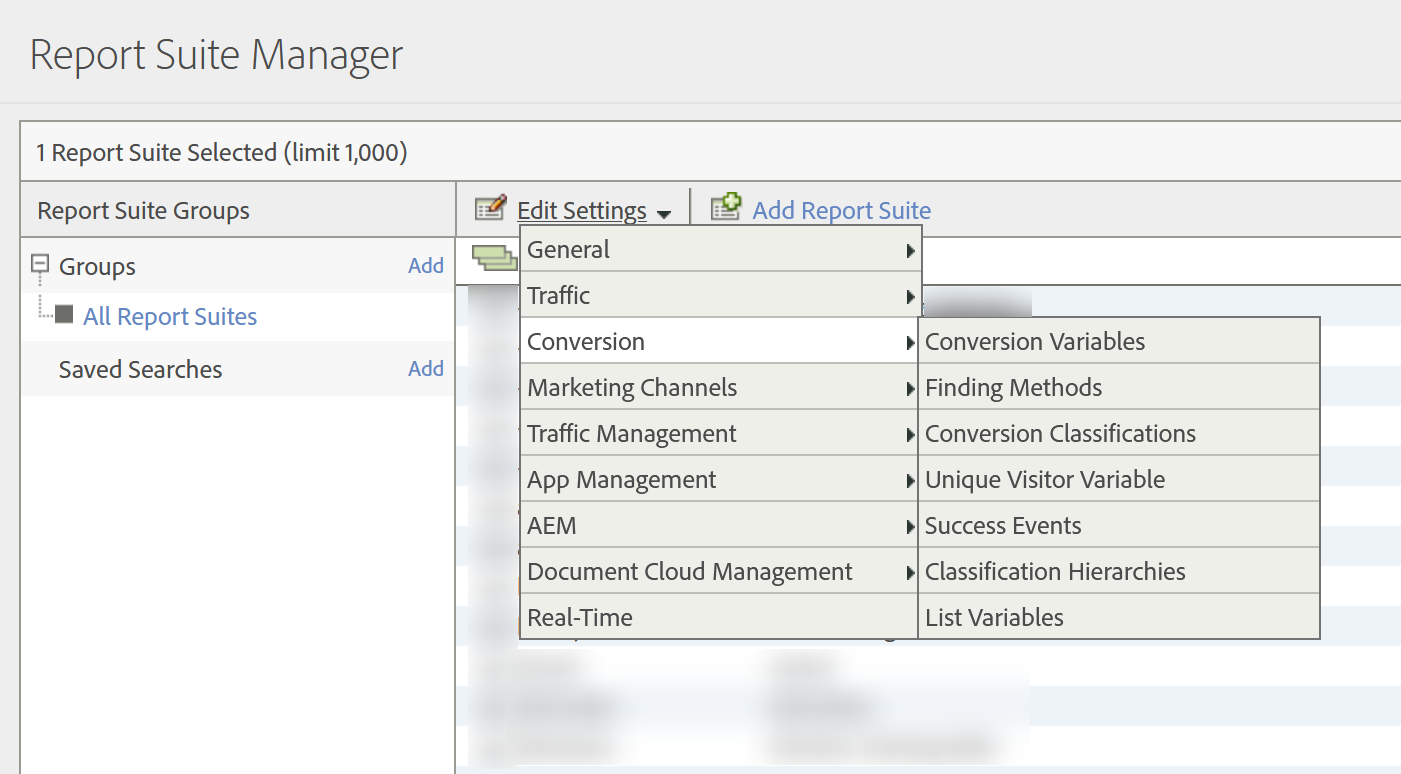
The whole panel, at a glance
The settings are organized into a handful of groups. Most of what lives in them earns a full module of its own later, so treat the table below as a map: what each area configures, and where its depth lives. The ones marked "this section" have no other home in the course, so they are the ones worth understanding now.
| Setting | What it configures | Where to go deep |
|---|---|---|
| General Account Settings | Site title, time zone, base currency, default page, IP obfuscation | This section |
| Internal URL Filters | Which domains count as "you" rather than referrers | This section |
| Bot Rules | Remove IAB and custom bot traffic before processing | Bot Filtering |
| Paid Search Detection | Auto-classify paid versus organic search | This section |
| Processing Rules | Clean or modify data as it is collected | Processing Rules |
| VISTA Rules | Server-side data transformation (set up with Adobe) | VISTA Rules |
| Traffic Variables (props) | Traffic and pathing dimensions | Props |
| Conversion Variables (eVars) | Persistent attribution dimensions | eVars |
| Success Events | Metrics and counts | Events |
| List Variables | Multiple values held in one variable | List Variables |
| Classifications | Offline metadata layered onto existing values | Classifications |
| Marketing Channels | First and last touch channel attribution | Marketing Channels |
| Activity Map | On-page click and link tracking | Activity Map |
| Traffic Management | Planned server-call spike handling | Server Calls and Billing |
| Privacy / Data Governance | Labeling data for GDPR and CCPA handling | Privacy and Data Retention |
General account settings: the data-quality foundation
- Time zone: defines when every day and hour boundary falls, for all reporting and for the timing of scheduled deliveries. There is one per suite, and changing it on a live suite creates a visible spike or gap in the data, so it is a launch-day decision, not a later tweak.
- Base currency: the currency all revenue is normalized to. A hit that sends a different currency code is converted at that day's exchange rate, so the base currency is the lens all money is viewed through.
- Default page: strips default filenames so that
example.comandexample.com/index.htmlcount as one page rather than two. Left blank, Adobe removes a standard list (index.html, default.asp, and the like). - IP obfuscation: the privacy control. It can leave, obfuscate, or remove the visitor IP, and removal is the default for new suites. It is permanent, and it runs late: IP exclusion, bot rules, and geo-lookup all complete before the address is touched, so those steps keep working normally. What is lost is the stored address itself, covered in Privacy and Data Retention.
Internal URL filters
These tell Adobe which domains are "you," so a visitor moving between your own pages is not miscounted as arriving from an external referrer. They feed the Referrer, Referring Domain, and Marketing Channel dimensions. There is a notorious default to watch for: a fresh suite often ships with a single internal filter set to a period, which marks all traffic as internal and leaves your referrer reports empty until you replace it with your real domains. Get this wrong and your entire traffic-source picture is quietly polluted.
Bot rules
Bot rules live in this panel, but they are consequential enough to warrant their own treatment: what they filter, what they cost, and what they cannot undo. Bot Filtering covers them in full.
The rule that governs all of it
One principle ties every setting together: they affect future data only. Adobe does not reprocess history when you change a setting. The day you change something is the day its new behavior begins, and everything before it stays exactly as it was collected. Picture a recording studio: you can change the mic setup for the next take, but you cannot re-EQ a take already recorded. The single exception is classifications, which are metadata layered on top of values you already have (post-production relabeling, not re-recording) and can be applied retroactively, covered in Classifications.
Because nothing backfills, the cost of a wrong setting compounds with every day of data collected under it. Enable a variable late and you simply have no history for it. Change a suite's time zone partway through and you leave a visible seam in your trends, a shift that has nothing to do with real visitors. Change the base currency and history is not restated, because every hit was already converted at the rate of the day it arrived, so a revenue trend spanning the change is quietly comparing two different things. IP obfuscation is the harshest: set to remove, the address is never stored, so no later change brings back an address you might want to investigate months from now. Treat the core settings as deliberate launch-day decisions, the same discipline as drawing suite boundaries, not as dials to discover later.
The deep mechanics of each area live in their own modules, but the levers all sit in this one panel, and they all obey the forward-only rule. Learn to read this screen and you can read almost any Adobe Analytics implementation.
One assumption has been sitting underneath everything so far, unexamined: that a hit goes to one report suite. It does not have to. A single implementation can feed several suites at once, which sounds like a free lunch and is billed like anything but. Multi-Suite Tagging is where the bill arrives.
Report Suite Settings: Admin → Report Suites → Edit Settings
General Account Settings: Edit Settings → General → General Account Settings
Internal URL Filters: Edit Settings → General → Internal URL Filters
Bot Rules: Edit Settings → General → Bot Rules
This article focuses on the concepts, architecture, and practical guidance behind the topic. For the latest UI walkthroughs and step-by-step implementation instructions, use the links below. They leave this site and open Adobe's own documentation in a new tab.