Collect the data › Adobe Analytics Tracking Calls
Experience Cloud ID (ECID)
A shopkeeper decides to keep records. Nothing sophisticated, just a register: the customer's name, their contact details, their address, and what they bought. Over months the book fills up, and it starts paying him back. He can see that a customer named ABC has spent a considerable amount over the year, so ABC gets remembered, greeted, and looked after.
Then a second customer walks in, and his name is also ABC.
Nothing about that is unusual, which is exactly the problem. The register has just stopped working, and no amount of care in filling it in will fix it.
The column that solves it was already in the register
The obvious repair is to write more down. Name plus address should separate them.
It does, briefly. Then it gets unwieldy, because identifying somebody by two long strings is tedious every single time. Worse, both of them move. People relocate, and people change their names, which is uncommon but entirely legal and entirely their business. Anything that can change is not an identity. It is a description.
The shopkeeper already has the answer and has been writing it down without noticing. It is the first column of his register: the serial number.
Customer ABC is number 17. The shopkeeper never mentions this to him, and would sound strange if he did. But when the accounts are reconciled at the end of the year, the calculation runs on 17, not on a name that two people share.
That is the origin of every identifier you have ever been issued. Customer ID, employee ID, student ID, citizen ID. Each one exists because names, addresses and attributes describe a person without distinguishing them, and the fix is a value chosen to carry no meaning at all. A serial number cannot be wrong about you, because it was never trying to say anything about you.
What Adobe Analytics is actually counting
Now bring that into the tool, because the same problem sits underneath every report you have ever run.
Adobe Analytics is not on the page to tell you how many times the Submit button was clicked. A counter could do that, and the answer would be nearly useless. What earns its keep is the other question: how many people clicked Submit this month.
Counting clicks is arithmetic. Counting people requires a serial number.
So Adobe issues one. On a visitor's first arrival at a site where the implementation is running, the library writes a cookie containing a 38-digit number that visitor has never seen and will never be told about, and sends it along with every subsequent request. The shopkeeper's register, at internet scale.
That cookie is written by your own domain, which is what keeps it working. A second, third-party cookie on Adobe's demdex.net domain once helped recognise the same visitor across different sites, and browsers now block it by default. Nothing on your own domain suffers for that, but it is the reason carrying identity between two sites you own takes deliberate work rather than happening by itself.
The identifier that kept changing its name
The concept has been stable for many years. The label has not, and knowing why saves confusion when reading older material or an API method name.
It began as the visitor ID, which is exactly what it was. It later became the Marketing Cloud ID, or MCID, because Adobe Analytics, Target and Audience Manager were then gathered under the Marketing Cloud banner. In 2017 that banner was renamed to Experience Cloud, and the identifier followed it to become the Experience Cloud ID.
Three names, one idea, no change in behaviour. The old name still surfaces in places, most visibly in the method used to read the value, which is still called getMarketingCloudVisitorID() years after the cloud it referred to stopped existing. Naming survives renaming, in Adobe as everywhere else.
How the number becomes Unique Visitors
When somebody in the business asks for visitors last month, this is what happens underneath.
Adobe takes the reporting logic and the date range, finds the distinct ECID values that qualify, and counts them. That count is Unique Visitors. Visits are assembled from the same identity with timeout rules applied on top, and the precise definitions of both live in Key Terminology.
The consequence is worth stating plainly, because it explains why this section sits where it does. Identity is upstream of almost every number you will ever quote. Get it wrong and nothing downstream can be right, no matter how carefully the rest of the implementation is built.
It is not an Analytics identifier, and your Launch property says so
The name is doing honest work. It says Experience Cloud, not Analytics, and that is a statement about ownership.
Whichever Adobe product the visitor encounters first creates the ID. Every other product then reuses it rather than inventing its own. If Target renders a personalised offer before any Analytics call fires, Target's request produced the ECID and Analytics inherits it.
That ownership shows up the moment you open a Launch property. The ECID is not a setting inside the Adobe Analytics extension, where most people first look for it. It has an extension of its own, named Experience Cloud ID Service, whose entire job is creating and maintaining the identifier in the visitor's browser. The wider Adobe ecosystem is the reason it earns that separate billing.
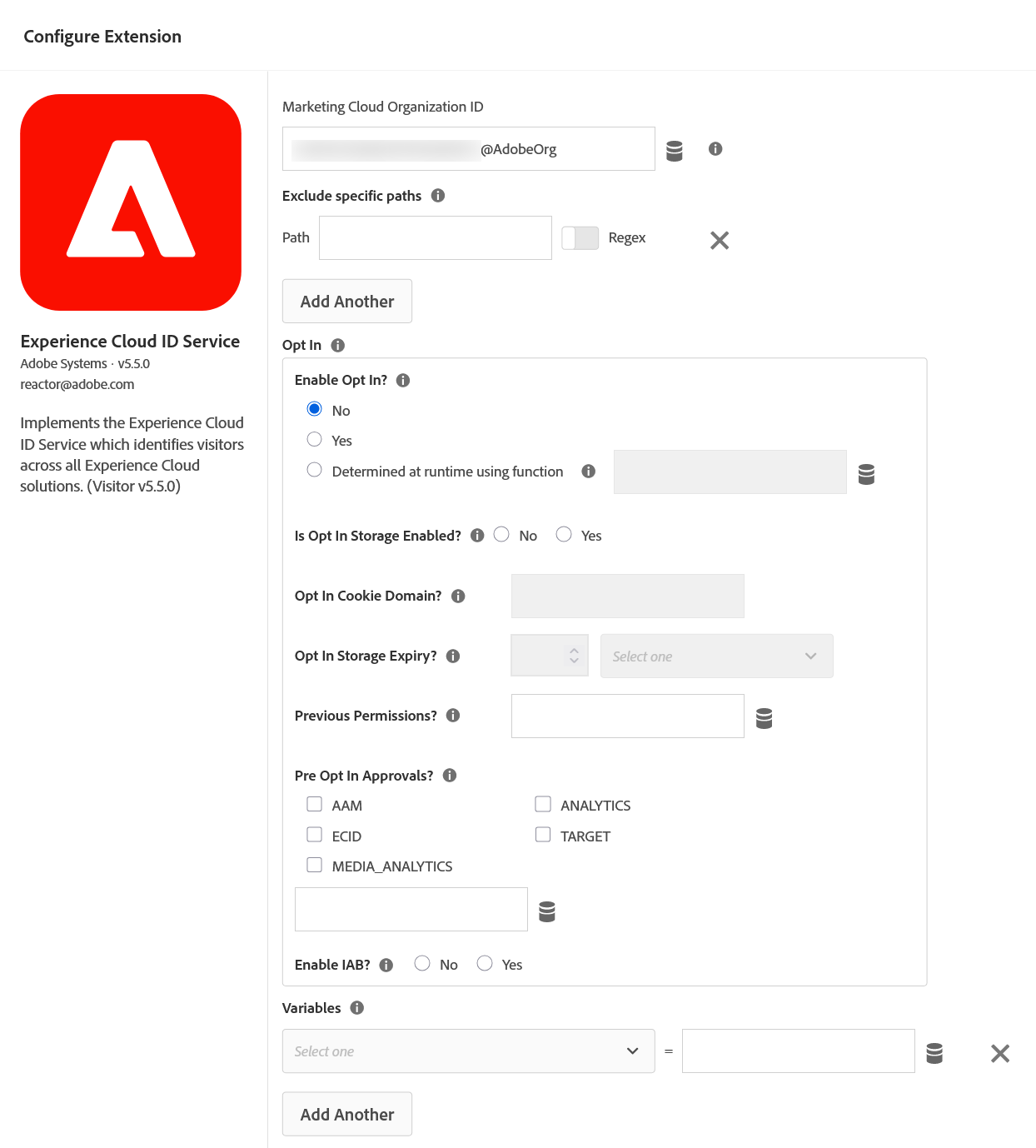
@AdobeOrg is the whole configuration. It names which company's visitor space this browser belongs to, and nothing else on the screen has to be touched for the ECID to start working. Note where you are standing while you do it: this is a Tags property, not Adobe Analytics. The identifier that ties every Experience Cloud product together is configured somewhere Analytics cannot see.What one shared identifier unlocked
The payoff is that products stop being islands. An audience assembled in Audience Manager can be delivered by Target and measured in Analytics, because all three are discussing the same number rather than three private ones. A test can finally be connected to the conversion it produced, which was the question that could not be answered before.
There is a sharp consequence hidden in that, and it becomes important later in this section: segments shared across Experience Cloud products do not include visitors who have no ECID. A visitor without one is invisible to every integration, however complete their Analytics data looks in isolation. Segment Types and Sharing covers what travels between products and what does not.
Then the identifier became a foundation
Adobe did not stop at making products agree. In Adobe Experience Platform the ECID stopped being a convenience and became structural.
Platform sorts identifiers into three kinds, and the distinction is the single most useful thing to carry out of this section:
| Kind | Examples | What it can honestly claim |
|---|---|---|
| Person | CRM ID, email address, phone number | This is a specific human being |
| Device | Mobile advertising identifiers | This is a physical device |
| Cookie | ECID, legacy Analytics ID | This is one browser on one device |
The ECID sits in the third row. It is the primary device-level identifier that personalisation, analytics and audience activation are all built on, and it is deliberately not a claim about a person.
What Platform adds is a way to connect the rows. An identity graph maps the relationships between these namespaces, so several cookie identities can be tied to one person identity. Real-Time Customer Profile then reads that graph, gathers the fragments that belong to the same person, and merges them into a single profile. Adobe's guidance is to make a person-level namespace the primary identity wherever one exists, precisely because the cookie-level one cannot carry that weight.
Back inside Adobe Analytics: what the number cannot tell you
Return to the report, because that diagram has an uncomfortable implication for numbers you may already have presented.
An ECID identifies a browser on a device. Nothing more. It is not a person, was never designed to be, and the gap runs in both directions.
One person produces several ECIDs. A phone, a work laptop, a private window, and a fresh one each time cookies are cleared. And one ECID can cover several people, because a shared tablet at home or a machine in a library is one browser used by many humans.
The metric gets read aloud in meetings as though it meant people. It does not, and no configuration changes that. There is no error, no warning, and the number looks equally credible whether it is close to the human count or nowhere near it. If a business decision genuinely depends on a count of people, that count has to come from an authenticated identifier or from a system that holds one, not from this metric.
Which is fine, because that is not what this tool is for
It would be easy to read all of that as a catalogue of flaws. It is not. It is a description of scope, and confusing the two leads teams to demand something from digital analytics it was never built to provide.
The ECID is not accurate. It is consistent, and consistency is what a trend needs. Whether more distinct visitors came this month than last is a question the number answers well, because the same imperfection applies to both months. How many actual human beings visited is a question it cannot answer, and no amount of implementation work will change that.
Which sets a boundary worth stating without hedging. If you are relying on a digital analytics tool as your book of record for orders and revenue, that is a category error. Those numbers belong in a CRM, an order management system, a finance system, somewhere built for accuracy and reconciliation. Digital analytics exists to attribute, to connect scattered activity into a model of behaviour, and to show you which direction things are moving.
Used for that, the ECID is more than good enough. Used as a headcount, it will quietly mislead every quarter.
Capture the ECID, and use it to prove your own work
Practical advice that costs almost nothing and repays itself the first time something breaks: capture the ECID into an Analytics variable.
The method carries its own history, as noted earlier, and reads the value from the ID service instance.
var visitor = Visitor.getInstance("YOUR_ORG_ID@AdobeOrg");

// The old cloud name survives in the method name
s.eVar60 = visitor.getMarketingCloudVisitorID();

// A callback form exists for cases where the ID
// may not be resolved yet
visitor.getMarketingCloudVisitorID(function (id) {
  s.eVar60 = id;
});
Storing it turns an abstract identifier into something you can search for, and that unlocks a verification technique worth building into every release.
Ship a new tracked feature, then go and use it yourself with a deliberate, counted pattern: exactly five visits, exactly ten clicks on the new button, nothing else. Note your own ECID from the browser before you start. Wait past the processing window, then filter a report to that single ECID and check whether it shows exactly five and exactly ten. Numbers that match mean the implementation is correct end to end, from tag to report. Numbers that do not tell you precisely where to look. It is the cheapest end-to-end test in Adobe Analytics and almost nobody runs it.
On the waiting: standard processing latency runs roughly thirty to ninety minutes, because collection servers batch and upload on an hourly cycle. Checking after ten minutes and concluding the implementation is broken is a common and avoidable panic. Give it more than ninety minutes before drawing conclusions.
Which variable to spend on this is a planning decision rather than an afterthought, and the trade-offs sit in Variable Planning.
The old fix: replacing the ID entirely
Sites with a login have always had a tempting shortcut available. Adobe Analytics exposes a visitorID variable, and setting it to your own customer identifier makes Analytics identify people by that value instead of by the cookie.
The appeal is obvious. Sign in on a phone and a laptop and both become the same visitor, so your unique visitor count starts approximating actual people. It genuinely works, and it is genuinely not recommended.
The visitorID variable overrides every other method of visitor identification. Adobe advises against it directly. Analytics itself will run perfectly well and your numbers will look better than before, which is exactly why the problem goes unnoticed: the breakage is elsewhere. A visitor identified this way has no ECID, and segments shared across Experience Cloud products do not include visitors without one. Target and Audience Manager stop seeing them. Every integration you might want later has been quietly disabled in exchange for a tidier number in one report.
It is an artefact of an era when Adobe Analytics stood alone and integration was not the point. That era has been over for some time.
The modern answer: keep both and let the graph do the work
The current approach does not ask you to choose. Keep the ECID exactly as it is, and additionally capture your own person-level identifier, using an internal customer ID rather than a raw email address or phone number for the reasons set out in Data Layer Design.
The ID service has a method for exactly this. setCustomerIDs attaches your own identifier to the ECID already in play, which is what lets a phone and a laptop be recognised as one person later.
visitor.setCustomerIDs({
  "crm_id": {
    "id": "8842197",
    "authState": Visitor.AuthState.AUTHENTICATED
  }
});Signing in happens once, and the session that follows can run for hours across dozens of page views. Setting the identifier only where the login occurs means every hit afterwards carries the browser identity alone, and the stitching you were relying on covers one page view instead of the whole visit. If the visitor is signed in, say so on every hit. This is the single most common way an otherwise correct identity setup underdelivers.
Both then travel into Adobe Experience Platform, where the person identifier joins the identity graph and pulls the scattered cookie identities together into one profile. Analytics keeps its integrations. You gain the person-level view. Nothing is overridden.
The part that makes this genuinely different from anything Analytics could do alone is that Platform is not restricted to online behaviour. It will ingest from a CRM, a call centre, a store system, a loyalty database. Where the same customer identifier is maintained in those systems, web behaviour joins purchases made in a shop and conversations with an agent, and the result is an omnichannel view of one person rather than a browser. Building analysis on top of that view is the work of Customer Journey Analytics, which is where this curriculum eventually arrives.
There is a compliance dimension to keeping a person-level identifier that is easy to overlook while thinking about reporting. A deletion request arrives naming a human being, usually by email address, and Adobe Analytics knows only cookie identities. Without a stored person-level identifier there is no route from the request to the data, and the request cannot be honoured properly. Privacy and Data Retention covers what that failure looks like, which is a clean and entirely successful-looking response that found nothing.
What you actually do, and the two things that bite
Everything so far is understanding. Here is the work, and it is genuinely short.
-
Go to
Launch› your property ›Extensions›Catalogand installExperience Cloud ID Service. Check that the Organization ID is correct. It is usually pre-filled. - Go to
Launch›Data Elements›Add›Custom Codeand return the ECID usinggetMarketingCloudVisitorID(). - Go to
Launch›Extensions›Adobe Analytics›Configureand assign that data element to a spare eVar. - Publish through development, then staging, then production.
- Verify it yourself: use the site with a counted pattern and note your own ECID. Wait more than 90 minutes, then filter a report to that single ECID. The wait is not optional — ask sooner and you will be reading incomplete data and drawing the wrong conclusion from it.
Done. There is nothing else to configure.
Step one is the part people get wrong by looking in the wrong place, hunting for an identity setting inside the Adobe Analytics extension. It is not there. Step two exists purely so future-you can debug, and step five is what turns an implementation you believe in into one you have proved.
Two things go wrong often enough to be worth knowing before they happen.
Loading order, if any code is placed by hand. The ID service has to run before AppMeasurement, because AppMeasurement asks it for an identity while building the request and gets nothing if the service has not finished initialising. Inside Launch the extensions handle this for you and it is a non-issue. It becomes an issue when hand-written tags are mixed with the tag manager, or when one library loads asynchronously and the other does not.
A request built before the ID service is ready does not fail. It is sent, it is processed, and it arrives carrying a different identity from every other hit in the same visit. The visit fragments, the visitor count inflates, and the pages that load fastest are the ones affected. No console error, no failed request, no report that flags it. This is the diagnosis nobody reaches for, because everything looks like it is working. Implementations on the Web SDK are exempt: the Edge Network owns identity there, so the ordering problem cannot occur.
Deploying onto a site that already has history. A frequent and reasonable worry is that switching the ID service on will orphan years of existing visitors. It does not. Where the older Analytics visitor cookie is present, that legacy identifier is carried into the new cookie alongside the freshly issued ECID, and it continues to identify the visitor until the cookie expires or is cleared. Existing visitors keep their history rather than appearing as a wave of new people.
The wrinkle is a partial rollout. If some pages have the ID service and some do not while all of them report into the same suite, the two kinds of page will disagree about who the visitor is, and the numbers will look wrong in ways nobody can pin down. Adobe Customer Care can apply a grace period, during which the service returns both identifiers so the pages agree. It runs up to 180 days and can be renewed.
It exists to cover a migration, not to run indefinitely, and there is nothing in any interface that will remind you. A grace period still running years after the last page was converted is a loose end worth checking for on any implementation you inherit.
What you have now
The shopkeeper's problem and yours are the same problem. Names, addresses and attributes describe people without distinguishing them, and everything that can change is a description rather than an identity. The fix in both cases is a value chosen to mean nothing: a serial number in a register, a 38-digit number in a cookie.
Adobe's version belongs to the whole Experience Cloud rather than to Analytics, which is why it has its own extension and why every product reuses the one identifier instead of minting its own. In Experience Platform it became structural, the cookie-level identity that a graph ties to a person so several browsers resolve to one profile.
What it identifies is a browser. Not a person, in either direction: one human generates several, and a shared device collapses several humans into one. That is a limit rather than a defect, because the tool exists to show direction rather than to count heads, and anything requiring an exact number belongs in a system built for exactness.
Capture it in a variable, because a stored identifier turns you into a visitor you can search for, and that is the cheapest end-to-end test available. Do not replace it, because the tidier number costs you every integration you have not needed yet.
One assumption has been quietly holding all of this together: that the cookie carrying the identifier is readable when the visitor arrives. It is readable only by the domain that wrote it. The moment a journey crosses to another domain you own, the identifier does not travel and one visitor becomes two strangers. Cross-Domain Tracking covers how to carry it across on purpose.
Identity configuration: open the property, then Extensions > Experience Cloud ID Service. It is a separate extension, not a setting inside the Adobe Analytics extension.
Read a live value: open the browser console and inspect the AMCV_<org id>@AdobeOrg cookie, where the ECID appears as MCMID|<value>, or read it with the Adobe Experience Platform Debugger.
This article focuses on the concepts, architecture, and practical guidance behind the topic. For the latest UI walkthroughs and step-by-step implementation instructions, use the links below. They leave this site and open Adobe's own documentation in a new tab.