Segment Containers
Start with a question a stakeholder actually asks. The people who placed an order last month, what else did they do on the site? Did they download the spec sheet, watch the product video, spend time on the pricing page? It sounds like one question. It is really a question about a whole journey, and the answer turns entirely on one setting that most people never stop to think about.
Try to answer it the obvious way. Build a segment that says an order happened, then look at the download and video numbers next to it. Nothing useful comes back. The reason is structural, and it is the reason this section exists.
This data is a journey, not a spreadsheet
In Understanding Segments, a segment turned out to be a filter that became a reusable object. Here is the other half of what sets it apart from a spreadsheet filter: the data underneath is not a flat grid of rows. It is layered, and the layers are built out of time.
A single action is a hit: one call to Adobe, one moment. A run of hits from one sitting is a visit, a session that ends after thirty minutes of inactivity. And every visit belongs to a visitor, a single cookie or device whose visits can stretch across weeks. Hit inside visit inside visitor. If those three distinctions are new, they are defined in Key Terminology. The point here is the shape: this data is a set of journeys unfolding over time, not a table you filter one row at a time.
That is why time carries weight here in a way it does not in something like a CRM. In a CRM a date is one column among many, when a record was created, when a contact was last touched. In web analytics the time ordering is the substance of the data itself. So a segment cannot simply point at a value and stop. It has to say how much of the time-ordered journey to pull in around that value. That decision is the container.
Three containers, three widths
A container comes in three sizes, one for each layer of the journey. Watch the order question get answered as the container widens.
Hit is the narrowest. It is a single server call, and "server call" is the part that matters: a hit is not only a page view. A link click sent as a custom link call, and an action fired from a mobile app, are hits too. Adobe used to call this the Page View container and renamed it the Hit container precisely to make that clear. Ask the order question at Hit scope and you get nothing extra, because the one hit that carried the order carried only the order. The download landed on a different hit, the video on another. A hit cannot see its neighbors.
Visit is one session. Widen the order question to Visit scope and the picture improves: the segment now returns the whole session that contained the order, so the downloads and video plays from that same sitting appear alongside it. But if the customer returned a week later and did more, that second visit stays invisible, because the order was not in it.
Visitor is the widest. It gathers everything a single cookie or device did across every visit inside the report's date range. Ask the order question at Visitor scope and it finally answers the stakeholder: every person who placed an order, and everything they did on the site in any visit, before the purchase or after it. Pair that with metrics like downloads, video starts, or time spent, and the question is answered.
The narrowest container is not always narrow
A hit cannot see its neighbors. A value, however, can arrive on them without being sent again, and that is where Hit scope stops behaving the way its name promises.
eVars (Conversion Variables) persist on purpose. Set one once and the collection servers carry that value forward onto every hit that follows, until something overwrites it or its expiration runs out. That is the entire point of an eVar, and it is what lets a campaign get credit for an order placed four pages later.
Now put a Hit container around a rule on that eVar. It does not return the one hit where the value was set. It returns every hit where the value was still in effect, which for a tracking code expiring after a week means the rest of the visit, and quite possibly several visits after it. The container is doing exactly what it was told. The variable underneath it was never hit-scoped in the first place.
This is the reason a "narrow" segment comes back far larger than expected, and nothing about the definition looks wrong. When the question really is about the single moment a value was set, segment on the instance metric for that variable, or on a prop carrying the same value, since props do not persist. Check the expiration setting before trusting any hit-scoped rule on an eVar, because the segment inherits that setting whether or not anyone remembers it was configured.
Choosing the container
The rule is easy to state: match the container to the natural scope of the question, not to the metric you plan to pair with it. A question about a single moment, such as which page threw an error, wants Hit. A question about a session, such as what happened in visits that included a purchase, wants Visit. A question about a person over time, such as what purchasers do across all their visits, wants Visitor.
The most common reflex is to reach for a Visitor container because the report needs a Unique Visitors number. Scope and metric are independent. A Hit container paired with the Unique Visitors metric still counts the unique visitors who had that hit. Choose the container for the data you want to pull in, then pair whatever metric answers the question. Picking Visitor scope just to get a visitor count silently widens the data far past what was asked.
Follow along: build your first segment
The clearest way to feel the container is to make one. Segments are created in the Segment builder, reached from the main menu. The steps below build the simplest possible segment and save it. They stop short of putting it in a report on purpose: building a segment and using one inside a Workspace panel are two different skills, and the second belongs to a module on Analysis Workspace. Here the goal is only to make the object exist.
- Where
Components›Segments›Add, which opens the Segment builder- Title
Safari hits- Description
- Hits that came from the Safari browser
- Scope
Hits— set it fromOptions(gear) › scope drop-down- Drag in
Browser- Operator
contains- Value
Safari- Finally
Save
The preview at the top right updates as you build, so you never have to save to find out whether you got it right.
That is a complete, saved, reusable segment, and it already has a container: the top-level one whose scope was set to Hits. Which is the next thing worth understanding, because that container is always there, even when it looks like nothing was set.
Every segment has one container at the top
Every segment has exactly one top-level container, and its scope, Hits, Visits, or Visitors, is the segment's overall width. Set nothing else and that single container still sits there, quietly deciding how much data everything inside it pulls in.
That top container also has a type: Include or Exclude. Include is the default and keeps the data that matches. Exclude keeps everything that does not. The builder marks an exclude container with a thin red bar down its left edge, which is worth training your eye to notice, because an accidental exclude is a silent way to invert an entire report.
Containers inside containers, and the rule that governs them
A container can hold another container. That is nesting, and it is the point where the hierarchy stops being trivia and starts changing answers. The order is fixed: Visitor is the widest, Visit sits inside it, Hit sits inside that.
The reason to respect that order is not a matter of taste. It is how the evaluation actually runs.
Nested containers evaluate from the outside in. The outermost container decides which data is included, and everything it discards is gone for good. The inner container then refines only what survived. It can never reach back out to data the outer already threw away.
That single rule is why nesting a wider container inside a narrower one is a mistake. Put a Visitor container inside a Visit container and it cannot do its job: the Visit container has already discarded every visit that did not match, so the Visitor container trapped inside it has nothing left to widen back out to. The structure looks meaningful on the canvas and changes nothing in the result. Keep the widest container on the outside, every time.
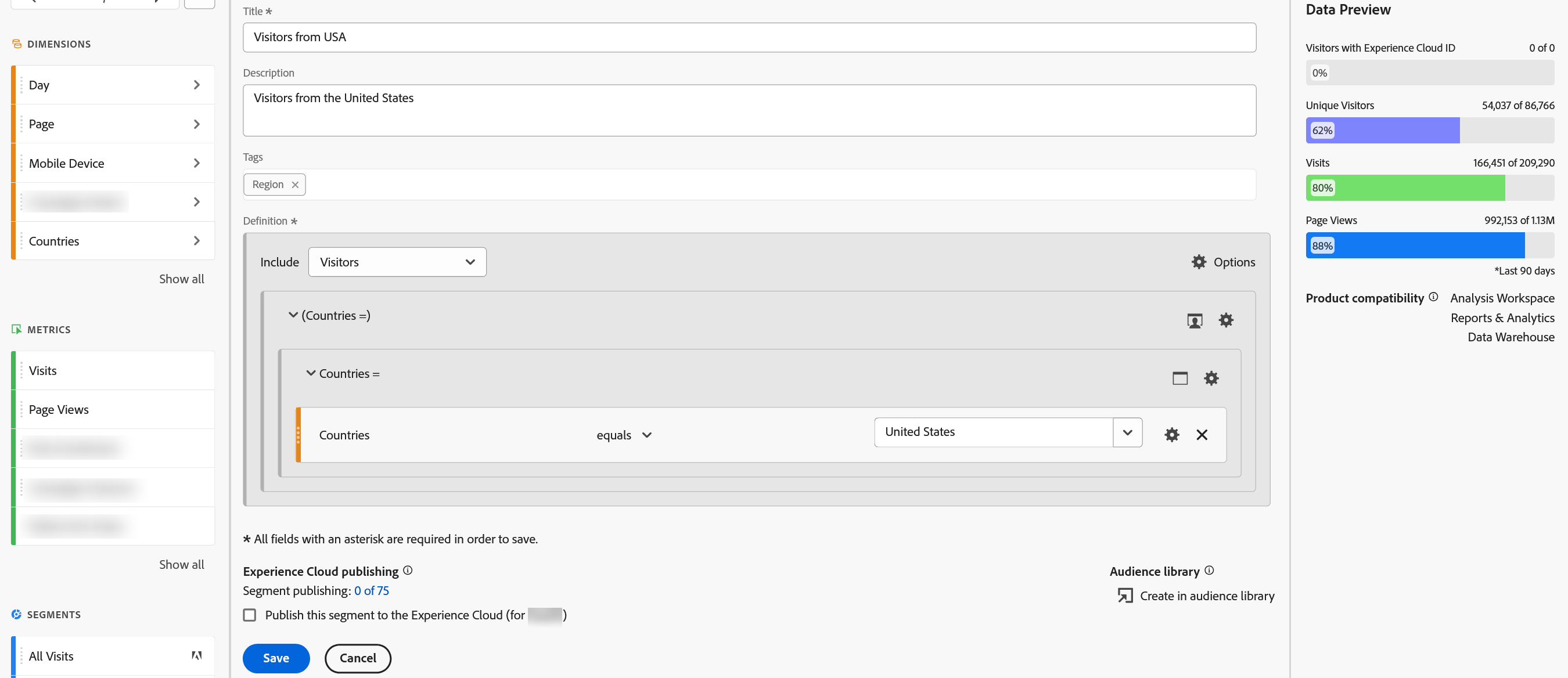
Before you start: open Components › Segments › Add, and set the Title to Visitors who ordered.
- Set the top container scope to
Visitors. -
Choose
Options(gear) ›Add container. A nested container appears inside the first one. - Set the nested container's scope to
Visits. - Drag
Ordersinto the nested container and set the operator toexists. - Choose
Save.
Reads as: visitors for whom at least one visit contained an order.
With a single condition like this, the nested form and a plain Visitor segment return the same people, so the nesting can look like effort spent for nothing. It earns its keep the moment two conditions have to happen together inside the same visit, for example viewing the pricing page and then not purchasing, within one session rather than scattered across weeks. Forcing conditions to co-occur is a job for logic and operators, the subject of Segment Logic and Operators.
The same segment can change a report's numbers
Because the container controls how much data is pulled in, the very same condition returns different numbers at different scopes, and this trips people up constantly. A condition of page equals Pricing at Hit scope returns just the pricing-page hits. At Visit scope it returns every hit in any visit that touched the pricing page. At Visitor scope it returns every hit from any visitor who touched the pricing page even once, across all of their visits.
Which leads to the effect that generates the most confused support tickets of all.
Apply a Visitor-scoped segment of page equals Pricing to a Pages report, expecting to see only the Pricing row, and the report hands back Home, Search, Checkout, and everything else too. Nothing is broken. A Visitor container returns all the data for every visitor who qualified, and those visitors viewed many pages. The segment qualified the people; it never narrowed the pages. To see only the pricing hits, the container has to be Hit scope, not Visitor. The container reaches beyond the segment and shapes the report itself.
Turning a container inside out
By default a container includes what matches. Flip it to Exclude and it removes what matches and keeps the rest, and at Visit or Visitor scope this is more powerful, and more dangerous, than it first looks.
Take visitors who came but did not buy. The clean way to build it is an Exclude container at Visit scope holding the order event: include everyone, then throw out the whole visits in which an order happened, and what remains is the non-purchasing sessions. Notice that the exclude operates at the container's scope. An Exclude Visit container removes entire qualifying visits, not just the single hit where the order landed. Change that same container to Hit scope and the meaning flips: now only the individual order hits are removed, and the rest of each purchasing visit stays in. Same words, different scope, opposite answer.
There is a second way to express a negative, using an operator such as does not equal on a component rather than excluding a container, and the two do not behave the same at Visit and Visitor scope. That distinction belongs with the operators themselves, in Segment Logic and Operators.
Scope set, now the logic
The container is the frame. It decides how wide a segment reaches, whether it includes or excludes, and how nested pieces relate through the Visitor, Visit, Hit hierarchy. What it does not yet decide is what goes inside the frame once there is more than one condition: whether two rules must both hold or either will do, and how the order of events changes the meaning entirely. That is logic and operators, and it is where a segment grows from a single scoped condition into something that can hold a real question.
Scope and type live inside the Segment builder. Open it from Analytics > Components > Segments > Add, then use the Options gear on the definition to set Include or Exclude and the Hits / Visits / Visitors scope. Options > Add container nests one container inside another.
This article focuses on the concepts, architecture, and practical guidance behind the topic. For the latest UI walkthroughs and step-by-step implementation instructions, use the links below. They leave this site and open Adobe's own documentation in a new tab.