Deliver and maintain › Solution Design Reference (SDR)
Variable Mapping
The five delivery documents this module is built on Business Requirements Document·Solution Design Reference·Technical Specification Document·Validation Report·Implementation Project Plan
Analytics project delivery documents
Six months after launch, a new analyst joins and is asked to add tracking for a gift registry. They need a spare eVar. They open Admin, look down the conversion variables, and eVar41 through eVar250 are all empty and unnamed. So they take eVar41.
Three weeks later somebody discovers eVar41 was quietly reserved for a loyalty tier that ships next quarter, agreed in a meeting nobody wrote down. The two uses are now mixed in one report, and the only clean fix is a third variable and a note explaining the first six months.
A variable map prevents that, and it is the one job the inventory does better than anything else. It just has to be built to answer the question somebody actually has, which is not what is eVar17.
The sheet being described here is Variable Map, at the back of the SDR workbook beside this page. Open it and scroll past eVar36. The empty rows that follow are the subject of this section, and they are much easier to argue about with the sheet in front of you.
The map answers a different question from the design
The blocks at the front of the document are organised by moments on the site, which is right for designing and right for review. They are useless for two other questions that come up constantly. What is free? And where else is this variable used?
Both are answered by turning the design inside out. List every slot the report suite has, in order, and against each one put its report name, its settings, and the solutions that populate it. The map is a reverse index of the design, generated from it. It is the only view where a variable used by nine solutions looks different from one used by a single solution.
| Conversion variable | Report name | Setting | Used by |
|---|---|---|---|
| eVar16 | Listing Type | Most Recent, Visit | KES-S003 |
| eVar17 | Cart Addition Source | Most Recent, Visit | KES-S005, KES-S006 |
| eVar18 | Delivery Option | Most Recent, Visit | KES-S010, KES-S012 |
| eVar19 | Payment Method | Most Recent, Visit | KES-S011, KES-S012, KES-S013 |
| eVar20 | Order ID | Most Recent, Page View | KES-S012 |
| eVar21 | Discount Code | Most Recent, Visit | KES-S014 |
| eVar37 | |||
| eVar38 |
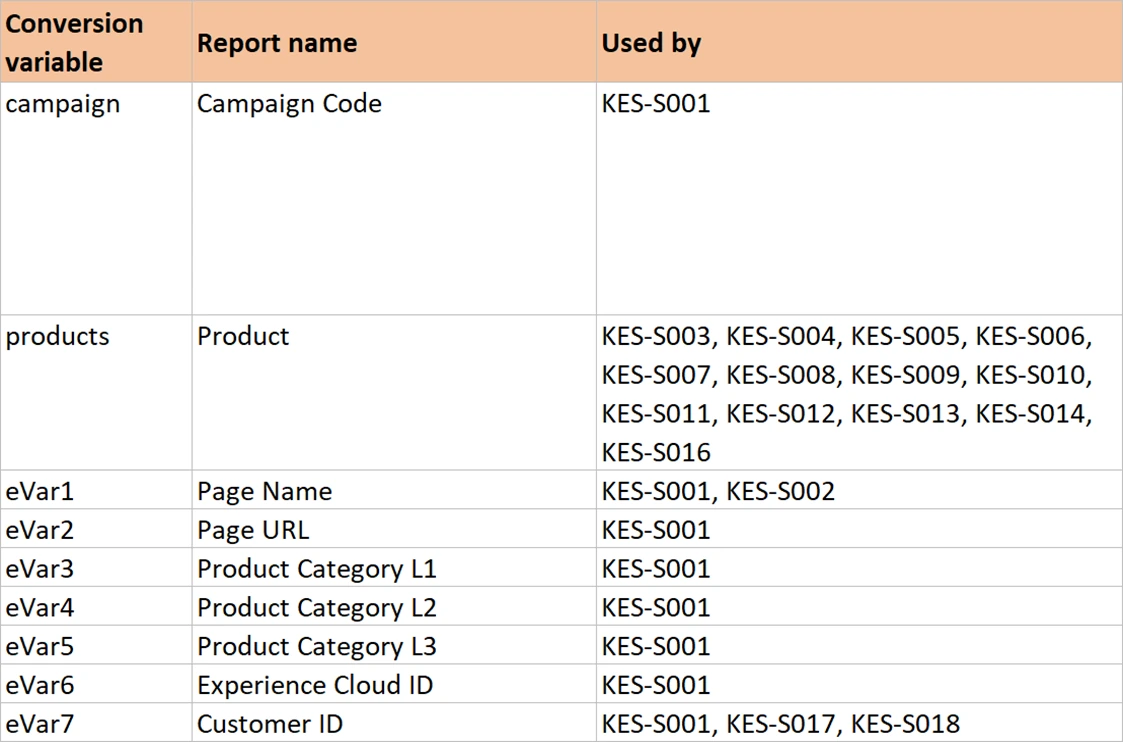
The last column is what lifts this above a list. Somebody proposing to change how Payment Method is set can see immediately that three solutions write to it, and that one of them is the order. That is a change with consequences, and the map says so before anybody touches a rule.
Show every slot, not only the used ones
The instinct is to list the thirty-six variables in use and stop. Do the opposite. List all of them, up to whatever the contract provides, and leave the unused rows empty.
Adobe allows up to 75 traffic variables, up to 250 conversion variables and up to 1000 success events. How many of each you actually have depends on the contract. So the first thing to do with the map is delete the rows the report suite does not have. A free row on that sheet then means genuinely free, rather than possibly free and possibly beyond your allowance.
The empty rows are the useful part. They are what the analyst in the opening was looking for and did not find. They are also where a reservation gets recorded. A slot with a name, no settings, and a note saying held for loyalty tier is a slot nobody takes by accident.
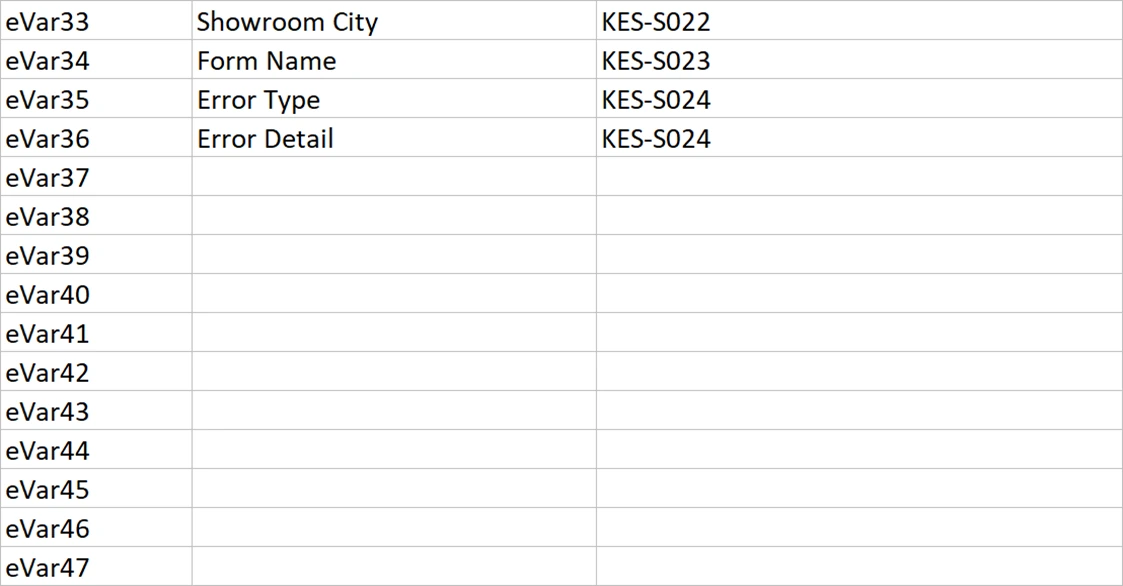
When something stops being used, do not blank the row. Historical data sits in that slot forever. Reassign it and one report holds two different things either side of a date, with nothing in the interface to warn anyone. Mark it retired, name what it used to hold, and record when it stopped. Only reuse a slot when the old data is genuinely past the retention period and somebody has said so out loud.
Technical settings belong here, and nowhere else
Allocation, expiration, merchandising, whether a prop has pathing turned on, whether an event counts or sums, whether it holds currency. All of it lives in the map. None of it belongs in the design blocks at the front, where it would put configuration detail in front of a business reader who cannot use it.
The design blocks carry a compressed hint instead, in brackets after the slot name. eVar12 (M) is merchandising. event18 (n) is numeric. event4 (M n) is a numeric merchandising event. That is enough for a technical reader skimming a block, and the full settings are one sheet away.
Two of those settings deserve a moment, because they are decisions rather than defaults. Allocation decides which value gets the credit when a visitor touches several. Most Recent is the usual answer. Original Value is right when the question is what started something. Banner Name in the worked example uses Original Value on purpose, because the interesting question is which banner brought somebody in, not which one they clicked last. Expiration decides how long a value keeps earning credit, and Visit is the safe default. Merchandising variables expire on purchase, so a product attribute stops applying the moment the product is bought.
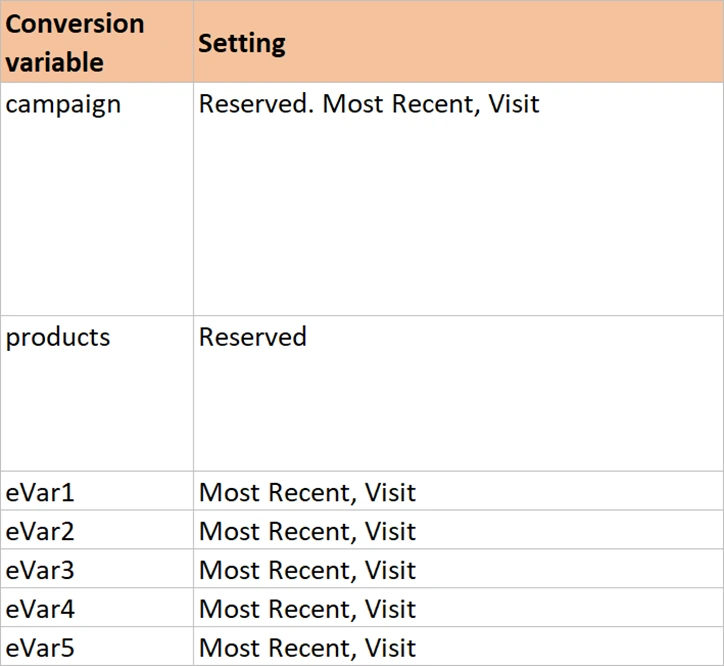
Analytics > Admin > Report Suites, select the suite, then Edit Settings. Conversion variables and their allocation, expiration and merchandising sit under Conversion > Conversion Variables. Events and their type sit under Conversion > Success Events. Props and their pathing sit under Traffic > Traffic Variables. The map in your document is a copy of these three screens plus the intent behind them.
The product string is a structure, not a variable
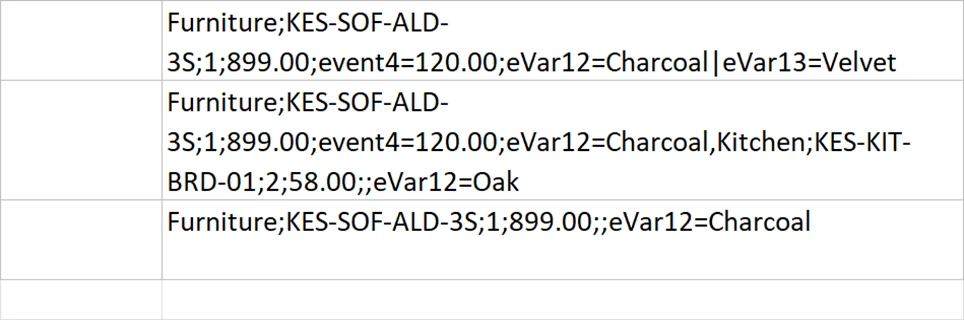
One row on the map says products, and that row is doing far more work than any other. The products variable is a string with fixed positions, separated by semicolons. It carries the category, the product, the quantity, the price, any numeric events bound to that product, and any merchandising variables bound to it.
A single row cannot describe that, so give it a sheet. Define each position, say what carries it, give a real example, and say what breaks when it is wrong. Then show a two-product string, because comma separation between products is where people go wrong, and show an empty position, because a missing element still holds its place.
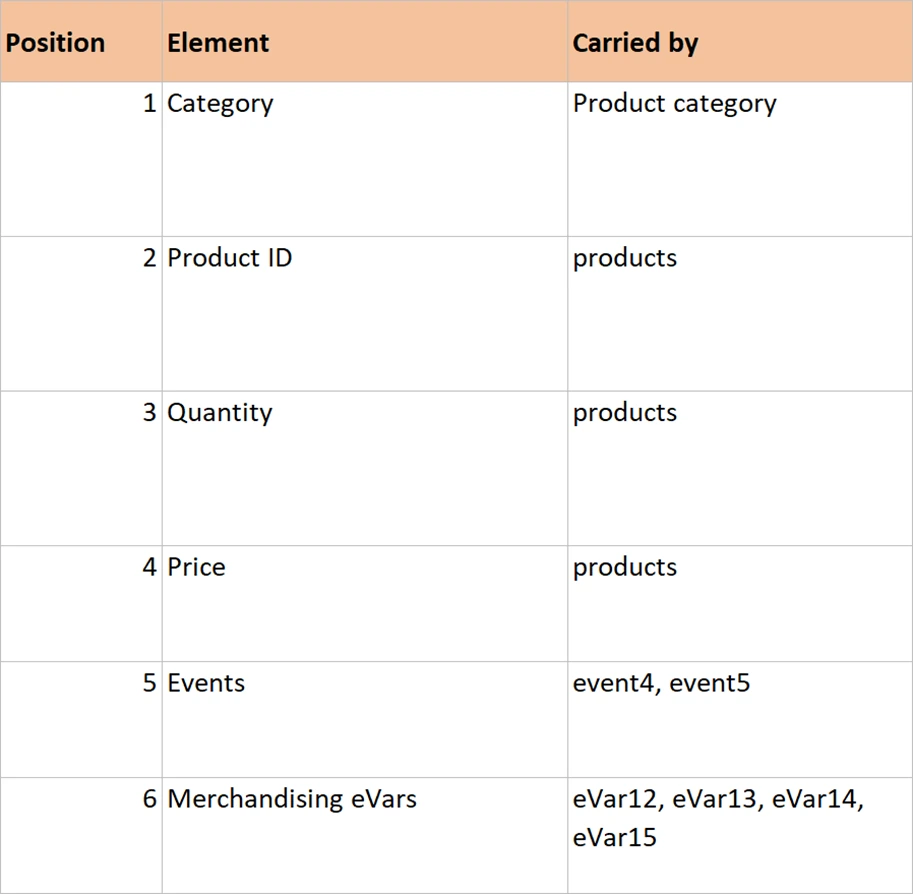
Eleven of the twenty-four solutions in the worked example depend on that definition. Writing it once and pointing at it is the difference between one clear rule and eleven slightly different descriptions of the same thing.
Your copy will drift from the live one
The map in the document is a copy. The live version is in Admin, it is maintained by the product, and it is always right about settings. Yours will fall behind, because somebody will change an expiration in the interface at four in the afternoon and not open the spreadsheet.
That is worth being honest about rather than pretending otherwise. Two things keep it usable. Name one person who owns the map, in the document, by role if not by name. And be clear about which copy is authoritative for what. Admin is the truth for what a setting currently is. The document is the truth for why it was chosen and who relies on it. Those are different facts and only one of them is in the product.
That pair of habits outlives this document and this tool. Any register that mirrors a live system will drift, whether it holds variables, servers, access permissions or suppliers. Naming an owner, and declaring which copy is authoritative for which kind of fact, is what keeps a drifting register useful instead of quietly abandoned.
Put a quarterly reconciliation in the calendar and give it thirty minutes. Export the conversion variables from Admin, put them beside the map, and look only for differences. The ones you find are usually small and occasionally alarming, and either way the fix costs minutes at that size. A map nobody has reconciled for two years is one nobody trusts, and an untrusted map sends the next analyst straight back to guessing.
Filling in the variable map
The Variable Map sheet in the SDR workbook already runs to every slot Adobe offers. Do this after the design blocks are written, never before: a map built first becomes a shopping list, and the design ends up shaped by whatever was already allocated.
- Delete the rows your contract does not cover. The sheet ships with 75 props, 250 eVars and 1000 events, which is the maximum rather than your allocation. Do this before anything else. Until it is done, a free row means possibly free and possibly beyond your allowance, which makes the whole sheet unusable for the one question it exists to answer.
- Keep the reserved variables at the top of each block and clear the names beside them. pageName, channel, campaign, products, purchase and the cart events. Adobe already decides what those mean. Listing them stops somebody designing a custom event for a cart addition.
- Fill in the report name and the settings for every slot your design uses, and leave the rest empty. Settings, not descriptions. Most Recent, Visit. Product Syntax Merchandising, expires on Purchase. Counter. Currency.
- Fill the Used by column with the solution IDs that populate each slot. It falls straight out of the design blocks, and it doubles as a check. A slot with a name and no solution against it is either a mistake or a reservation, and both need explaining.
- Read the sheet top to bottom looking for two different things sharing one slot, and for one thing occupying two. Both are common in a first draft and both are nearly invisible in the design blocks, because those blocks sit forty screens apart on four sheets.
- Write reservations and retirements into the empty rows, each with a date and a reason. This is the step that prevents the gift registry problem in the opening. An empty row that says held for loyalty tier is not empty.
That is the whole map. Every slot, its settings, and who uses it. Extend it where the estate needs more: list variables, a second currency or deep classifications each want a block of their own, and a large estate wants a column naming which report suites share a definition.
Why the map goes at the back
Position in the document is an argument about what the document is for. A map at the front says this is an inventory with some notes attached. A map at the back says this is a design, and here is the reference material it produced.
That ordering also matches how the document gets used. In review, nobody opens the map. In build, everybody does. During a change six months later, the map is the first sheet somebody checks and the design blocks are what they read next. Front to back, the document runs from why to what, and the map is the last stop before the work becomes instructions.
Those instructions are the next layer. The design says a colour is bound to the product. The map says eVar12 is merchandising. Neither tells a developer which object on the page holds the value, or when to populate it. Developer Instructions covers the columns that answer that, and the ordering rule that prevents the most common failure in any implementation.