Deliver and maintain › Solution Design Reference (SDR)
Validation and Sign-off
The five delivery documents this module is built on Business Requirements Document·Solution Design Reference·Technical Specification Document·Validation Report·Implementation Project Plan
Analytics project delivery documents
The build is done and the first test cycle starts on a Thursday. By lunchtime it is clear that a lot of it does not work. Direct calls firing twice. A quantity arriving as the cart total. Payment methods coming through as gateway codes. A customer ID sitting in the data layer as a plain email address, which stops the testing entirely while somebody is telephoned.
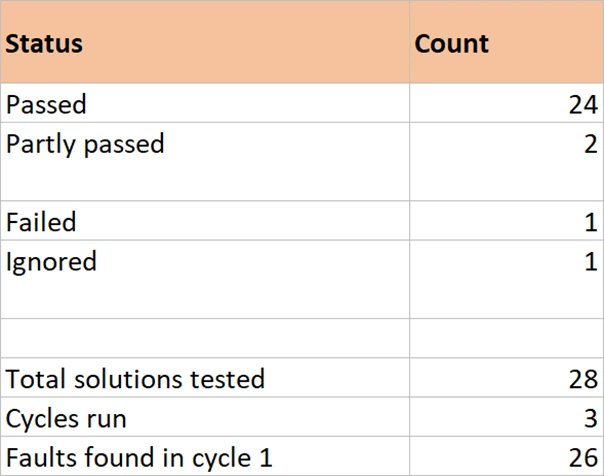
Twenty-six of the twenty-eight things tested have something wrong with them. Two were right first time.
That is a completely normal first cycle, and it is not a sign that anything has gone badly. What decides whether the project survives it is whether every one of those findings lands somewhere it can be tracked, or whether it lands in a chat thread.
Where they landed is the fourth workbook beside this page. Open it before reading on. Twenty-eight rows, three dated cycles inside each one, and four different statuses, and the rest of this section is an explanation of why it is shaped that way rather than as a simple pass and fail list.
Test against the ID, not against the site
The instinct is to write a test plan from scratch: a list of pages, a list of things to click, a column for what happened. It produces findings nobody can act on, because a finding attached to a page is not attached to a requirement, and nobody can tell whether it matters.
The test document is the solution list. One row per solution ID, the requirement sentence copied across so the row reads on its own, and then the findings. Nothing is invented and nothing is renumbered.
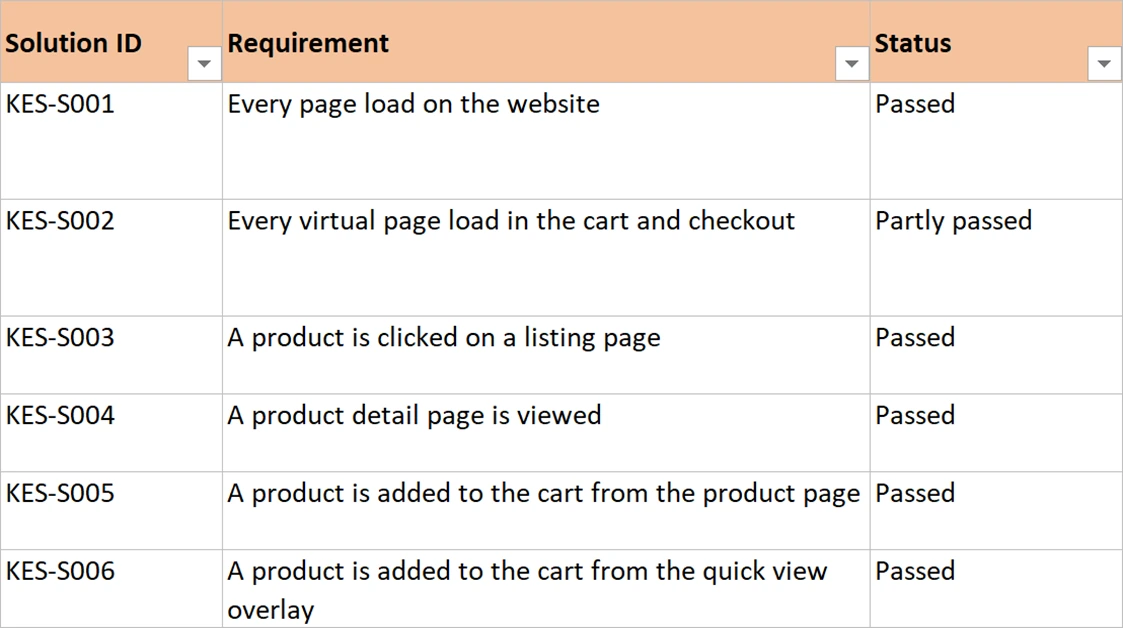
Everything follows from that. Coverage is countable, because the rows are the design. A finding is unambiguous, because it names a solution rather than a page. And the question anybody asks in a status call, which is whether a particular thing works yet, is answered by reading one row.
Four statuses, and the useful one is Ignored
Pass and fail is not enough, because most of what happens in testing is neither.
| Status | Means | What it needs alongside it |
|---|---|---|
| Passed | Behaves as the design says, with evidence captured | Nothing. This is the only status that closes cleanly |
| Partly passed | The main case works. A named part does not | The exact part that does not, an owner, and a date |
| Failed | Does not work | An owner and a date. Never left without both |
| Ignored | Dropped from this phase by agreement | A reason, who agreed it, and when |
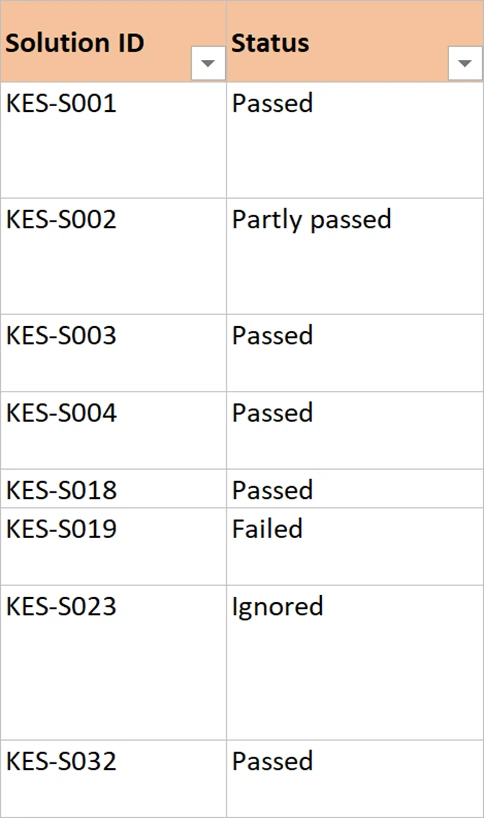
Ignored is the status that makes the document honest. In the worked example the form tracking solution is dropped. The direct call identifiers were wrong, the form component belongs to a third party, and their next release lands after go-live. Three cycles confirmed nothing had changed. It goes out of Phase 1, in writing, with the reason and the date and the name of who agreed.
Compare that with the alternative, which is silence. The form solution stays on the list, nobody mentions it, go-live happens, and in October somebody builds a report on form completions and finds nothing there. At that point the implementation looks unreliable, and the argument about whether it was ever delivered has no evidence on either side.
Nothing about analytics documentation is meant to force every requirement into production. Projects have dates and third parties have release windows, and the correct answer is often to cut something. What the document does is make sure the cut is a decision somebody made, rather than something that happened. Anyone can then find out later what was cut and why. Partly passed and Ignored are how a project stays truthful about itself.
Keep the cycles in the row, dated
Findings go in one cell per solution, newest at the bottom, each prefixed with its date. Never overwrite the previous finding.
The reason is that a fix moving a problem looks exactly like a fix solving it, until the history is in front of you. One row from the worked example, in full:
22 May: Payment method arrives as the gateway code rather than the name.
29 May: Names correct for card and PayPal, still a code for Klarna.
04 Jun: All five correct.
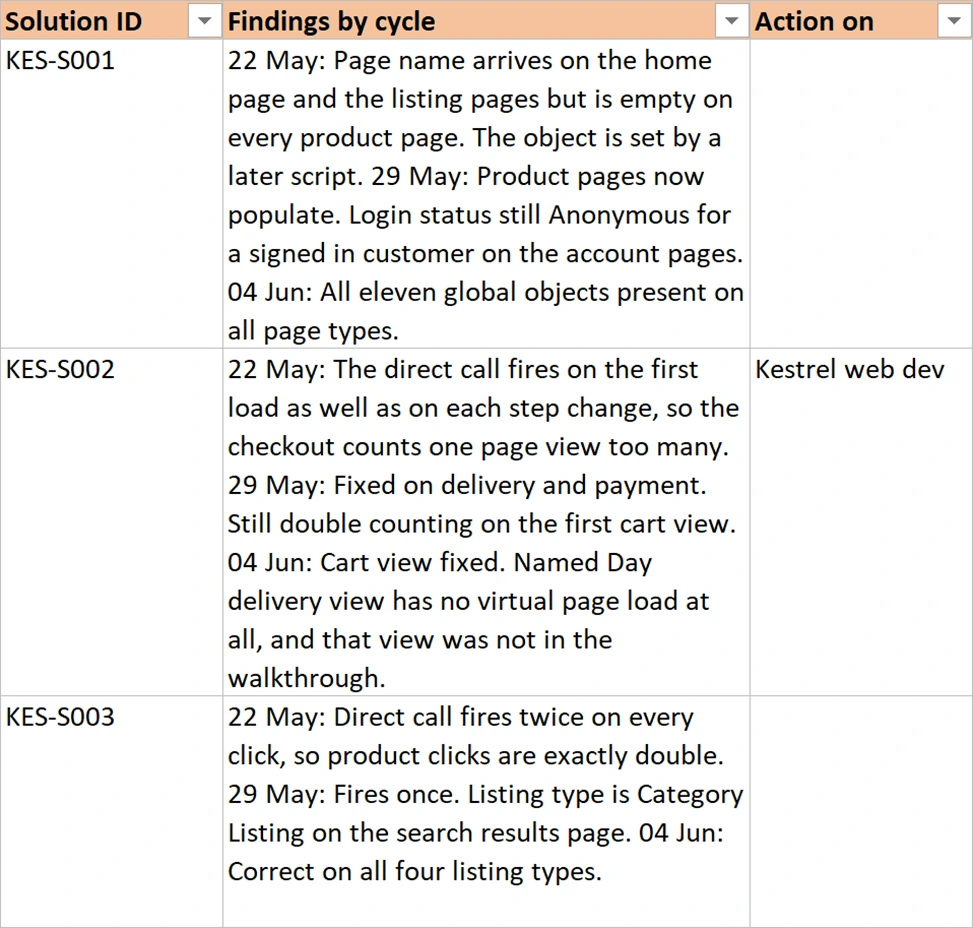
Three lines, and they say something no single status could. The fix was partial, the gap was one payment provider, and it took a third cycle. Somebody reading this in a year, wondering why April data has codes in it, gets their answer without asking anyone.
It also protects you. When somebody says a thing was reported as fixed two weeks ago, the row shows what was actually observed on that date. That is usually more precise than anybody's memory.
Evidence is a screenshot, not an assertion
Capture what the call actually carried. A screenshot of the network request or the debugger output, saved against the solution ID, taken at the moment it passed.
This costs a few seconds per solution and it settles arguments permanently. It is also the only defence against the most awkward situation in implementation work, which is a thing that passed testing and is wrong in production. With evidence you can say precisely what was seen on staging, and the conversation becomes about what changed between the two environments. Without it, the conversation is about whether the testing was any good.
Name who is blocking, in a column
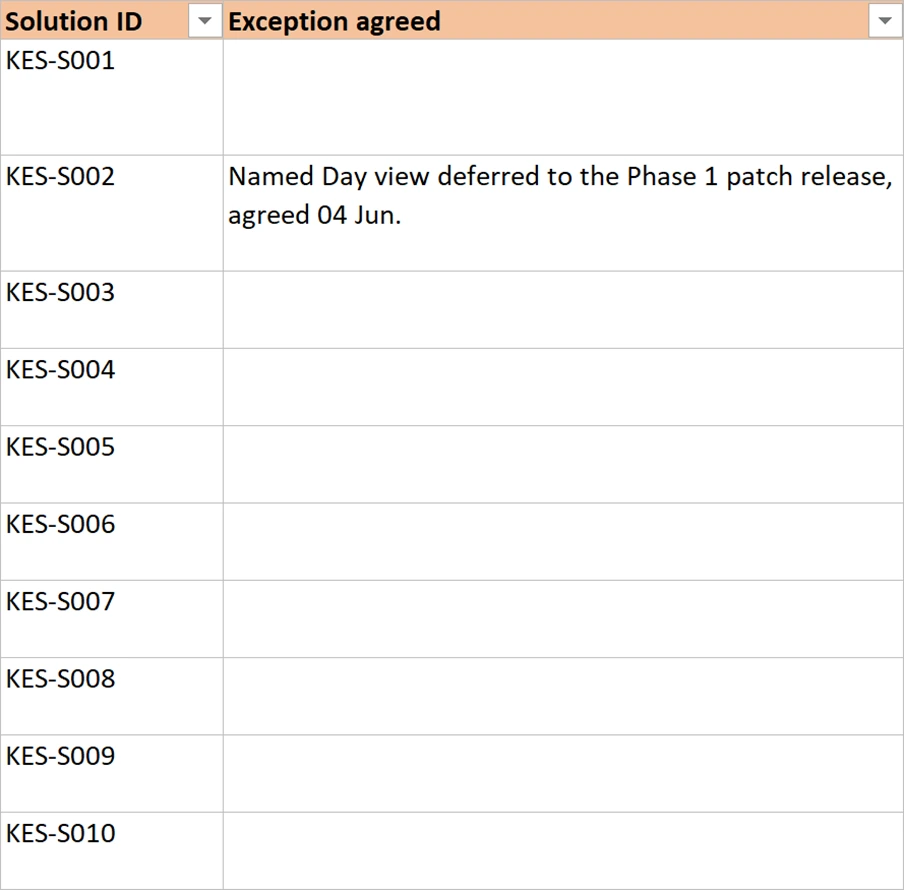
Every open finding gets an owner and a date. Two columns, filled in during the cycle rather than afterwards.
This is the part people avoid, because writing a client's name against a failure feels like blame. It is the opposite. An unowned finding stays open by default and gets rediscovered every cycle, and the third time it appears somebody starts asking why the implementation is taking so long. An owned finding with a date is a piece of work somebody is doing.
Be even-handed about it. In the worked example the column names the analytics team on some rows, Kestrel web dev on others, Kestrel QA on the test data, and a third party that neither side controls on one. The document records who acts next, not who is at fault, and once that is established nobody minds their team being in the column.
Sign-off is theirs to give, and it has to be recorded
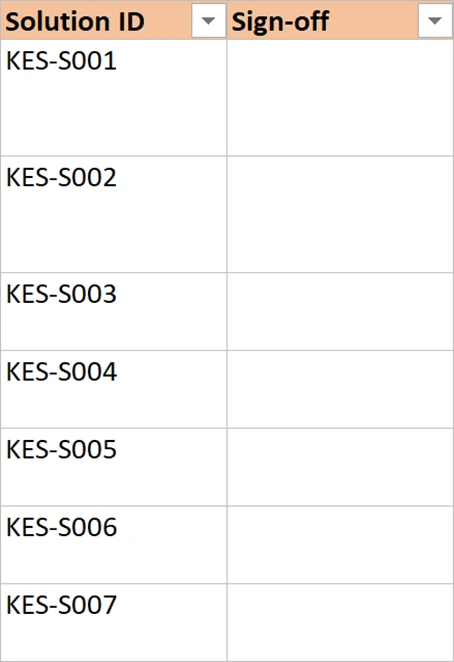
A row is not finished when you think it works. It is finished when the client says so, in the sign-off column, next to the solution ID.
That distinction matters more at the end of a project than during it. Twenty-six of twenty-eight signed, one failure with an owner, one dropped by agreement, and a summary saying so. There is no argument to have, because the numbers are in a document both sides filled in as they went. The alternative is a closing meeting where success is a matter of opinion. Opinions at the end of a long project tend to be shaped by whatever went wrong most recently.
The plan that says who owes what, and when
One more document, and it is not a delivery artifact so much as the thing that stops the others from being late. A plan: every activity, an owner, what it produces, start and end dates, estimated hours, and a status.
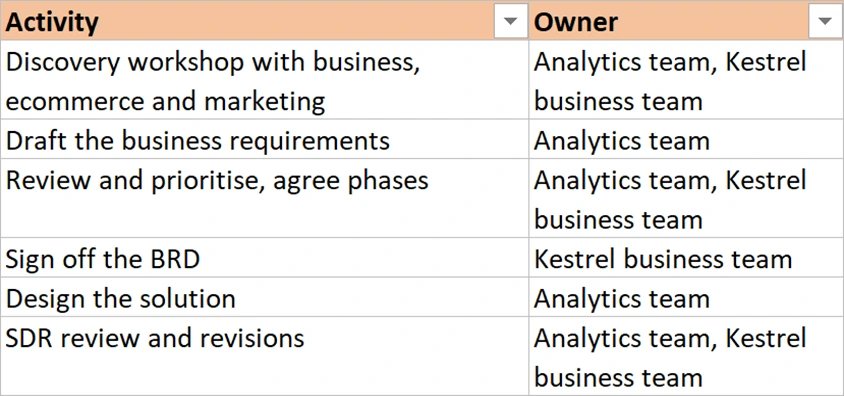
Two parts of it earn their place. The deliverable column, because a run of activities producing nothing is a warning worth seeing early. And an assumptions sheet, which is where the dependencies get written down before they become excuses. The data layer is being built by the client. Three test cycles are included and a fourth is a change request. The staging payment gateway has to be able to fail on demand, or the payment failure solution cannot be tested at all.
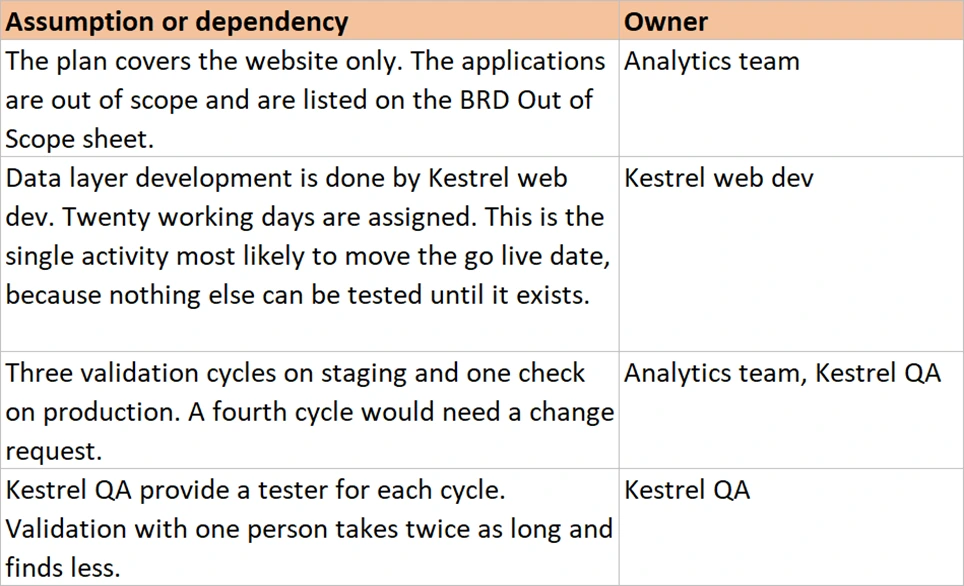
Those sentences cost nothing in week one. In week nine, when the gateway turns out not to fail on demand, they are the difference between a renegotiation and an argument.
Running a cycle in the validation workbook
The validation report beside this page holds a finished Phase 1: twenty-eight rows, three cycles, four statuses and a summary. A cycle on an implementation this size is a day of testing and two or three days of fixes, and three cycles is a realistic plan.
- Part one, set up
- Clear the Kestrel rows from the Tracker sheet and paste in your own solution IDs and requirement sentences, straight from the SDR. Copied, not retyped and not renumbered. The moment these IDs stop matching the design, every other document in the set stops connecting to this one.
- Include the configuration solutions alongside the rules. Marketing channel rules and classifications fail as often as anything else and are easier to forget, because nothing on the site looks different when they are wrong.
- Arrange the hard-to-produce test data before the cycle rather than during it. A failed payment, a valid discount code, a search that returns nothing, an order with ten products. Each one is half a day of waiting if it is not ready when you reach its row.
- Part two, the cycle
- Work down the rows in order, exercising each solution and reading what the call actually carried. In order, so coverage is countable. Testing the interesting ones first is how the boring ones go untested.
- Write each finding into the row with today's date in front of it, leaving the previous findings where they are. Look at KES-S011 for the shape. Be specific: quantity was 2 when one product was added beats quantity incorrect.
- Capture evidence against every solution that passes, named with its solution ID. The call, or the debugger view. Seconds now, arguments avoided later.
- Set an owner and a date on every row that is not Passed, before the cycle is circulated. Before, not after. An owner assigned in the review meeting is an owner chosen by whoever was quietest.
- Part three, close it
- Decide the exceptions explicitly and write them in the Exception agreed column: what is accepted as it is, and what is dropped from this phase. Each with a reason and a date. This is the conversation that makes go-live possible, and it has to happen in a meeting rather than by inference.
- Count the statuses onto the Summary sheet and write one line of recommendation. Twenty-four passed, two partly, one failed, one dropped, proceed. That is a sentence a decision-maker can act on without reading twenty-eight rows.
- Get the sign-off column filled in by the client, row by row. Row by row is the point. A single signature on a covering email is not the same thing and will not survive a disagreement.
That is a validation cycle complete. One row per solution, dated findings, evidence, owners, exceptions and a signature. Go further where the stakes are higher: a regulated business will want the tester named on each row, and a large programme will want the whole cycle repeated on production rather than a single check.
How you know the project succeeded
At the end there is a number, and it comes out of the documents rather than out of anyone's judgement. So many solutions signed, so many carrying an agreed exception, so many dropped and why. Every one of those traces back through a solution ID to a requirement ID to a sentence somebody said in a workshop in March.
That is the whole reason the chain exists. Not tidiness, and not process for its own sake. A project that can answer did we deliver what was asked for with a count, rather than an impression, can be handed over. It can be inherited, audited and defended. One that cannot will be re-litigated every time a number looks strange.
Nothing in this module argues that the documents are the work. The work is the implementation. The documents make the implementation legible to the six or seven people who each need to understand it differently. They also let somebody who was never in the room pick it up two years later and be right about it.
And almost none of what makes that work belongs to Adobe Analytics. An identifier that survives from a meeting to a signature. Scope written down before anybody builds. One instruction per row, so a change costs one edit. Four statuses instead of two, because most of what happens in testing is neither a pass nor a failure. A dropped item recorded with a reason and a name against it. Take those five to a data platform migration, a replatform, or a system nobody has built yet, and they behave the same way. The analytics was the pathway. The method is the part you keep.
What all of this assumes is that you can see what a call actually carried, which is a skill of its own and the subject of a whole module. Testing and Debugging covers the tools that show you the hit and how to read one. It also covers how to tell a data layer fault from a rule fault, when both look identical from the outside.