Collect the data › Adobe Launch (Tags)
Extensions
When Adobe retired DTM and moved everyone to Launch, a fair number of people asked the obvious question: why was this even necessary? Was it a nicer interface? Yes, it was. Was Launch faster? Also yes. But those were the visible reasons, not the deep one.
DTM was built around Adobe Analytics. Analytics was the vehicle, and the other products, Target, Audience Manager, sat on top of it more like accessories than equals. Launch threw that assumption out. It was rebuilt so that no single product was the center of gravity, every product was a guest with the same standing. And the mechanism that made that possible is the thing this whole section is about: the extension framework. For the first time, any vendor could build their own piece and publish it into Launch. That single design decision is what changed tag management, and it is the most important thing Launch ever did, more than the speed, more than the interface.
Why extensions exist at all
Start with what a website has become. It is no longer a place that publishes content for people to read, and it stopped being a simple chat or commerce destination a long time ago. Today a single site might carry brand awareness, news, articles, transactions, personal banking, education, and the day-to-day running of the business, all at once. In this era of digitisation a website does, more or less, everything.
So ask the honest question: is your own HTML and JavaScript enough to deliver all of that? It is not. A real site leans on a long list of third-party utilities, a Google pixel, a Meta pixel, form-hosting capabilities, video and media-streaming tools, and a dozen more. And the moment you depend on other people's code at that scale, three problems show up.
The first is dependency. Every third-party utility you want has to be wired in by a developer, and developers work on release cycles. If the next release window is a quarter away, your new utility waits a quarter. Marketing's timeline and engineering's timeline rarely agree.
The second is the state of the code itself. Picture your site's source with twenty different pixels, SDKs, and snippets pasted into it. It becomes hard to tell what is core to the site and what is bolted on. Any seasoned developer will tell you how much documentation and proper context matter, because code is never a one-day job, it passes from hand to hand over years. It has to be readable without the person who wrote it standing next to you. Twenty hand-placed third-party tags work directly against that.
The third is weight and waste. When the page loads, it pulls all of that in, every utility, whether or not it will ever fire on this particular page. The browser does not know which of those tags matter here, so it loads them all. The page gets heavier, the visitor waits, and a slow site is exactly the kind of thing that sends a visitor to a competitor. So the question becomes: how do you get all this capability without the dependency, the clutter, and the weight?
Launch is the platform that launches them
The answer is Launch, Adobe Experience Platform Data Collection Tags. The name is literal: it is the platform you use to launch these third-party utilities onto your site. Instead of a developer hand-wiring each one into the source, the utility is managed inside Launch, deployed through the single embed script from Properties, and fired only under the conditions you decide.
And here is the real power, the thing that matters more than the UI or the speed: Launch has its own app store. The extension catalog. Any vendor who wants their technology to run on Launch-enabled sites can build an extension for it and publish it to that catalog, and you install it the way you would pick an app off a shelf. Properties touched on this idea, with Meta publishing its own Meta Pixel extension. The catalog is what turns Launch from a tag manager into an ecosystem.
What an extension actually is
It is tempting to leave the analogy at "extensions are apps," but that is where it breaks, and the difference is worth getting right. A phone app is plug and play. You install it, it has its own self-contained purpose, and you need no technical knowledge to make it work. An extension is not like that. Each one is built for a specific job, to collect a particular kind of data, to host some content, to fire a pixel for a vendor like Google, Meta, or LinkedIn, and installing it is only the first step. Almost every extension carries its own configuration, and depending on what it does, configuring it correctly takes some technical understanding. Extensions are installed, but they are not plug and play.
Because an extension is not plug and play, treat its vendor documentation as part of the installation, not optional reading. It tells you which configuration fields matter, what the vendor expects to find on the page, and how to test it. Budget time for that step rather than assuming an install is a single click.
That said, they still make the work dramatically easier than the alternative. Think about how a developer used to add a third-party utility: take the vendor's API or library, wire it in by hand, check the calls, set the options, test it thoroughly across cases, and only then push to production, often across several development and testing cycles. An extension collapses most of that. You get a proper configuration screen, you get the vendor's documentation alongside it, and if you are stuck on a detail you can go back to the vendor, who can help you find the right settings, test the configuration, and debug their own extension when something fails. The hard, repetitive integration work has been done once, by the people who know the technology best.
Adobe put its own products in the catalog too
The part that says a lot about the design: when Adobe built this framework, it did not hold its own products above everyone else's. Adobe Analytics, Target, Audience Manager, even the Web SDK, are all delivered as extensions, sitting in the same catalog, installed the same way, as everyone else's. Adobe democratised its own platform. The honest footnote is that Adobe's products do gel unusually well with Launch, the binding is tighter, but architecturally they play by the same rules.
The Adobe-published extensions you will reach for most often:
- Core, the default extension that is always present, supplying the generic web building blocks like page-load and click events and custom code.
- Adobe Analytics, Adobe Target, and Adobe Audience Manager, the classic Experience Cloud products.
- Adobe Experience Platform Web SDK, the single Edge-based library that increasingly replaces the individual product libraries.
- Adobe Experience Cloud ID Service (ECID), which establishes the shared visitor identity.
- Adobe Client Data Layer and Adobe Media Analytics for Audio and Video, for event-driven data layers and streaming measurement.
The catalog carries far more than this, ContextHub, Experience Manager Forms, Adobe Fonts, Adobe Privacy, and others, but the set above covers most real implementations.
Adobe also builds supporting extensions through its Consulting team, utilities that make the products easier to use rather than products in their own right. It is the same instinct as a carmaker that also manufactures genuine accessories for its own vehicles. The two you will meet most:
- Common Analytics Plugins, which augments the Adobe Analytics extension and packages the classic Analytics plug-ins so you do not have to paste them in by hand. It requires the Adobe Analytics extension to be installed.
- Adobe Analytics Product String, which builds the
s.productsstring for you from your data layer, no custom JavaScript required.
Worth knowing that partners such as Search Discovery, Blast, and Further publish their own extensions too, including their own product-string builders, which is exactly the open-ecosystem effect the framework was designed to create.
The anatomy of an extension
To use extensions well, you need to know what one actually contributes when you install it. Adobe's own engineers have a word for the pieces an extension supplies: delegates. An extension hands Launch a set of these delegates, and they become the building blocks you select from later when you assemble rules and data elements. Install a new extension and the menus you build with grow new options. That is the mechanism underneath everything.
An extension contributes up to five kinds of thing:
| Component | What it is | Example |
|---|---|---|
| Configuration | The extension's own global settings, set once and used wherever the extension runs. | The Adobe Analytics extension holds your report suite IDs per environment, the tracking server, and whether the tracker is made globally accessible. |
| Event types | Triggers that can start a rule: the "when" of an implementation. | Core supplies page load, click, and direct call; the Web SDK supplies a "send event complete" event. |
| Condition types | Criteria that decide whether a triggered rule is actually allowed to run. | Core supplies value comparison, cookie, and custom code conditions, each usable as a regular or an exception. |
| Action types | What a rule does once it fires: the "then" of an implementation. | The Adobe Analytics extension supplies "Set Variables" and "Send Beacon"; the Web SDK supplies "Send event". |
| Data element types | Ways to capture and shape a value from the page, for reuse anywhere. | Core supplies cookie, JavaScript variable, constant, and custom code; other extensions add their own. |
The Core extension is the reason a brand-new property can already build a basic rule: it supplies the generic, product-neutral building blocks. The product extensions add their own specialised delegates on top. This is why the components genuinely overlap, and why it is pointless to pretend a clean wall exists between extensions, rules, and data elements. They are one connected system. An extension is the supplier; rules and data elements are where its delegates get used.
- Go to
Data Collection›Tags›Club Web›Extensions›Catalog. - Search for
Adobe Analytics, then chooseInstall. -
Open
Configureand setLibrary ManagementtoManage the library for me. This screen is the extension's contract with the product.
Installed, and its delegates show up wherever they are relevant: as data element types, as rule events, and as rule actions. You did not write a line of code.
A concrete pass makes it click. Say you want to record a product view on a product detail page. You install the Adobe Analytics extension and fill in its configuration, the report suite and tracking server. Then you build a rule. For the trigger you reach for a Core event, DOM Ready. To make sure it only runs where it should, you add a Core condition that checks the page is a product detail page. For the outcome you add two Adobe Analytics actions, Set Variables to populate what you want to send, then Send Beacon to send it. The values those variables draw on come from data elements, which themselves were created from data element types. In one small rule you have used delegates from the Core extension and the Adobe Analytics extension together, with data elements feeding them. That is the whole machine working as one.
The deeper mechanics of building rules, the ordering, the sequencing of actions, and the full range of what data elements can do, have their own sections. Here the thing to hold onto is the supplier relationship: extensions are what stock the shelves that rules and data elements then shop from.
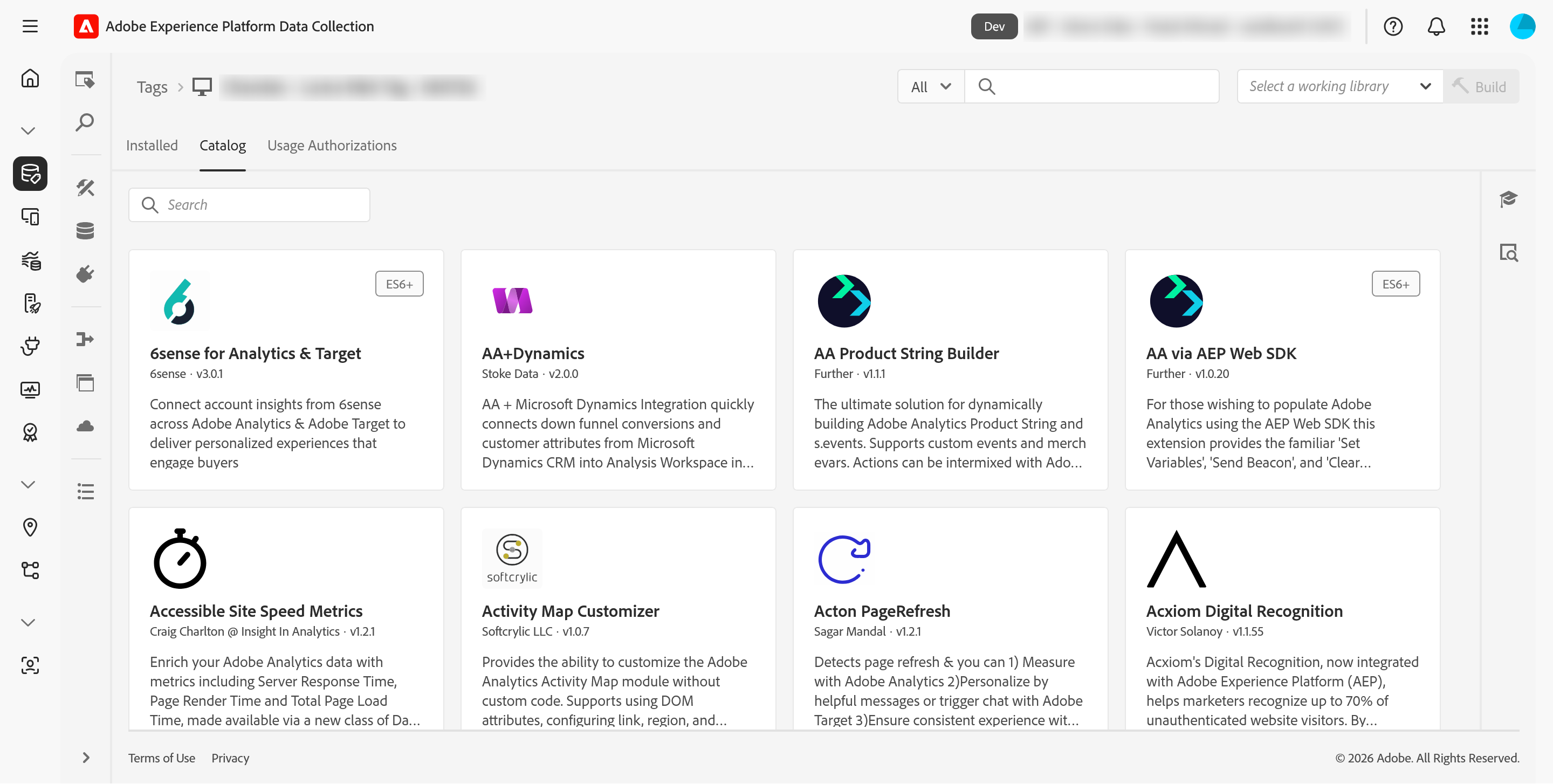
Inside a property, open Extensions. The Catalog tab lists everything available to install; Installed shows what this property already has.
This article focuses on the concepts, architecture, and practical guidance behind the topic. For the latest UI walkthroughs and step-by-step implementation instructions, use the links below. They leave this site and open Adobe's own documentation in a new tab.