Deliver and maintain › Solution Design Reference (SDR)
What Is an SDR
The five delivery documents this module is built on Business Requirements Document·Solution Design Reference·Technical Specification Document·Validation Report·Implementation Project Plan
Analytics project delivery documents
A requirement arrives that reads like one line. Track the forms on the site. Before touching anything you ask for the implementation's SDR, because there is no sense rebuilding what already exists, and a spreadsheet comes back with three tabs in it. One tab lists the props, one lists the eVars, one lists the events. Every row is filled in and every row is correct. eVar24 is Form Name. event30 is Form Start. event31 is Form Submission. The expirations are stated, the allocations are stated, nothing is missing.
And none of it answers the question. Which forms are covered, and which are not? Where does the start fire, on the first keystroke or on the page load that shows the form? Is a submission the click on the button, or the server accepting the data? Does the newsletter box in the footer count as a form at all? The document lists what exists in the report suite. It describes nothing about how any of it works, and how it works is the only thing you came for.
So you open the tag manager and read the rules instead, reconstructing the design by reading the build. The document written to describe the design turned out to be unable to describe it.
What usually arrives when you ask for an SDR
What arrives is an inventory. A row for each variable, a report name, a few technical settings, sometimes a sentence about where the value comes from. It is a perfectly reasonable object and it is not wrong about anything. Somebody built it carefully, and in most implementations somebody has kept it more or less current, which is more than can be said for a lot of project documentation.
The trouble is what an inventory can and cannot be asked. It answers questions of the form what is eVar24. Every real question runs the other way. How does form tracking work on this site. What happens when a customer adds the same product twice. Why does the checkout count more people than the cart. Those questions start from behaviour and look for the variables, and an inventory is indexed the wrong way round to answer any of them.
There is a second problem, quieter and more awkward. That same list already exists inside Adobe Analytics. Open Admin, open the report suite, open the conversion variables, and there are the names, the allocations and the expirations, live and correct, maintained by the product rather than by a person. A document whose entire content is a worse copy of a screen anyone with access can open has to justify itself somehow, and mostly it does not try.
None of this makes the variable list worthless. It is genuinely needed, by people without Admin access, by anyone deciding which slot to use next, and by the design conversation itself. What it cannot do is carry the design. It belongs inside the SDR, near the back, doing one job well, and that is what Variable Mapping is about.
An architect does not hand you a count of bricks
Think about what happens when somebody has a house built. The architect comes back after a few weeks with drawings. Here is the plan of the ground floor. The kitchen sits at the back, where the morning light lands. The stairs come off the hall rather than the living room, so nobody walks through a conversation to get to bed. This wall is where the extension will attach in five years, if it is ever wanted. The client stands over the drawing, imagines walking through it, and says yes, or says the study is in the wrong place.
Now imagine the architect had instead handed over a list. Fourteen doors. Nine windows, of which two are casement. Four thousand bricks, sixty bags of cement, one hundred and ten metres of copper pipe. Every figure accurate, every figure necessary, and the list will be needed when the order goes to the builders' merchant. But nobody can sign it, because nobody can see the house in it. You cannot tell from that list whether the front door opens into the kitchen.
Both documents describe the same building. Only one of them is a design. The bill of quantities is derived from the drawing and never the other way around, and if the two ever disagree it is the drawing that is right, because the drawing is where the thinking happened.
An SDR is the drawing. Solution Design Reference is a plain description of the job, and the word doing the work is the middle one.
Three documents, three audiences, three different questions
A design cannot be the only document, because a design does not record what was asked for and it does not tell a developer what to type. Three documents cover the ground, and the reason there are three is that three different people need three different things and none of them will read the other two.
The business tells you what they want, in their words, and needs to recognise their own request when they read it back. That is the Business Requirements Document. You decide how each request will be answered, and that decision has to be reviewable by somebody who does not write code. That is the Solution Design Reference. Then the site developer needs to know which object to populate, with what, and in what order, and cares about nothing else on the page. That is the Technical Specification Document.
| Document | Answers | Written for | Signed by |
|---|---|---|---|
| BRD Business Requirements | What does the business want to know? | Marketing, ecommerce, analysts, whoever asked | The business, before design starts |
| SDR Solution Design Reference | How will each of those be answered? | The same people, plus whoever inherits this in two years | The business, before build starts |
| TSD Technical Specification | What exactly does someone build? | The site developer and the analytics developer | The technical team, before build starts |
Notice what is not in that table. There is no document for the person running the project, because the plan is a separate thing, and no document for the person testing, because the test results are a separate thing. Both of those exist here too, and both of them are covered in Validation and Sign-off. What matters at this point is the shape of the middle three: a request, a design, an instruction.
The company these documents belong to
Everything from this point on refers to one implementation, and it is worth being clear about what it is before any of it is used as an example.
Kestrel and Co. is a fictional online homeware retailer. Furniture, kitchen, bedding, twelve showrooms, and a trade account scheme for interior designers. The implementation is run by an analytics team working alongside three Kestrel teams: the business team who ask for things and sign them off, Kestrel web dev who build the data layer, and Kestrel QA who test. The company does not exist and the project never happened. Nothing inside the documents is invented for effect, though. The requirements are the ones businesses ask for, the design decisions are the ones that have to be made, and the faults found in testing are the faults that occur.
The project sits at a specific moment, and reading it that way is what makes it useful. Requirements were signed in March. The design was signed in April. The build ran through May, three test cycles followed, and go-live is about a week away. So when a later section says what was agreed, or what failed in cycle two and was fixed by cycle three, it describes a project that is nearly finished. Not a template somebody filled in.
The complete set for Kestrel and Co., used throughout this module. They are filled in rather than blank, because an empty grid teaches nothing and a filled one can be emptied in a minute. Delete the rows, keep the shape.
Open them now, before going further. Five minutes of scrolling through the SDR and the validation report is enough. Everything after this point describes rows you can look at, and the rest of the module is much harder work when the document being discussed is one you have never seen. The same five files sit in the panel beside this page and under the byline of every section, so they are never more than one click away.
What this module is really teaching
One more thing before the documents themselves, because it changes how the rest reads.
This is taught through an Adobe Analytics implementation, because that is the work these documents were built for and that is where the examples come from. Very little of it is about Adobe Analytics. Requirement identifiers that survive from a meeting to a signature. Scope written down before build starts. A record of what was deliberately not done. One instruction per row, so a change costs one edit. Four test statuses instead of two. A dropped item recorded with a reason and a name against it. That is project management.
It is shown here on an analytics project. It transfers without modification to a platform migration, a replatform, a customer data platform rollout, or anything else large enough that people start losing track of what was agreed. The analytics is the pathway. The method is the thing worth keeping.
The ID that runs from a request to a sign-off
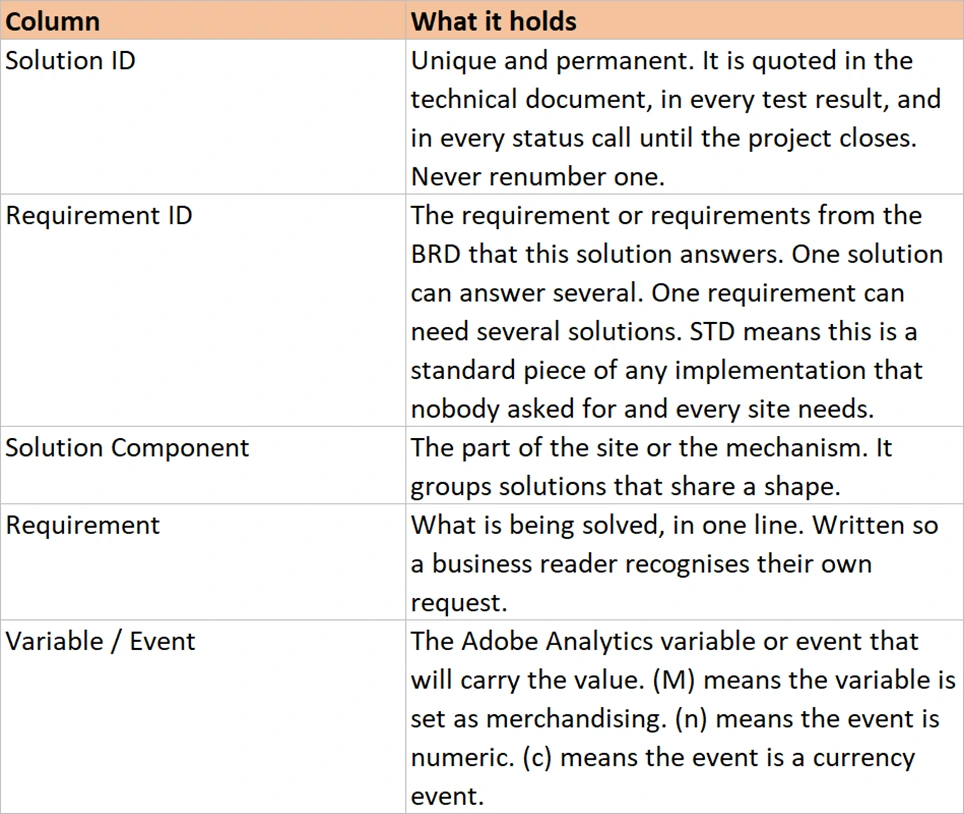
Three documents sitting in three files are three documents. What turns them into one thing is that every requirement is given an identifier the moment it is written down, and that identifier is never reused, never renumbered, and never dropped. A request from the business becomes KES-R003. The design that answers it becomes KES-S005. The build instruction carries KES-S005. The test result is a row keyed on KES-S005. The sign-off is against KES-S005.
The prefix is there because programmes have more than one brand in them, and a retailer running three websites will have three requirement sets that would otherwise all start at R001. It looks like bureaucracy for the sake of it, right up to the first status call where somebody asks whether the thing about cart sources ever got fixed, and the answer is a sentence rather than a meeting.
One request became two solutions there, which is normal and is the reason the two identifiers are separate rather than shared. Adding to the cart from a product page and adding from a quick view overlay are the same event to a customer. To a developer they are two different builds. The day the quick view stops working you want a row that says so, rather than a cart number that is quietly ten per cent low.
Why this lives in a spreadsheet and not in a document
The format is not a matter of taste, and the argument for it is short. An implementation project changes constantly. Requirements get reprioritised. A solution turns out to need a second rule. A page load call becomes a direct call because the data layer is not ready in time. Every one of those changes has to land in the documentation on the day it happens, or the documentation stops being true.
In a word processor document, a change means finding the paragraph that describes the thing, rewriting it, then finding the other three places that mentioned it. In a spreadsheet a change means editing a row. You can filter to Phase 1 and see the whole phase. You can sort by owner. You can add a column when the project needs something the template never had, which happens on every project. You can hand the same file to a business reader and a developer and let each of them look at different columns.
None of that is available in a hundred-page technical document, and that shape of document has a worse problem than editing cost, covered in Developer Instructions: nobody reads it. Every meeting still begins with somebody explaining the thing the document already explained.
What the standard template gives you, and what it leaves out
Adobe publishes an SDR template and a page of guidance on how to use it, and it is worth knowing exactly what that guidance recommends, because it is the definition most people are working from. The suggested columns are implementation status, variable name, the Analytics variable it is mapped to, and a description of the logic that sets it.
Those four fields are the inventory, described precisely. There is no requirement in them, so there is nothing tying a variable back to a person who asked for something. There is no identifier, so nothing can be traced across documents. There is no solution, so two rules that populate the same eVar for different reasons look identical. There is no phase, no priority, no owner, and no place to say that a thing was tried and dropped.
This is not carelessness on Adobe's part. They sell to every customer in every industry, from a bank with four hundred variables to a charity with nine. The template can only be the part common to all of them, and that part is the variable list. Everything that makes a design a design is the part that differs per project, and a vendor cannot ship that. Which is exactly why it falls to you, and why doing it properly is the difference between being the person who configures the tool and the person the project depends on.
If you are ever unsure whether something belongs in an SDR, ask which column it would sit in. A fact about eVar24 belongs in the map at the back. A fact about how form tracking works belongs in a solution row near the front, and it will bring three or four variables with it. The document is organised by what the business wanted, which is why the business can read it.
Starting your own set from these
There is no reason to build any of this from an empty sheet. The three workbooks above already carry the columns, the sheet layout, the header comments and a worked example of every row type. Strip them and they become yours, and the whole job is an afternoon.
- Open the BRD, the SDR and the TSD, and save each one under your own project name with the version in the filename. Version 1.0 signed, and version 1.0 with four unrecorded edits in it, are the same file to everyone except the person who made the edits.
- Delete the Kestrel rows, but keep one worked example of each row type until you have found your feet. Keep the sheets, the columns and the header comments. An entirely empty sheet is harder to start from than one with a single example still sitting in it.
-
Replace
KESwith your own two to four letter prefix everywhere, using find and replace across the whole workbook. One minute of work. It is what stops your first status call being an argument about whose R001 anybody means. - Start in the BRD and nowhere else. One row per thing the business asked for, numbered from 001, before you write a single variable name. Even when you already know what the design will be. A design written before the requirements are numbered has nothing to trace back to, which is the whole problem this set exists to solve.
- Leave the SDR and the TSD closed until the BRD is signed. Designing against unsigned requirements is how a project ends up building something nobody agreed to, and being certain it did the right thing.
- Put your first entry in the change log on day one, while it is still empty. A log started on the day of the first change has already lost that change. Nobody ever adds one retrospectively and gets it right.
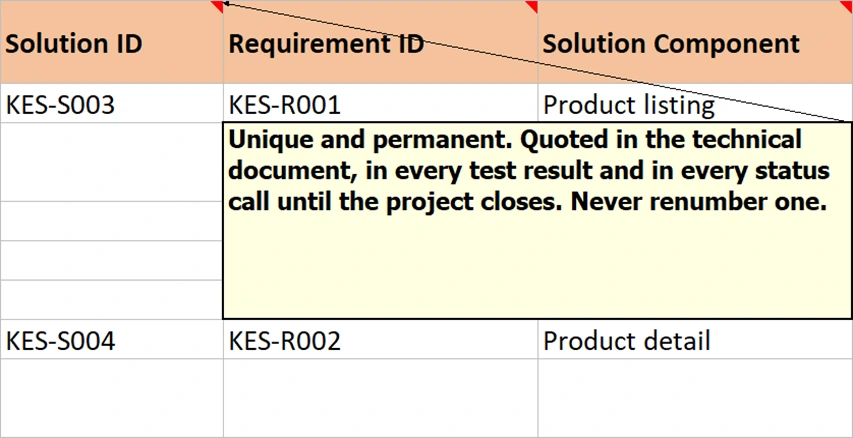
- Keep the header comments and edit them where your project differs. They are what makes the workbook explain itself to whoever opens it in two years, which is usually not you, and is sometimes you having forgotten.
That is the whole setup. Three workbooks stripped, one prefix changed, and the requirements started. Nothing else needs building before the work begins. None of it is a ceiling either: every project adds a column or a sheet its own situation demands, and the ones that hold up are worth carrying into the next project.
Where the design actually gets made
So the thing to carry out of this section is small. An SDR is a design document, and it is organised by what somebody asked for rather than by what the report suite contains. The variable list belongs in it and belongs at the back. Every row carries an identifier, and that identifier is what lets a sentence spoken in a meeting in March be traced to a signed test result in June.
That leaves the question of where the identifiers come from in the first place. They are assigned before any design exists, in the document that records only what the business wants and deliberately says nothing about how it will be done. Business Requirements Document covers how that one is built, why a trivial-sounding request and an enormous one get written down the same way, and how to record the things you are not going to do.