Collect the data › Adobe Analytics Tracking Calls
First-Party Cookies
The Cross-Domain Tracking ended on the third-party cookie fading away. This section is about the consequence you actually see in your reports: returning visitors who keep looking like brand new ones. A Safari user comes back a week later and is counted fresh. Unique visitors inflate, visit counts climb, and multi-session journeys quietly fall apart, so a conversion that took three visits over two weeks gets attributed to nobody. This is not a tagging bug you can debug in Launch. It is the browser deleting the cookie that held the visitor's identity.
Fixing it means understanding what actually makes a cookie survive, and the popular answer, "use first-party cookies," turns out to be only half true.
Why identity keeps disappearing
A visitor's identity in Adobe is a value stored in a cookie. The ECID, the organization-level ID that says "this is the same person," lives in a browser cookie, and every returning-visitor number you report depends on that cookie still being there next time. For years browsers have been steadily restricting cookies to stop companies from tracking people across the web, and Apple's Intelligent Tracking Prevention, ITP, has led the charge. That effort is aimed at cross-site tracking, but analytics identity got caught in the same net.
The first casualty was the third-party cookie, the kind set by a domain other than the one in the address bar. Safari and Firefox now block those by default, and Chrome has spent years threatening the same. So the industry moved to first-party cookies, set by your own domain. And this is exactly where the misconception takes hold.
First-party is not the same as durable
Here is the fact almost everyone misses. Safari does not only restrict third-party cookies. It also caps first-party cookies that are set by JavaScript, the ordinary document.cookie that nearly every analytics library uses, at a maximum of seven days. If it decides your script looks like a tracker, that drops to twenty-four hours. Being first-party does not exempt you. What actually decides a cookie's lifespan is not first-party versus third-party, it is how the cookie was written: by JavaScript in the browser, or by a server in an HTTP response.
| Cookie type | Set by | Browser treatment | Durability |
|---|---|---|---|
| Third-party | A domain other than the site (Adobe's domain) | Blocked by default in Safari and Firefox | Effectively none |
| First-party, JavaScript-set | Your page's own script, via document.cookie | Allowed, but capped at 7 days by Safari ITP (24 hours if judged a tracker) | Short |
| First-party, server-set | Your own server, via the HTTP response | Exempt from the JavaScript cap | Durable, up to its full lifetime |
Read that middle row carefully, because it is where Adobe's default cookies sit. The AMCV_ cookie that holds the ECID is written by JavaScript. The Web SDK's default identity cookie, kndctr_<org>_identity, is also written by JavaScript. Both are first-party, and both are still capped at seven days on Safari. A visitor who returns on the eighth day is a stranger again. That is the real problem this section exists to solve, and "we are first-party" does not solve it.
The older fix, and why it is no longer enough on its own
The traditional answer was first-party data collection through a CNAME. You point a subdomain such as metrics.yourbrand.com at Adobe's collection servers with a CNAME DNS record, set that as your tracking server, and use the Adobe-Managed Certificate Program to handle the SSL certificate. Because the cookie is then written by a server on your own domain rather than by JavaScript, it used to escape the seven-day cap.
That loophole has narrowed. Since Safari 16.4 in 2023, even a server-set cookie is capped at seven days if Safari decides the CNAME is "cloaking," meaning the subdomain resolves to what looks like a tracker, or the collection server's IP address does not match your site's. A CNAME by itself is no longer a guaranteed durable identity. It is still worth doing, but it is not the finish line it once was.
The durable answer today: first-party device IDs
The current, most durable approach flips who is in charge of identity. Instead of letting a browser script or a CNAME endpoint write the cookie, you generate the identifier on your own server and set it there. This is Adobe's first-party device ID, or FPID, and it is built for the Web SDK.
The shape of it is straightforward. Your own server generates a random UUID, sets it as a genuinely server-written first-party cookie with a long lifetime, and your Web SDK implementation hands that value to the Edge Network. The Edge Network then uses the FPID as a seed to generate the ECID, deterministically, so the same FPID always produces the same ECID. Because the cookie was written by your server rather than by JavaScript, it is exempt from the seven-day cap and can live for its full lifetime. You have moved identity off the browser's fragile ground and onto infrastructure you control.
# On your own server, before the page returns, if no FPID cookie
# exists yet: generate a UUID and set it via the HTTP response.
# Because the server writes it (not document.cookie), it is
# exempt from Safari's 7-day JavaScript cap.

Set-Cookie: FPID=123e4567-e89b-42d3-9456-426614174000;
            Domain=yourbrand.com; Max-Age=33696000;
            Secure; SameSite=Lax

# Then enable the "First-Party ID Cookie" option in your datastream
# so the Edge Network reads this cookie and seeds the ECID from it.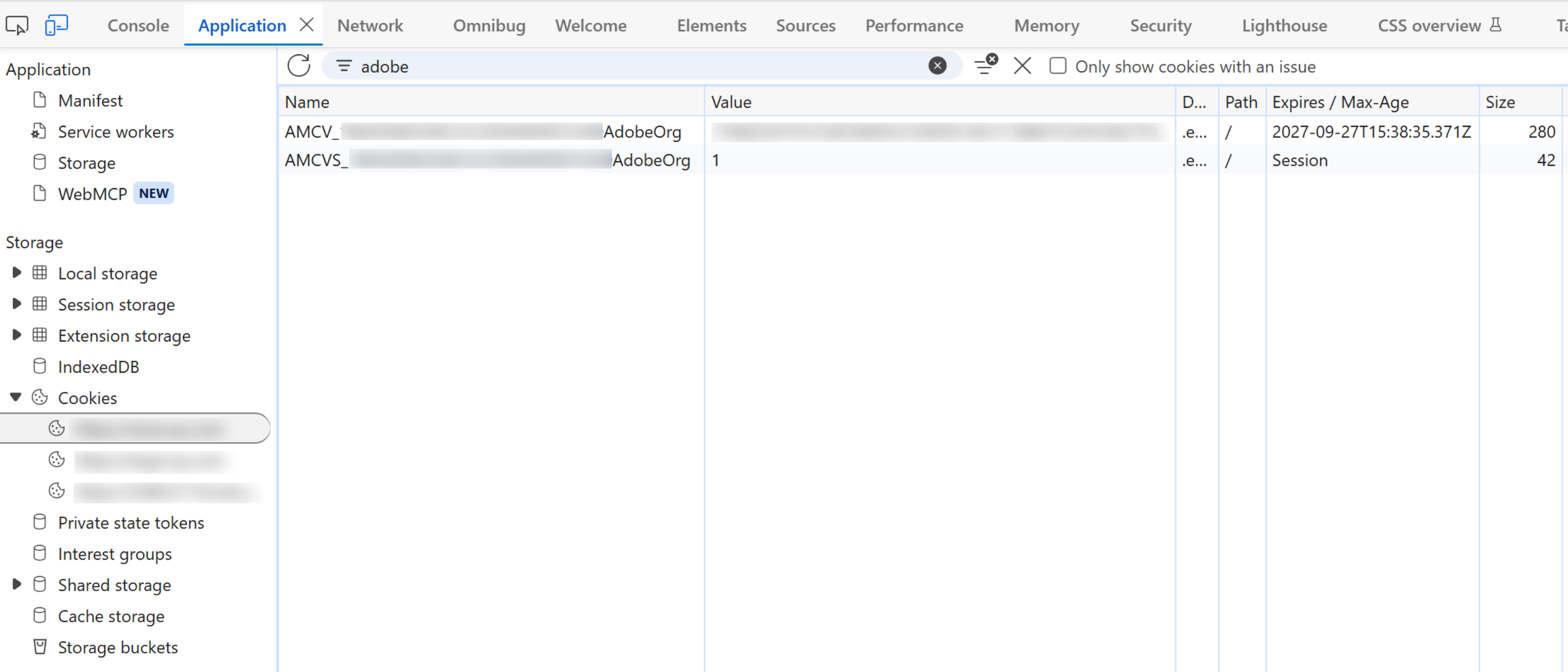
AMCV_ carries a date more than two years out; AMCVS_ says Session and is gone when the tab closes. That is the whole argument of this section rendered as a table: the identifier that survives is the one with a date on it, and every claim about returning visitors, long consideration cycles and repeat purchase rests on that single column being what you think it is.The trade-offs, and the mistake
Durability is not free. An FPID means your engineering team owns server-side cookie logic, has to coordinate it with your consent flow so the identifier is only set when it should be, and has to validate that returning visitors really do keep a stable identity. That is more responsibility than letting the library set a cookie for you. The judgment is worth making deliberately: the more your business depends on recognizing returning visitors, long consideration cycles, subscriptions, high-value purchases, the more that server-side effort pays for itself, and the less it matters for a site where almost everyone converts in a single session.
The mistake to avoid is treating this as a checkbox. "We set up a CNAME" or "our cookies are first-party" sounds like the problem is solved, and on Safari it often is not. Durable identity now lives or dies on whether the cookie is written server-side on infrastructure the browser trusts as genuinely yours.
One consequence of any of these moves deserves stating before you make it, because it lands in the reports rather than in the code. Identity is the cookie. Change where that cookie comes from, third-party to first-party, a new tracking server domain, a CNAME endpoint, a switch to server-generated FPIDs, and every visitor already carrying the old one stops being recognised. They are not lost. They are new.
So the week of the switch shows a jump in unique visitors, a matching collapse in returning visitors, and a set of multi-visit journeys that simply end at the boundary. The data is not wrong. It is describing a population that was reset.
Nothing breaks, no error appears, and every number is internally consistent, which is what makes this worth planning rather than merely worth knowing. Left unannounced, somebody in a marketing review reads the spike in new visitors as a campaign working and the drop in returning visitors as a retention problem, and both conclusions get acted on. Tell the reporting audience the date before the switch rather than after, and record it somewhere a future analyst comparing across the boundary will find it.
Before investing in FPIDs, size the exposure with data you already have. In Analysis Workspace, build a segment for visitors on ITP-governed browsers (Safari, and every browser on iOS and iPadOS, since they all use the same engine) and see what share of your traffic and conversions it represents. If Safari is a small slice of a single-session audience, the durability gap may not be worth the build. If it is a large slice of a multi-visit journey, it almost certainly is. Let your own numbers, not a general worry about cookies, decide.
Step back and the shift is clear. For years, visitor identity was something the tag library quietly handled and you never thought about. Browser privacy changes have turned it into something you architect on purpose, on your own servers, because that is the only place a durable cookie can now be written. First-party is the floor, not the ceiling. What lasts is server-set, on infrastructure the browser recognizes as truly yours.
That closes Tracking Calls, and with it the whole of the Collect the data phase. Across this phase you have followed a hit from the moment it is defined to the moment it is sent: what a page view and a link call are, what every call costs, and how identity holds together across single page applications, separate domains, and browsers that keep deleting the cookie. Collection is where raw behavior becomes data you own. The work turns next to making that data usable, which is the job of the Shape the data phase, beginning with Processing Rules, the first of the server-side tools that clean, enrich, and reshape hits after they arrive.
Cookie lifetime, live: Browser DevTools → Application → Cookies (check the Expires column)
Size your ITP exposure: Workspace → segment on Safari / iOS browsers
This article focuses on the concepts, architecture, and practical guidance behind the topic. For the latest UI walkthroughs and step-by-step implementation instructions, use the links below. They leave this site and open Adobe's own documentation in a new tab.