Collect the data › Data Layers
Adobe Client Data Layer (ACDL)
What Is a Data Layer left off at a clean breaking point. The CEDDL digitalData object is a photograph of the page, painted once at load. On a traditional site that is fine, because every click loads a fresh page and repaints it. But a single-page application never reloads, so the moment it swaps from the product view to the cart without a page load, the photograph is stale: the shopper is on the cart, the data layer still describes the product.
The Adobe Client Data Layer fixes this by changing what the data layer fundamentally is. Instead of one snapshot you keep overwriting, it is an array you only ever add to, a running log of what happens, plus a current state that ACDL keeps merged and up to date for you. The fastest way to understand it is not more theory. It is to follow one real thing all the way through. So walk a shopper adding items to a cart, from the developer's first line of code to what you see in the console to what you set up in Launch.
Step 1: the developer declares it
It starts, as before, as just a variable, except this time the variable is an array.
window.adobeDataLayer = window.adobeDataLayer || [];
That single line means "use the adobeDataLayer array if it already exists, otherwise start an empty one." It matters because your tracking library and your page code load independently and either can arrive first. Written this way, nothing you push ever gets wiped out by load order. From here on, the developer adds to the log with .push(), the ordinary array method.
Step 2: something happens, so the developer pushes
First, the steady facts about the page get pushed once. These are state, and they persist:
adobeDataLayer.push({
  page: { name: "Product Detail", type: "product" },
  user: { loginStatus: "logged-in" }
});
Now the shopper clicks "Add to cart." At that exact moment, the developer fires a push describing the event. Notice where the product sits, this is the single most important detail in the whole section:
adobeDataLayer.push({
  event: "cartAdd",
  eventInfo: {
    product: { id: "SKU-123", name: "Blue Widget", price: 49.0, qty: 1 }
  }
});
There are two places data can go in a push, and they behave differently. Anything at the top level (like page and user above) gets merged into the persistent state and stays there. Anything inside eventInfo rides along with this one event and is not kept in the state afterward. The product goes in eventInfo on purpose, and the next step shows exactly why that choice matters.
Step 3: see it, in the console
This is where it becomes real, because you can watch it. Open the browser console and ask for the current state, the same instinct as typing digitalData there:
> adobeDataLayer.getState()

< {
    page: { name: "Product Detail", type: "product" },
    user: { loginStatus: "logged-in" }
  }
Look closely: the product is not there. The cartAdd event fired and carried the product with it, but because the product was in eventInfo, it was never written into the state. getState() only ever returns the persistent snapshot, the page and the user.
Now the shopper adds a second item, a green widget, which fires another cartAdd. Ask the console again:
> adobeDataLayer.getState()

< {
    page: { name: "Product Detail", type: "product" },
    user: { loginStatus: "logged-in" }
  }
Still just page and user. Two add-to-cart events have happened, and the current state shows neither product. So where did those two events go, and this is the question you were probably asking yourself the entire last section: if the state only holds the present, why keep a history at all?
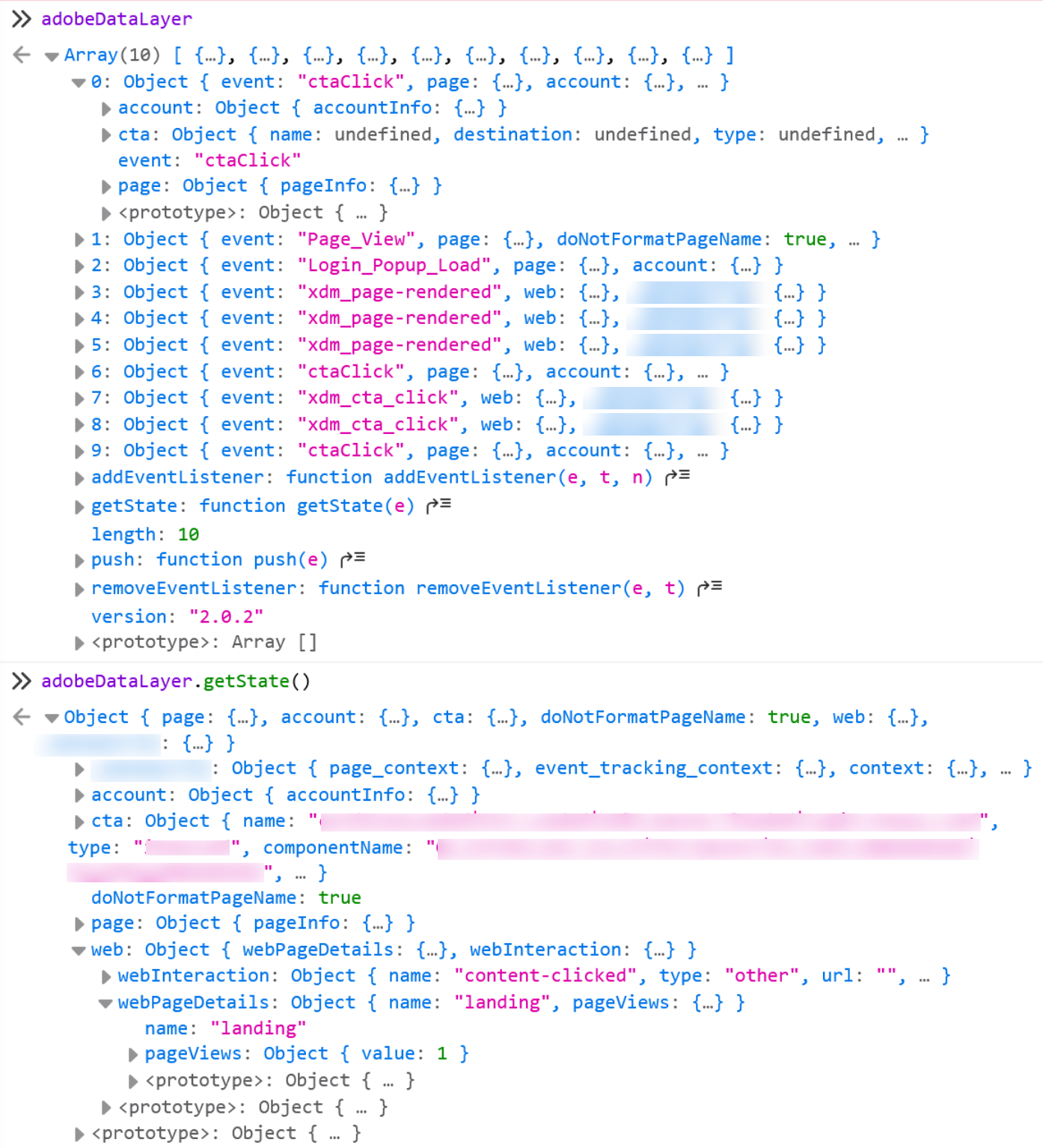
event key naming what happened. The object below, returned by getState(), holds page, account, cta and web, and no event anywhere in it. That is not a display quirk. State is only what the pushes left behind; the event that carried them is not part of it, which is why a rule reading state alone can never tell you what just happened.Where the history actually earns its keep
Here is the honest answer, and it is worth being precise about, because it is easy to oversell. The data layer's history is not a database. Adobe Analytics and CJA store your history for the long term downstream, that is their job, not the data layer's. The log in the browser is something narrower and genuinely useful: it is working memory for the current session, and it earns its place in exactly three situations.
First, a listener that arrives late still catches what it missed. This is the timing problem from that section, solved by design. You register a handler for the event, and by default it fires for matching events whether they happened in the past or the future:
adobeDataLayer.push(function(dl) {
  dl.addEventListener("cartAdd", function(event) {
    var product = event.eventInfo.product;  // this event's product
    var context = dl.getState();             // current page and user
    // build and send the analytics hit for THIS add-to-cart
  });
});
Because the default reaches into the past, if both cartAdd events already happened before this listener registered, it fires twice the instant it attaches, once for each, and your analytics catches both. Remember the empty-glass-before-the-tap trap, where firing the signal before the data was ready silently lost the hit? It largely disappears here. The log kept both events, so a listener can never truly be too late. That is the replay described earlier, made concrete.
Second, debugging. Mid-session, in a real browser, you can call getState() at any moment to see the current truth, and attach a listener with the past scope to replay everything that already fired, in order. When a tag misbehaves, being able to ask the page "what actually happened, and in what sequence" without a single server round-trip is worth a great deal.
Third, custom logic that needs earlier context. Suppose at checkout you want to know something about the journey that led here. Because the session's state is sitting right there in getState(), your code can read it directly instead of re-fetching from a server. The history and the merged state are local, immediate, and free to read.
This is also why the product went into eventInfo rather than the top level. If every cartAdd wrote its product into the persistent state, each one would overwrite the last, and the state would only ever show the most recent item. By keeping each product on its own event, every add-to-cart is preserved as its own entry in the log, distinct and in order, which is exactly what you want for a cart that fills up over a session.
The flip side of eventInfo is a bug teams hit constantly. Because top-level data persists in the state, on a single-page application it carries over between virtual views unless you clear it. If page A pushes page: { name: "Product" } and the shopper navigates to page B without a reload, getState() still reports "Product" until something overwrites it, so page B's hit can be tagged with page A's values. The fix is deliberate: before the next view's data, push a null to wipe the stale branch, adobeDataLayer.push({ page: null }). Persistent state is a feature, but on a single-page app it is also a thing you must actively reset.
There is a shortcut that suggests itself at exactly this point, and it is worth refusing before you reach for it. Clearing a branch with a null push is deliberate and narrow. Emptying the whole array by assigning a fresh one looks like the same idea, only tidier.
window.adobeDataLayer = [] does not clear the data layer. It discards the initialised instance along with every listener registered against it, and puts an ordinary array in its place, one with no getState and no addEventListener. Everything pushed after that lands in a plain array where nothing is listening. No error is raised, the page carries on, and collection simply stops. The same caution covers any array method that changes the log in place, pop, shift, splice, sort and reverse: the log is append-only, and push is the only method that belongs in your code.
Step 4: catching it in Launch
This is where the data layer gets consumed, and it is the modern replacement for the manual _satellite.track() torch that What Is a Data Layer called a legacy method. In Launch you install the Adobe Client Data Layer extension, and then a rule looks like this:
| In the rule | What you choose |
|---|---|
| Event | Adobe Client Data Layer, then "listen to specific event," with the event name cartAdd and scope set to all (so late listeners still catch past events) |
| Current context | A data element of type Computed State, which is simply getState(), giving you the page and user data |
| This event's data | Reference %event.message.eventInfo% to reach the product that rode in on this specific cartAdd |
| Actions | Map those values to your eVars, props, and events, then send the beacon, the variable-setting discipline from earlier in this guide |
So the persistent state and the event's own data come from two different places, on purpose: Computed State for the steady context, %event.message.eventInfo% for what just happened. The deep mechanics of building rules and data elements belong with Adobe Launch (Tags). The shape is the point here: the page narrates events into the log, and Launch subscribes to the ones it cares about, no torch required.
The honest cost, in one line
ACDL is not a pure upgrade. It asks more of everyone: more code, a real discipline about what belongs in persistent state versus eventInfo (get it wrong and a stray top-level push silently overwrites state), and a tighter partnership with developers who must structure every push deliberately. What you buy for that effort is a data layer that survives single-page applications, defuses the timing race by design, and feeds cleanly into the Web SDK and the Edge.
The two models, side by side
So do you actually need it?
Whether that trade is worth it for your site is a genuine decision, not a foregone conclusion, and it deserves far more than a paragraph. That is exactly what Do You Really Need ACDL? takes on: not whether ACDL works, which you now understand, but whether you actually need it. Whichever way it lands, hold on to one thing. The data layer is the most human part of the whole pipeline, an agreement between the analytics and engineering teams, and quietly the most decisive thing in the entire implementation.
This site's second guide, AppMeasurement to Web SDK Migration, covers how an event-driven data layer like this one feeds XDM once you move to the Web SDK and the Edge. Its data layer reference is worth reading alongside this section.
The Adobe Client Data Layer extension is installed from the extension catalog inside a tag property, under Data Collection > Tags > [your property] > Extensions > Catalog. Its configuration screen is where you rename the adobeDataLayer object if you need to, and where you choose which data layer events the listener responds to.
This article focuses on the concepts, architecture, and practical guidance behind the topic. For the latest UI walkthroughs and step-by-step implementation instructions, use the links below. They leave this site and open Adobe's own documentation in a new tab.