Analyze the data › Data Warehouse
Delivery Options
A finance team gets a monthly export by email. It works for a year. Then the business grows, the file passes the size the mail server will accept, and the email stops arriving. Nobody notices for six weeks, because a report that does not arrive looks exactly like a quiet month.
Delivery is the half of a Data Warehouse request that people configure quickly and then never think about again. It is also the half that decides whether the thing keeps working when you are not watching.
Five destinations, and email is not one of the good ones
Adobe recommends five destinations: Amazon S3, Google Cloud Platform, Azure RBAC, Azure SAS, and email. The older FTP and SFTP options still exist and are no longer recommended.
Cloud storage is the right answer for anything that runs on a schedule or feeds another system. S3 needs a bucket name, an access key ID and a secret key. Azure Blob needs a container, an account and a key. Google Cloud is configured the same way. Once set up, the file lands somewhere a pipeline can pick it up without a human in the loop.
Email is right for one thing: a file a person is going to open. A one-off test, a small extract somebody asked for once, a sanity check on a new request. It is the fastest way to see whether you built the table correctly.
Email is wrong for everything else, and the failure at the top of this section is the reason. Mail systems have size limits you do not control, they are not designed to be a data transport, and the failure mode is silence. A pipeline built on email works until the volume grows.
| Destination | Use it for | What it needs |
|---|---|---|
| Amazon S3 | Anything scheduled or automated | Bucket name, access key ID, secret key |
| Google Cloud Platform | Same, where the estate is on Google | Bucket and credentials |
| Azure RBAC / Azure SAS | Same, where the estate is on Azure | Container, account, key |
| Tests, one-offs, small files a person opens | An address, and a file under the mail limit | |
| FTP / SFTP | Existing pipelines only. Not recommended for new work. | Host, username, password |
It is worth knowing why FTP fell out of favour, because the reason is also what you gain by moving off it.
The first part is the obvious one. Plain FTP sends everything unencrypted, including the username and password, so anyone positioned between the two ends can read the file and help themselves to the credentials. That alone settles it.
The second part matters more day to day, and it is about ownership. An FTP site is a shared folder with one set of credentials. Whoever holds them can read everything in it, write anything, and delete anything, and there is no way to say that one system may read while another may only write. Everyone gets the same door key.
Cloud storage turns that around. The bucket belongs to you and sits inside your own security model, so you grant specific permissions to specific identities: this pipeline may read, that process may write, nobody may delete. You also inherit the encryption, logging and key rotation your organisation already runs everywhere else, rather than maintaining a password on a server somebody set up years ago.
So moving off FTP is not really a protocol upgrade. It moves the destination inside your own perimeter, where your existing controls already apply.
Report options are small settings with large effects
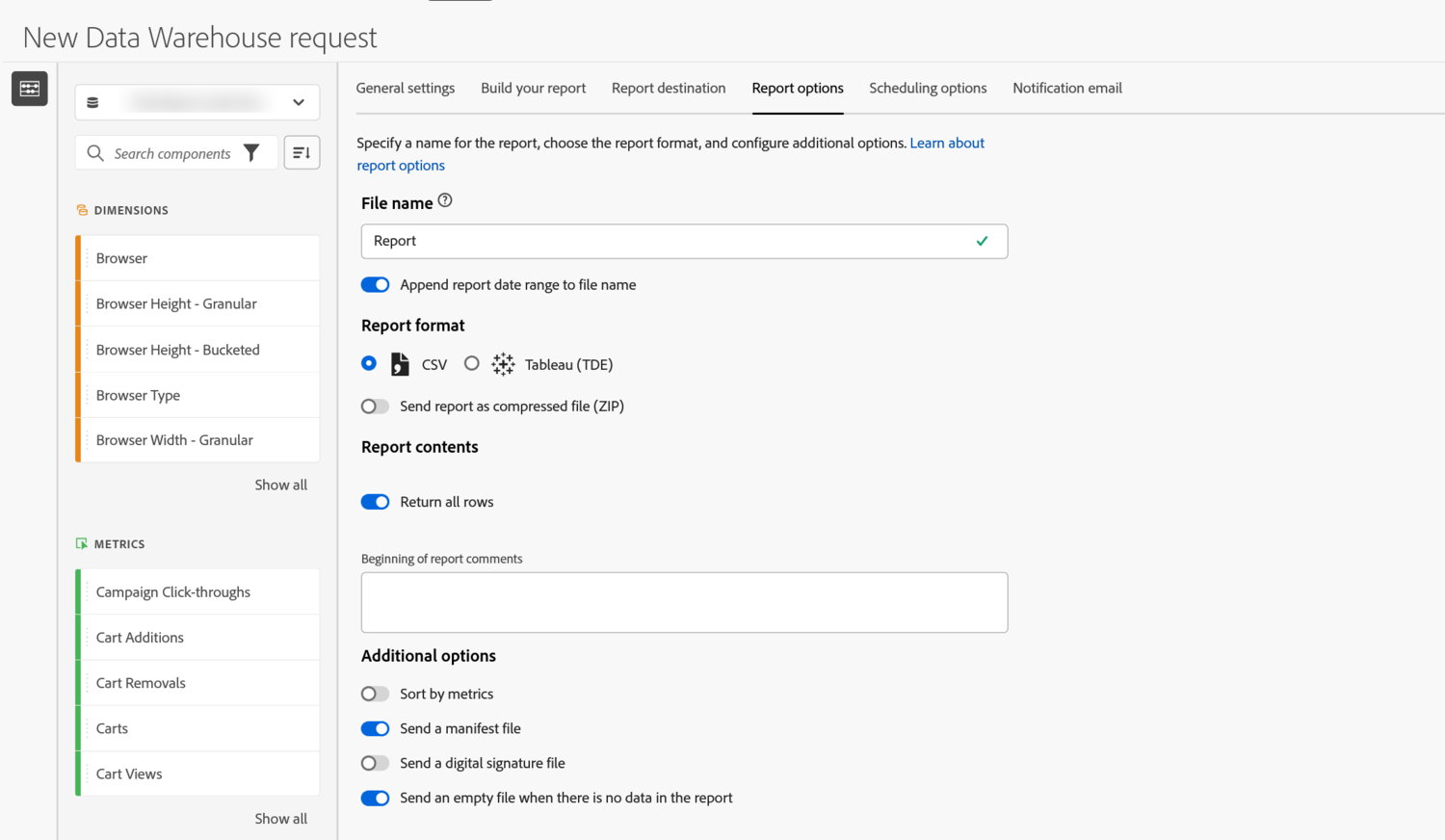
The Report options tab looks like formatting preferences. Three of them decide whether an automated process can use the file at all.
File name, and appending the date range. A scheduled request writes to the same destination every time. If every delivery has the same name, each one overwrites the last, and you have one file instead of a history. Switching on the option to append the report date range gives you names like the report period, so files accumulate in order and a pipeline can pick up the newest by name.
The manifest file. This is a small companion file listing the file name, its size, and the number of records. It is delivered last, after the data itself. That ordering is the point: if the manifest is there, the transfer finished. Without it, a process reading the bucket has no reliable way to know whether it is looking at a complete file or one still being written.
Send an empty file when there is no data. Off by default, and worth switching on for anything automated. A day with no matching data produces nothing at all, and a pipeline cannot tell the difference between no data and no delivery. An empty file with the right name says the request ran and found nothing, which is a real answer.
The remaining options matter less but are worth knowing. Files are delivered as CSV or as a Tableau extract. Data Warehouse compresses anything over 1 MB automatically, and you can force compression for everything. A digital signature file lets a recipient verify the file has not been altered. You can add comment lines at the top of the file, which is helpful for humans and a nuisance for parsers, so leave it off for anything automated.
These three settings are the difference between a pipeline that fails loudly and one that fails silently, and all three are one click each. The date in the file name stops deliveries overwriting each other. The manifest tells the receiving process the file is complete. The empty file distinguishes a quiet day from a broken request. None of them helps anybody reading a file by hand, which is exactly why they get skipped, and the skipping only shows up months later when somebody asks why the numbers stopped.
Scheduling, and the setting you cannot change later
A request either runs once or runs on a schedule, and the choice has a consequence beyond convenience.
A scheduled request can be opened and edited afterwards. A one-off request cannot. If you build a one-off and get a dimension wrong, your only option is to build the whole request again. That is why experienced users schedule almost everything, including requests they expect to run a single time, and simply stop the schedule afterwards.
When you do schedule, match the frequency to the decision the file feeds, not to how often the data changes. Data changes constantly. A monthly finance reconciliation needs a monthly file. Sending it weekly means four times the files, four times the storage, and no extra information for the person receiving it.
Also give the schedule a start date that is far enough ahead to be sure the first run is right. A daily request that starts tomorrow gives you one night to discover a mistake.
Two things about scheduling are not obvious from the form, and both stop you saving a request rather than warning you afterwards.
The first is that the date range and the schedule are coupled. Pick a custom date range on the General settings tab and the scheduling options switch off. That is deliberate rather than a fault: a scheduled request needs a rolling period such as Last month, because a fixed set of dates would deliver the same data every time it ran. If you want a schedule, pick one of the presets.
The second is that a notification address is not optional once you deliver anywhere other than email. Choose cloud storage and leave the notification field empty and the request will not save. It is worth treating as a feature rather than an obstacle, because a file going to a bucket has nobody watching it, which is exactly when somebody needs to hear that a run failed.
Adobe states that a request can take up to 72 hours to process, and complexity and volume both push it towards that end. Most requests are far quicker, which is precisely the trap: people build a mental model from a small test that returned in ten minutes and then promise a stakeholder a quarterly export by the end of the day. Build the delay into whatever you commit to, and if a request is genuinely urgent, ask whether a narrower version answers the question well enough today. A scheduled request that has been running for a month has already solved this problem, which is another argument for scheduling early rather than requesting on demand.
Follow along: set up a delivery that survives you
This turns a Data Warehouse request into something that runs on its own and can be picked up by another system. If you do not have cloud storage credentials to hand, do the first part and read the second.
- Part one, the options that make it usable
-
Open your request and go to
Report options. Set a file name that describes the contents, and switch onAppend report date range to file name. Each delivery now has its own name. Without this, every run overwrites the one before. -
Switch on
Send a manifest fileandSend an empty file when there is no data. The manifest arrives last and confirms the transfer completed. The empty file proves the request ran on a quiet day. -
Leave
Beginning of report commentsempty for anything automated. Comment lines sit above the header row and break a lot of parsers. - Part two, the destination
-
Go to
Report destinationand choose your cloud storage provider rather than email. S3 wants a bucket, an access key ID and a secret key. Azure wants a container, account and key. -
On
Scheduling options, set a repeating schedule matched to the decision the file feeds, and set the start date at least a few days out. Scheduling also keeps the request editable, which a one-off never is. -
On
Notification email, use a shared inbox or a distribution list. Failure notices sent to one person stop being read the week that person changes role. - Part three, prove it
- Wait for the first delivery and check three things: the file name carries its date range, the manifest arrived, and the record count in the manifest matches the rows in the file. If those three hold, the pipeline can be trusted to a machine.
There is nothing else to set up. Destination, three report options, a schedule and a shared notification address. Everything past this is deciding whether a Data Warehouse request was the right tool at all.
A file nobody collects is not a report
Cloud storage for anything scheduled, email only for tests and small extracts a person will open by hand. The older FTP options work and should not be chosen for new pipelines.
Three options in the formatting tab do most of the work of making a delivery reliable. Put the date range in the file name so deliveries do not overwrite each other. Send the manifest so a receiving process knows the transfer finished. Send an empty file so a quiet day cannot be mistaken for a broken request.
Schedule rather than run once, because scheduled requests stay editable and one-offs never do. Match the frequency to the decision, not to the data. Send failure notices to a shared inbox. And plan for up to 72 hours, because the small test that came back in ten minutes is not the guide.
All of which assumes the request should exist. Data Warehouse is slow, rigid, and refuses calculated metrics, so a good part of the skill is knowing when to reach for it and when the answer is somewhere else entirely. Best Practices and Use Cases covers what it is genuinely good at, the requests that should never have been exports, and how it differs from the other export in this phase.
Analytics > Tools > Data Warehouse, then open a request. Report destination, Report options, Scheduling options and Notification email are the last four tabs of the form.
Cloud storage credentials are entered on the destination tab and are stored with the request. Changing a key later means opening every request that uses it, so it is worth recording which requests point at which bucket.
This article focuses on the concepts, architecture, and practical guidance behind the topic. For the latest UI walkthroughs and step-by-step implementation instructions, use the links below. They leave this site and open Adobe's own documentation in a new tab.