Shape the data › Marketing Channels
Marketing Channel Processing Rules
The variables are created. Now they get populated.
Do not worry that the ground has shifted. This is still Marketing Channels, still the same module. Channel Configuration established the analogy and it holds all the way through: creating a marketing channel is like declaring a variable, and filling it is a separate act performed somewhere else. That somewhere else is the Marketing Channel Processing Rules screen, and this section is about what you do there.
Notice also who is driving now. The channel design document exists. The stakeholders discussed, argued, and signed. Their job is finished, and that approval is the business saying its marketing strategy is settled and handing the execution to you. From here the work is technical, and it is yours.
Why are they called processing rules?
The name is worth pausing on, because the answer explains the design of the whole feature.
Adobe Analytics was not born whole. Nobody woke one morning to find VISTA, Processing Rules, Classifications, Segments, and Marketing Channels all sitting there together. These capabilities arrived across many years, built by different people at different times to solve different problems, and they carry the fingerprints of the eras that produced them.
VISTA is the elder. It has existed essentially from the beginning, engineering-built and server-side. Classifications arrived under the name SAINT. Segmentation, long before Analysis Workspace existed, lived in a separate tool called Discover, later renamed Ad Hoc Analysis, and it was used heavily. Processing Rules came along to give practitioners a self-service way to shape data without filing an engineering request. And Marketing Channels arrived in 2013, well after all of them.
So by 2013 the shelf was already full of ways to manipulate data. The question facing whoever built Marketing Channels was which of those paradigms fit the job of sorting a hit into a channel. Work through them and the answer arrives by elimination.
| Existing paradigm | How it works | Why it does not fit channel assignment |
|---|---|---|
| VISTA | Server-side logic, built and deployed by Adobe engineering | You get no self-service control. You cannot see the order, cannot reorder it, cannot iterate on it. Marketing changes campaigns faster than an engineering ticket can turn around. |
| Classifications | A lookup table applied to a value after collection, and retroactive | Works on a value that already exists. Channel assignment has to happen while the hit is being collected, because there is no channel value to classify until something decides one. |
| Segments | Filters applied at report time, when someone runs a report | Never writes anything into the data. A segment reads. Channel assignment must write a value that is then stored on the hit. |
| Processing Rules | A rule builder you control, running at collection time, in an order you set | Nothing. This is the fit. |
The processing-rule paradigm was the only one that gave all three things the job needs at once: a builder a practitioner can operate without engineering, execution at collection time so a value is written onto the hit, and, most importantly, an order the practitioner decides. That last one turns out to matter enormously, and the rest of this section is largely about why.
Marketing Channel Processing Rules are a separate feature from Processing Rules. They share a name, a philosophy, and a similar builder, but they are different screens, they run at different stages of the pipeline, and they do different jobs. Adobe's own documentation opens by disambiguating the two. Think of them as siblings rather than as the same thing wearing two hats.
Where these rules run
Position in the pipeline is not trivia here, because it has a consequence you can use.
Marketing channel rules run late. A hit arrives, the general processing rules run, VISTA runs, and then marketing channel rules run near the end, just before the hit is stored. Which means the data these rules are reading has already been shaped by everything upstream.
Marketing channel rules can read a variable that VISTA has set, but they cannot read data that VISTA has deleted. That is not a quirk, it is a lever. If a channel signal is buried somewhere awkward, a VISTA rule upstream can lift it into an eVar, and a marketing channel rule can then match on that eVar. But if something upstream stripped a referrer, no marketing channel rule can recover it, because by the time these rules run, it is gone.
The anatomy of a rule
Every marketing channel rule has the same shape. Conditions on the left, two assignments on the right.
Two assignments, not one. The channel is the bucket, and the detail is the label inside the bucket. A rule that sets a channel but forgets the detail produces a Paid Search line in the report with nothing underneath it, and no way to ask which campaign or keyword did the work. Setting the detail is not optional polish. It is half the rule.
A single rule can carry multiple conditions, joined by any or all. And a single channel can be fed by multiple rules, which is useful when you want the same channel to record a different detail depending on how the visitor arrived.
What you can match on
The conditions available fall into three families.
| Family | Conditions |
|---|---|
| Adobe-detected No value to type. Adobe decides. | Matches Paid Search Detection Rules; Matches Natural Search Detection Rules; Referrer Matches Internal URL Filters; Referrer Does Not Match Internal URL Filters; Is First Hit of Visit; Referrer Is Social Network; Referrer Is Conversational AI |
| Hit attributes You pick a dimension, an operator, a value. | Page; Page Domain; Page Domain And Path; Page Root Domain; Page URL; Query String Parameter; Referrer; Referring Domain; Referring Domain And Path; Referring Parameter; Referring Root Domain; Search Engine; Search Keyword(s); Search Engine + Search Keyword(s); AMO ID; AMO EF ID |
| Conversion variables | eVar 1 to 250 |
Two things to notice. There is no condition called "tracking code." Campaign traffic is caught with Query String Parameter, matching on the parameter in the landing URL. And every text field is matched case-insensitively, so a parameter value of EML and eml are the same thing to a rule.
The waterfall, and why order decides everything
Here is the single mechanic that governs this entire screen.
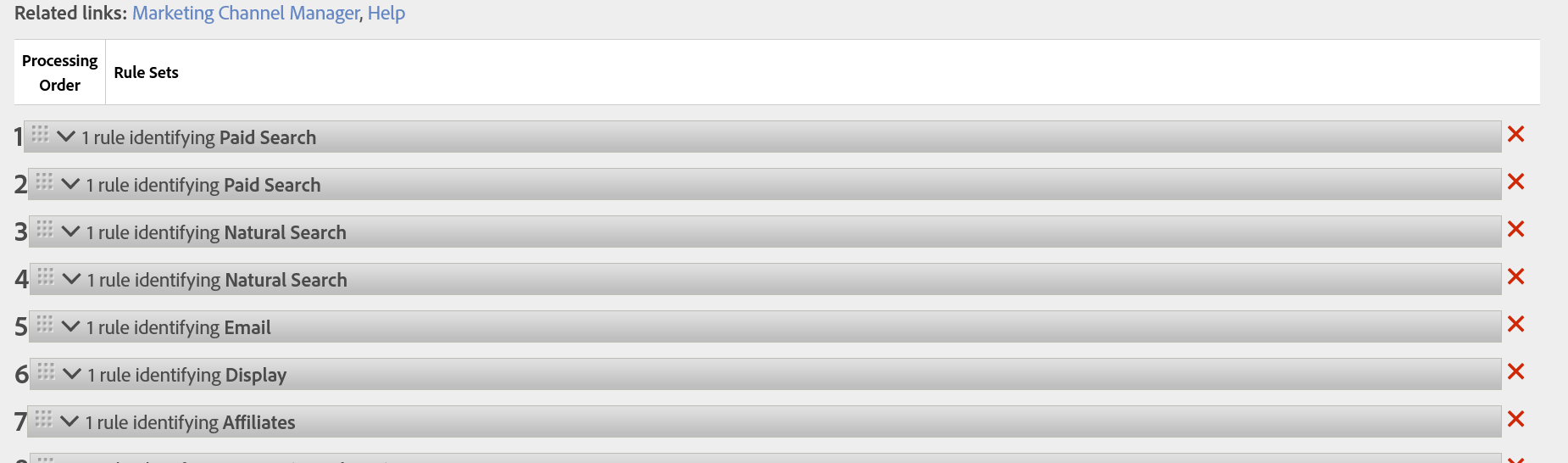
Rules are evaluated from the top down. Adobe tests the hit against rule one, then rule two, and so on. The moment a rule matches, that channel is assigned and processing stops. Every rule below the match is never evaluated at all. It is a waterfall, and each rule gets to catch only what the rules above it let fall through.
This is why Adobe's guidance on ordering is not a style preference. Place the paid and managed channels first, and the organic and absorbent channels last. Paid Search sits above Natural Search because a click on a paid search ad also arrives carrying a search engine referrer. Put Natural Search first and every paid click is silently recorded as organic, and the campaign you are paying for shows nothing.
Three facts that will save you
This is the one that catches experienced practitioners. Marketing channel rules process every hit a visitor makes, not only the arrival. So a rule with a loose condition, the classic being Page URL exists with nothing else, matches on every single page view and reassigns the channel over and over. A page URL always exists. That is why the bottom rules carry the Is First Hit of Visit condition: it is what stops them from re-firing on every page a visitor touches.
Marketing channel data is processed at collection time and written into the hit. It is not retroactive. Discover a broken rule after six months and you can correct it going forward, but every hit already collected under the broken rule stays wrong forever. There is no reprocessing, no backfill, no undo. This is the same irreversibility that made the channel list a business decision in Channel Configuration, and here it has a sharper edge, because a rule is far easier to get subtly wrong than a channel name is.
And one that quietly protects you: two marketing channels never receive credit for the same event. A single purchase cannot be counted under both Email and Paid Search. This is unlike eVars, where two variables can both take credit for one conversion. Because the waterfall stops at the first match, a hit belongs to exactly one channel, which is what makes a Marketing Channel report add up to one hundred percent of your traffic.
Building the default rules, one at a time
If the report suite had no channels, Auto Setup created both the channels and a first pass at their rules. Treat that as your starting document and walk it rule by rule. What follows is the standard set in Adobe's recommended order, and it is written so you can build it as you read.
If you are going to follow along and build these rules yourself, and you should, do it in a development or test report suite. Marketing channel data is written at collection time and is not retroactive. A rule you save and then think better of has already miscategorized every hit that arrived while it was live, permanently. Adobe recommends keeping a template report suite exactly for this, and pushing the finished rule set to production once it is settled. Practice where mistakes cost nothing.
Open Analytics, then Admin, then Report Suites, select your test suite, then Edit Settings, then Marketing Channels, then Marketing Channel Processing Rules. Keep that screen beside this page. Each rule below is shown as it appears in the builder: the conditions on top, the two assignments underneath. Add them in order, and drag them into position as you go.
Here is the finished set at a glance, which is what you are building toward.
| # | Channel | Catches | Channel Detail |
|---|---|---|---|
| 1 | Paid Search | Clicks on paid search ads | Search Engine + Keyword |
| 2 | Natural Search | Search traffic that was not paid | Search Engine + Keyword |
| 3 | Display | Banner and programmatic ads | Query string parameter value |
| 4 | Clicks from email sends | Query string parameter value | |
| 5 | Affiliate | Named partner domains | Referring Domain |
| 6 | Other Campaigns | Any tracked campaign not caught above | Query string parameter value |
| 7 | Social Networks | Known social platforms | Referring Domain |
| 8 | Session Refresh | Visits starting from your own domain | Page |
| 9 | Direct | No referrer at all | Page |
| 10 | Referring Domains | Everything else with a referrer | Referring Domain |
Notice the shape of that list. Paid and managed channels at the top, organic and absorbent channels at the bottom, and a catch-all sitting on the boundary between them. Now build it.
1. Paid Search
- Position
- 1 — top of the waterfall
- If all are true
- Matches
Paid Search Detection Rules - Identify the channel as
Paid Search- Set the channel's value
Search Engine + Search Keyword(s)- Depends on
Edit Settings›General›Paid Search Detection
This is an Adobe-detected condition, so there is nothing to type. It leans on a separate screen, Paid Search Detection, where you tell Adobe which query string parameters mark a click as paid. Configure that screen first or this rule catches nothing. It sits first because a paid click looks exactly like organic search traffic in every respect except the parameter marking it, so it has to be caught before anything else gets a look.
2. Natural Search
- Position
- 2
- If all are true
- Matches
Natural Search Detection Rules - Identify the channel as
Natural Search- Set the channel's value
Search Engine + Search Keyword(s)
Adobe-detected again, and it means: the hit came from a recognized search engine and did not match paid detection. Read that definition carefully, because this rule is defined by what the rule above it already removed. It only works because Paid Search ran first. That dependency is the waterfall in miniature.
3. Display
- Position
- 3
- If all are true
- Query String Parameter
cidcontainsdisplay - Identify the channel as
Display- Set the channel's value
- Query String Parameter
cid - Example landing URL
https://site.com/offer?cid=display_q3_banner- What you get
- Channel
Display, Detaildisplay_q3_banner
Display traffic carries no natural signal. A banner click arrives looking like a referral from an ad server, so the only reliable marker is whatever marketing appended to the landing URL. Which means this rule is only as good as the parameter convention agreed in the design document. Substitute your own parameter name and value; the ones above are illustrative.
4. Email
- Position
- 4
- If all are true
- Query String Parameter
cidcontainseml - Identify the channel as
Email- Set the channel's value
- Query String Parameter
cid - Example landing URL
https://site.com/sale?cid=eml_july_winback- What you get
- Channel
Email, Detaileml_july_winback
Same principle as Display, and the detail is what earns its keep: it is how a marketer sees that the July winback send outperformed the others. Without the detail assignment, the report says Email produced revenue and nothing more, which is almost useless to the person who has to decide what to send next.
5. Affiliate
- Position
- 5
- If any are true
- Referring Domain contains
partnersite.com - Referring Domain contains
dealsite.net
- Referring Domain contains
- Identify the channel as
Affiliate- Set the channel's value
Referring Domain- Watch out
- List root domains only, without the
www.prefix.
Affiliates are a managed channel with a real commercial relationship behind them, which is why they sit above the organic tier rather than being swept up by Referring Domains at the bottom. Use ANY here rather than ALL, since a visitor arrives from one partner, not all of them at once. Setting the detail to Referring Domain is what lets you see each partner separately and pay them accordingly.
6. Other Campaigns
- Position
- 6 — after every paid rule, before every organic rule
- If all are true
- Query String Parameter
cidexists - Identify the channel as
Other Campaigns- Set the channel's value
- Query String Parameter
cid
This is the paid catch-all, and its position is exact. It sits after every specific paid rule and before every organic one. The reason is simple and it will happen to you: marketing launches something next quarter with a tracking parameter nobody told you about. Without this rule, that traffic falls straight past all your paid rules and lands in Referring Domains or Direct, and a campaign somebody spent real money on appears to have produced nothing at all. This rule catches anything tagged as a campaign that you have not written a specific rule for yet.
7. Social Networks
- Position
- 7
- Rule name
- Social Networks — rename it to
Organic Social - If all are true
Referrer Is Social Network- Identify the channel as
Organic Social- Set the channel's value
Referring Domain
Adobe-detected, matched against a known list of platforms. Two things to do here. Rename the channel to Organic Social if you also run paid social, because otherwise no analyst will ever be sure which one a report is showing. And check Adobe's platform list against your own market, since the defaults will not include every network that matters to a regional or industry-specific audience.
8. Internal, renamed Session Refresh
- Position
- 8
- Rule name
- Session Refresh — Adobe names this channel
Internal - If all are true
Referrer Matches Internal URL FiltersIs First Hit of Visit
- Identify the channel as
Session Refresh- Set the channel's value
Page- In Marketing Channel Manager
- Leave
Override Last-Touchunchecked.
This catches a visit that begins with a referrer from your own domain, which sounds impossible until you picture it: a visitor leaves a tab open, goes to lunch, the session times out after thirty minutes, and they come back and click. New visit, internal referrer. Both conditions are load-bearing. Drop Is First Hit of Visit and this rule matches every internal click on your entire site. Rename it, because "Internal" gets confused with internal campaigns, which are a completely different feature and must never appear in this report.
9. Direct
- Position
- 9
- If all are true
- Referrer
does not exist Is First Hit of Visit
- Referrer
- Identify the channel as
Direct- Set the channel's value
Page- In Marketing Channel Manager
- Leave
Override Last-Touchunchecked.
A typed URL or a bookmark arrives with no referrer at all. Again, Is First Hit of Visit is doing essential work, since plenty of hits deep inside a visit can also arrive without a referrer. Leave Override Last-Touch unchecked so that a visitor who was acquired by a paid ad last week and returns today by bookmark does not hand the credit to Direct.
10. Referring Domains
- Position
- 10 — last, and this position is not negotiable
- If all are true
- Referrer
exists Referrer Does Not Match Internal URL Filters
- Referrer
- Identify the channel as
Referring Domains- Set the channel's value
Referring Domain
Almost every visitor who arrived from anywhere at all has a referring domain. Social platforms have one. Affiliates have one. Move this rule up even a few positions and it will quietly swallow every channel beneath it, and those channels will simply stop reporting. Nothing breaks, no error appears, and your Social and Affiliate lines just go quiet. If a channel that should have traffic is showing none, this rule's position is the first thing to check.
Save. Every rule is in place and every rule is in the right position, which on this screen are two different achievements.
Adobe now offers Referrer Is Conversational AI as a detected condition, which identifies visitors arriving from AI chat tools. If a meaningful share of your traffic now comes from someone asking an assistant a question rather than a search engine, this deserves its own channel. Place it in the organic tier alongside Social Networks and above Referring Domains, with Referring Domain as the detail. Most channel configurations written before this existed are currently counting that traffic as Referring Domains, which is worth checking on your own report suite.
What you have now
The channels exist and the rules fill them. Every arriving hit now falls through the waterfall and lands in exactly one bucket, with a detail recorded underneath it. Open a Marketing Channel report and there is finally something in it.
Which surfaces the question every channel report eventually runs into. A visitor arrives from Paid Search in March, returns from Email in April, and buys. Both channels are recorded. Both did work. So which one gets credit for the purchase? That is attribution, and it is where Channel Attribution goes.
Analytics > Admin > Report Suites > select suite > Edit Settings > Marketing Channels > Marketing Channel Processing Rules. Drag and drop rules to set their order. Paid search detection is configured separately at Edit Settings > General > Paid Search Detection, and internal URL filters at Edit Settings > General > Internal URL Filters.
This article focuses on the concepts, architecture, and practical guidance behind the topic. For the latest UI walkthroughs and step-by-step implementation instructions, use the links below. They leave this site and open Adobe's own documentation in a new tab.