Deliver and maintain › Solution Design Reference (SDR)
Developer Instructions
The five delivery documents this module is built on Business Requirements Document·Solution Design Reference·Technical Specification Document·Validation Report·Implementation Project Plan
Analytics project delivery documents
The traditional technical document for an analytics implementation is a book. A chapter per requirement, written in prose, with headings and diagrams and a table of contents. A hundred and fifty pages is normal. Two hundred happens.
It takes a week to write. Then a page load call has to become a direct call, and the change lands in four chapters, three of which cross-reference each other. Another week goes on finding and rewriting them, and the implementation work that week is an hour.
And nobody reads it. Every walkthrough with the development team still starts from nothing, with somebody talking through what the document already said. The book was written for an audience that turned out not to exist.
What replaced it is the third workbook beside this page. Open it alongside the SDR and put the two windows next to each other, because the whole of this section is about the relationship between them, and thirty seconds of looking is worth several paragraphs of description.
Why the technical document was the one that failed
The failure is not about writing quality. It is about the shape of the thing against the shape of the work.
An implementation changes continuously, in small pieces, each affecting one moment on the site. Prose spreads one moment across paragraphs, and paragraphs across chapters, so a small change touches several places that have to stay consistent with each other. The cost of a change is not proportional to its size, and that is what makes the document lose the race.
The second failure is the reader. A developer building a data layer needs to know which object to populate on the product page, in what format, and when. They need about eight lines. Handing them two hundred pages containing those eight lines somewhere is the same as handing them nothing, and they will do the sensible thing and ask for a call instead.
Extend the SDR instead of writing a second document
The design already has a row for every variable in every moment. The instruction for building that moment belongs on the same row.
So the technical document is the SDR with eight columns added to the right. Same solution IDs, same requirement IDs, same blocks, same order. Copy the file, add the columns, fill them in. Nothing is restated, because nothing was moved.
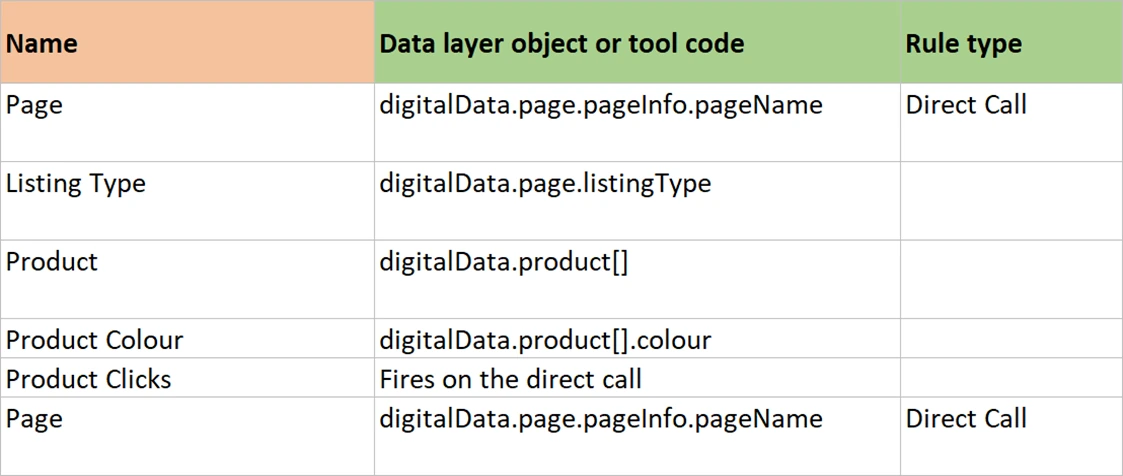
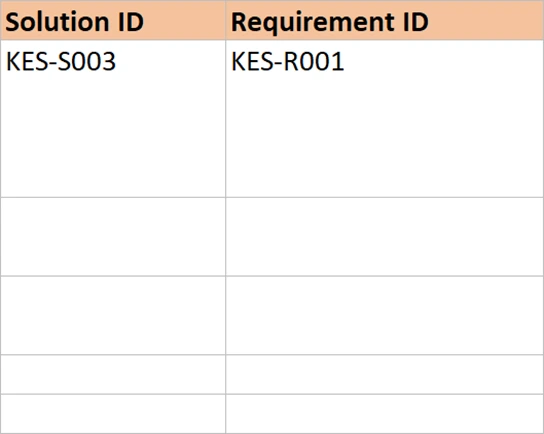
The gain is not the saved typing, although a week is a week. It is that the two documents can no longer disagree. There is no second description of what KES-S005 does, so there is no way for one of them to go stale while the other is updated.
The columns that turn a design into instructions
Eight columns, and each one answers a question a builder actually has.
| Column | Holds | The question it answers |
|---|---|---|
| Data layer or tool code | digitalData.cart.source, or s.getNewRepeat(30) | Where does this value come from? A site object, or code inside the tag manager? |
| Rule type | Page load, event based, direct call | What kind of rule fires this? |
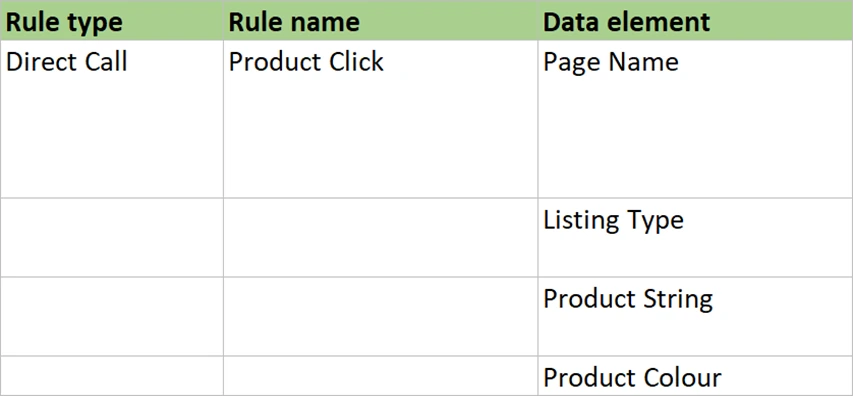
| Rule name | Cart Add | What is the rule called, exactly, including case? This is the name in the tag manager |
| Rule condition | cart_add | What makes it fire? A page condition, an element selector, or a direct call string |
| Data element | Cart Source | Which data element holds this? One per site object, so a rename is one edit |
| Developer instructions | Several lines of plain English | What does the site developer do? This is the only column they read |
| Product data layer | The product objects this solution needs | Which product fields must be set? Separated because eleven solutions share them |
| Custom code | A pointer to the code sheet | Does this need code rather than configuration, and why? |
Only the first row of a block carries the rule columns, in the same way the design does. The variable rows beneath it carry their own data layer path and their own data element, and leave the rest empty. A rule is a property of the moment, not of each variable in it.
Two developers, and only one of them should read your column
An implementation is built by two different people who often do not work for the same organisation. A site developer writes the data layer, populating objects on the page. An analytics developer works in the tag manager, building the rules and data elements that read those objects.
They need different columns and they need to be told which. The site developer reads Developer Instructions and Product Data Layer, and nothing else. The rule name, the rule type and the data element name are none of their business, and reading them only raises questions about a system they do not have access to.
Colour the header row to say so. In the worked example the seven inherited columns are one colour and the eight new ones another, and the instruction given with the file is one sentence: the first colour is what the business signs, the second is what the build team uses, and the site developer only needs the one column that is named for them. That sentence saves more time than the document does.
Say what must happen first, every single time
One instruction repeats on almost every row, and it prevents more faults than everything else in the document combined. Populate the data layer objects before firing the call.
The reason is that a rule reads the page at the instant it fires. A direct call sent before the objects are set will go out with empty values, and nothing anywhere reports an error. The rule fired. The call was sent. Adobe accepted it. The report is simply thinner than it should be, and it looks like a collection problem rather than an ordering one.
The same trap has a page load version that is worse, because it depends on timing rather than on order in the code. A product page rendered by the server can fill its product objects from a script that runs after the page load rule has already fired. On a fast connection it works. On a slow one it works. On the machine of whoever tests it, it usually works, and then a proportion of real product views arrive empty forever.
The fix is not to add a delay, and it is not to poll for the object. Change the rule to a direct call and have the site fire it once the objects are set. The site knows when its own data is ready and the tag manager never will. In the worked example this exact change was made to the product view solution after the first test cycle, and the change log records why, which is what stops somebody changing it back.
One instruction per row is what makes a change cheap
The instruction column is prose, and it is the only prose in the document. Keep each one to a handful of lines: what to populate, what to call, and in what order. Here is one, verbatim.
Set the cart source to Product Page, update the product objects with
the chosen colour and quantity, then call:

  _satellite.track('cart_add');

Quantity is the quantity being added, not the quantity now in the cart.

Notes:
1. Populate the data layer objects before the direct call.
2. Also populate the product objects listed in the next column.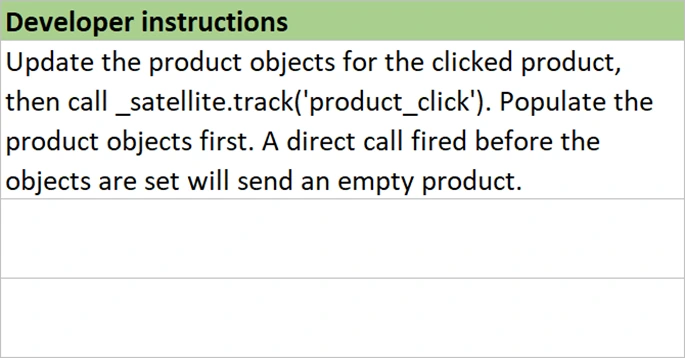
Nine lines, and a developer can build from them without a call. Notice what is not there. No explanation of what an eVar is, no rationale, no reference to the requirement. Those all exist, one column to the left, for a reader who wants them.
The economy of this shape shows up on the day something changes. A direct call gets renamed, and that is one cell. A product field is added, and that is one cell. The change log gets a line naming the solution ID. Nothing else in the document has to be touched, and nothing else can quietly fall out of step.
That property is the reason this shape is worth stealing for work that has nothing to do with analytics. A document where one change costs one edit stays true. A document where one change costs four edits across three chapters becomes false quietly, a little at a time, and nobody can point at the day it stopped being reliable.
What else has to be written down before any of it works
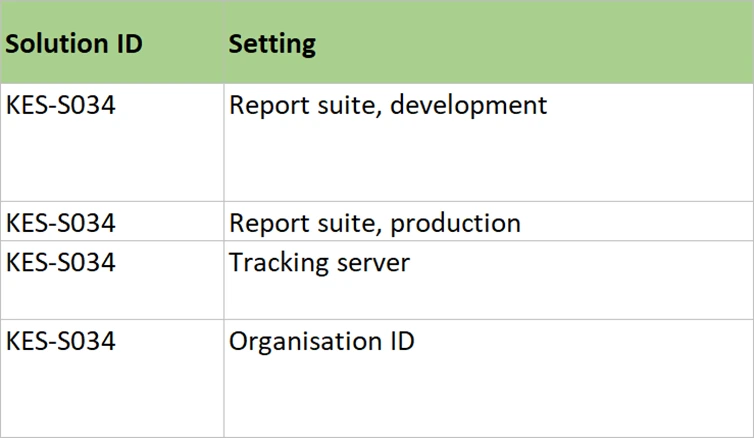
Rules do not run in a vacuum, so two more sheets belong in the technical document. One for the platform: which extensions are installed, the report suite for each environment, the tracking server, the identity service, which plugins are loaded and where. One for custom code, holding the four or five places the implementation genuinely needs code rather than configuration.
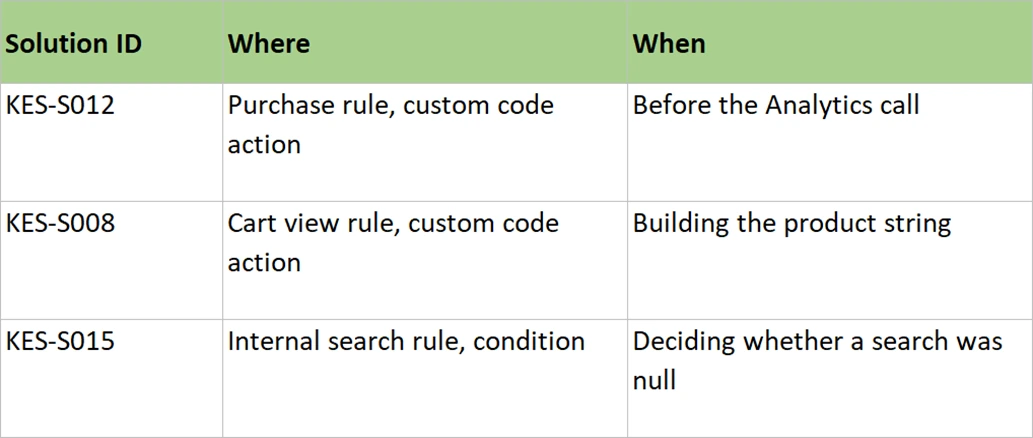
Write the reason next to each piece of code, not only the code. A guard that stops a refreshed order confirmation sending a second purchase looks like clutter to somebody tidying up next year. With one line saying what it prevents, it survives.
Filling in the technical document
The TSD workbook beside this page is already the SDR with its eight extra columns, filled in for Kestrel and Co. Open both files side by side once before you start, because the relationship between them is easier to see than to describe.
- Copy your signed SDR to a new file, name it as the technical document version 1.0, and change nothing in the first seven columns. Compare them afterwards. Those columns should be identical cell for cell, and if they have drifted the business has signed something that no longer exists.
- Add the eight columns with the header colouring the Kestrel file uses, and say once what the two colours mean. First colour is what the business signs, second is what the build team uses. A colour nobody explained is decoration.
- Decide the rule type for each block first, then name the rule and its condition. Direct call for anything the site has to trigger. Page load only when the values are genuinely present at page load. Event based when the tag manager can recognise the element on its own.
- Give every data layer object exactly one data element, and reference the element in rules rather than the raw path. A renamed object is then one edit. Read the path directly in twelve rules and it becomes twelve edits, and the twelfth is the one that gets missed.
- Write the developer instruction for each block, ending with the ordering note. Plain English, a handful of lines, and the exact call to make. Repeat the ordering note on every block even though the words are the same. It is the one that gets forgotten.
- Rewrite the Platform Setup and Custom Code sheets for your own build. Extensions, report suites per environment, plugins, the consent gate. Then each piece of code with the reason it exists written beside it, or somebody deletes it during a tidy-up next year.
- Walk it through with both developers in one session, and tell each of them which columns are theirs. One session, not one per team. Most of the questions are about the seam between them, and the seam only gets discussed when both are in the room.
That is the technical document finished. Eight columns, two support sheets and one walkthrough, and no prose anywhere except inside a cell. Add to it where the estate is bigger: a mobile app needs a second set of technical columns entirely, because an app has no data layer and the instructions are different from top to bottom.
What a developer can now do without you
What exists now is one file, fifteen columns wide, where a business reader sees the seven they signed and a builder sees the eight that tell them what to make. Every row still carries the identifier that goes back to a sentence somebody said in a workshop.
The build can start, and it will not be right first time. Direct calls will fire twice. A quantity will arrive as the cart total. A payment method will come through as a gateway code rather than a name. That is normal, and none of it is a documentation failure, because the way faults get found is a test cycle that checks the build against the design, row by row, using the same identifiers.
Validation and Sign-off covers how that cycle is run and recorded, why four statuses are better than pass and fail, and how a project reaches the point where somebody can say honestly whether it worked.