Shape the data › Marketing Channels
Channel Configuration
Marketing Channels are genuinely useful. They help a business grow sales, spend its budget where it actually returns, and turn interested strangers into customers. All of that is true, and the overview made the case for it. But it left the important question standing: how do you actually do it? This section and Marketing Channel Processing Rules answer that, and they split the work in a way that mirrors how Adobe itself splits it.
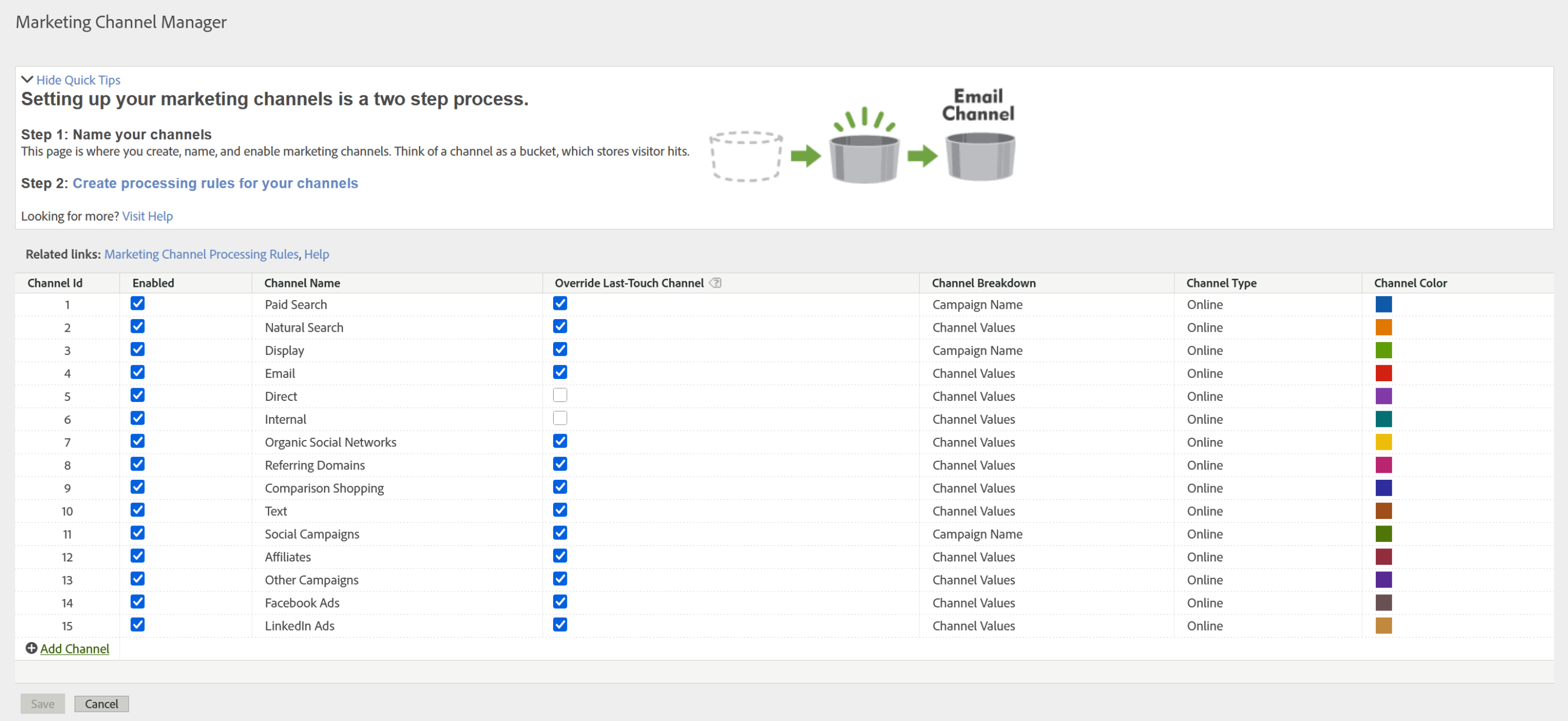
Here is the direct path. Go to Analytics, then Admin, then Report Suites, select your report suite, then Edit Settings, then Marketing Channels, then Marketing Channel Manager. That screen is where marketing channels get created. And that is genuinely all this screen does. You name a channel and it exists. You do not tell Adobe how to fill it, not here.
The best way to hold this is with something you already know. Creating a variable in report suite settings and populating that variable are two separate acts. You declare eVar7 exists, and only later does code or a rule put a value into it. Marketing Channels work the same way. The Marketing Channel Manager creates the empty bucket. The Marketing Channel Processing Rules decide which visitors land in it. Two screens, two jobs, and Adobe keeps them deliberately apart.
That separation is not an accident of the interface. It exists so that your reporting vocabulary can stay still while your marketing tactics churn underneath it. Marketing signs a new partner, moves to a new ad platform, changes its tracking parameter convention, and the rules get rewritten. But Email is still Email. That is precisely what lets a marketer compare this quarter's Paid Search against last year's Paid Search and have the comparison mean anything at all.
Simple, isn't it?
No. It is not.
Mechanically, yes. Creating a channel takes seconds. But walking up to that screen and typing in names is not the job, and treating it as the job is the most common way this goes wrong. Before anything is created, a long list of questions has to be asked and answered, by you, by your team, by the business. Discussed internally, properly, and only then decided: which marketing channels does this business actually need?
What kind of business is this?
Start there, because the honest answer changes everything downstream.
Take the familiar case first. You run an ecommerce site selling products to consumers. The entire business lives online, so you advertise where consumers are. Paid Search, Display, Affiliate, Email, Social. These are obvious, and the standard channel list fits you almost out of the box.
Now change the business. You supply engineering equipment to industry, automation systems sold to automobile plants, railways, manufacturers, electronics companies. Will Paid Search and Display and Affiliate carry that? Those are consumer instruments. They are not how you reach a procurement head at a rail manufacturer. You reach industrial buyers through trade forums, conferences and trade shows, professional communities, personalized outreach rather than bulk email sends, industry publications, and formal RFP processes. There are plenty of channels here, but almost none of them are the traditional ones. The channel spectrum for that business looks nothing like the ecommerce list, and a report suite configured with Adobe's defaults would tell that business almost nothing useful about how its customers actually arrive.
Some channels are not chosen. They are mandatory.
There is a trap hiding in that comparison, and it is worth stepping around carefully. It is tempting to reason that since no business spends money on Direct traffic or on internal traffic, those channels can be skipped. Nobody buys them, so why define them?
Because spending on a channel and defining a channel are two completely different decisions. Traffic that arrives with no referrer, or from a session that refreshed after a timeout, still arrives. It does not stop existing because you declined to create a bucket for it. It simply has nowhere to go, and it piles up under "No Channel Identified," which is a polite way of saying your marketer's report now has a hole in it. Adobe's own guidance is explicit: plan the list so that every visitor hit is categorized somewhere, include channels for internal hits, and include a catch-all channel for traffic that matches nothing else.
So the ecommerce site needs Direct and Internal and a catch-all just as much as the industrial supplier does. Not because anyone is buying that traffic, but because every hit must land somewhere, and the channels you do not spend on are exactly the ones that catch what the others miss.
The defaults, and what they are for
Adobe ships a standard set as a starting point, and for a report suite with no channels yet, an automatic setup will create them along with a first pass at their rules. The set below is the common default map. Read it as a draft to argue with, not a list to accept.
| Channel | What it captures | Overrides last touch? |
|---|---|---|
| Paid Search | Visitors arriving from paid search ads | Yes |
| Natural Search | Unpaid, organic search results | Yes |
| Display | Banner and programmatic ad placements | Yes |
| Clicks from email sends | Yes | |
| Affiliate | Partner and affiliate referrals | Yes |
| Social Networks | Traffic from social platforms | Yes |
| Referring Domains | Other sites linking to you, not classified above | Yes |
| Internal | Session refresh, and traffic already inside your domain | No, by best practice |
| Direct | Typed URL, bookmark, no referrer present | No, by best practice |
That last column is a per-channel setting on the Manager screen, and it is doing more work than its size suggests. The full attribution story behind it belongs to Channel Attribution.
Why this decision is close to permanent
Here is the constraint that should change how carefully you approach the whole exercise.
A channel, once created, cannot be removed. You can disable it, and you can rename it, but the channel itself stays. You are also capped at 25 channels per report suite. And renaming carries a subtlety that catches people: the name change is retroactive across all reporting, but the data underneath it is not. Rename "Affiliate" to "Video" and every historical affiliate hit now sits under a label reading Video. The name moves. The history does not follow it.
Sit with that for a moment. Twenty-five slots, no deletions, and renames that quietly relabel your past. This is not a setting you adjust casually on a Tuesday. It is closer to a schema decision, and a poorly considered channel list will still be distorting reports years after the person who created it has moved on.
So write it down, and get it approved
Which leads directly to the practice that separates a professional implementation from a hasty one. Before anyone opens the Marketing Channel Manager, the channel list should exist as a document.
List every finalized channel. Against each one, record a short rationale. Why is this channel needed? What does it capture? What is its potential? Is it permanent, or is it a trial that will be evaluated after a defined period? If it does not work, what replaces it? Then add the technical column, which is the part you own: how will this channel be identified, what parameter or referrer or tracking code signals it, what is the actual detection logic.
Then get that document approved, formally, by every party with a stake in it. Keep proper logs and version history. Do not let copies multiply across inboxes and laptops. Treat it the way a legal document is treated: one authoritative, current copy on the official shared platform, whether that is a cloud drive, SharePoint, or whatever the business runs on, carrying its version history, its stakeholders, and its approvers.
This may read like bureaucracy. It is not. It is the direct consequence of the constraint above. When a decision cannot be undone, the only protection you have is that it was made deliberately, by the right people, with the reasoning written down.
This is a business decision, not an analytics decision
And that leads to the most important idea in this section, so it is worth saying plainly.
Notice where you enter that diagram. Not at the top. Marketing Channels are not one more analytics feature that an implementation engineer switches on during week one. They are the technical face of something much larger, which is how the business markets itself. The channel list encodes where the company chooses to spend, which customers it intends to reach, and how it plans to reach them. When that is the subject, everyone has a stake: sales, marketing, procurement, technology, senior leadership, the owners.
Compare it to the rest of your work and the difference is stark. You define the variables. You build the Launch rules. You design the data layer. The business rarely intrudes on any of it, and rightly so, because those are engineering decisions. Here, the business has the strongest say, and your role is to execute a decision that was made above you and around you. That is not a diminished role. Knowing which decisions are yours to make and which are yours to implement well is a large part of what separates an architect from a technician.
Now build it
Assume the discussion happened, the document exists, the approvals are in. Now the work is yours.
Go to Analytics, then Admin, then Report Suites, select the suite, then Edit Settings, then Marketing Channels, then Marketing Channel Manager. If the report suite has no channels defined yet, an Auto Setup screen appears first and offers to create a standard set along with their rules. Use it as scaffolding if it helps, but edit what it gives you against your approved document rather than accepting it wholesale. A default list is a guess about your business made by someone who has never seen it.
Then add each approved channel, and set its properties:
- Name. The friendly name that every marketer will see in every report for years. It comes straight from the approved document, and it should read clearly to a business user, not to an engineer.
- Enabled. A checkbox that turns the channel on or off. This is also your only route to retiring a channel, since deletion does not exist.
- Channel type: Online or Offline. Online is the normal case, a visitor arriving through a search engine or an email link. Offline covers visitors who found you through something that never touched a browser, a newspaper coupon or a magazine advertisement, and that data reaches Adobe through Data Sources rather than through a hit on your site. Most channels are online, but knowing offline exists is what lets you answer a marketer who asks whether print can appear in the same report.
- Channel Breakdown. An optional second level. It lets a channel be split into subchannels through a classification on the channel's detail value, so Paid Search can break down by engine, or Email by send, without either becoming a channel in its own right. This is the mechanism behind the advice to keep the channel list short: the variety belongs at the detail level, and this is how you give that variety a shape.
- Override Last-Touch Channel. A checkbox, and the most consequential one on the screen. It decides whether this channel is allowed to take last-touch credit away from a channel that is still persisting from an earlier visit.
A visitor clicks a paid search ad on Monday, does not buy, and returns on Thursday by typing your URL and purchasing. If Direct is allowed to override last touch, Direct takes the credit for that order, and the paid campaign that actually did the work shows nothing. Adobe's best practice is to leave the override unchecked for Direct and Internal, so that broad, absorbent channels cannot steal credit from the channels that earned it. This one checkbox is behind a large share of every attribution investigation that starts with a marketer saying the numbers look wrong.
If the same channel list has to exist across many report suites, do not create it by hand in each one. Adobe supports applying a template report suite's settings to multiple suites, which is how you keep a channel vocabulary consistent across a large estate. Push the channels first, then the rule sets, because a rule needs a channel to attach to.
What you have, and what you do not
At the end of this section the buckets exist. They are named, enabled, typed, and their override behavior is set. Open a Marketing Channel report now and it will still be empty, because nothing has been sorted into anything yet. A channel with no rule behind it is an empty label, and the Manager will even show a warning next to a channel that has no rule attached.
Filling those buckets is the work of Marketing Channel Processing Rules, where you write the logic that reads each arriving hit and decides which of these channels it belongs to, and where the order you place those rules in turns out to matter enormously.
Analytics > Admin > Report Suites > select suite > Edit Settings > Marketing Channels > Marketing Channel Manager. For a suite with no channels yet, the Auto Setup screen appears first. To apply one channel set across many suites, select multiple report suites and apply template report suite settings.
This article focuses on the concepts, architecture, and practical guidance behind the topic. For the latest UI walkthroughs and step-by-step implementation instructions, use the links below. They leave this site and open Adobe's own documentation in a new tab.