Collect the data › Data Layers
What Is a Data Layer
A data layer is where the website developer and the Adobe Analytics developer meet. It is a contract between two teams, and it is where most real implementations quietly succeed or fail. Data Collection covered how a hit physically leaves the page. This is the layer underneath all of it: where the data on the page is agreed, named, and made ready to collect in the first place.
Start by deflating the scariest-sounding term in the field, because it is hiding something simple. Think back to the very first thing you learned in programming. Claim a little space in the computer's memory, give it a name, put something in it that you can change later. That is a variable. A data layer is exactly that and nothing more: a JavaScript variable, an object, sitting on the page, holding the values you want to measure. When people say "the data layer," they are pointing at a variable. That is the whole mystery.
And here is the other word you will hear constantly: tag. A tag is just a label. When you hand clothes to a laundry, the shopkeeper pins a small slip with your name on them so he knows whose they are. A tag on a website is the same idea, a label attached to something that happened: a page was viewed, a button was clicked, a form was submitted, a filter was used, a search was run. That is all a tag is. And the way you attach that label on a website is, you guessed it, through a data layer.
Who builds it, and why it is the most fragile thing you own
Here is the fact that shapes everything. You are the analytics developer. You do not own the website. The web developer does. You cannot reach into the page and place a value wherever you like, you have no rights there. So you do the only thing you can: you go to the web developer and you ask.
That request, and the agreement it creates, is the data layer's true nature. It is a contract between two teams. The web team agrees to populate these named fields, with these agreed meanings, at these moments. You agree to read only from those fields and never to go scraping values out of the raw page. Neither side has to understand the other's internals. That decoupling is exactly why a data layer is worth having.
It is also precisely why it is the most vulnerable part of a real implementation. A data layer is not a piece of technology that either works or does not. It is a human treaty between two teams who have different priorities, different backlogs, and different release schedules. It breaks the moment the contract is vague, undocumented, or silently changed, when a front-end developer renames a field in a refactor and never tells you, and three reports go quietly dark. The technology is trivial. The agreement is the hard part, and the part that fails.
The instrument of the contract: your SDR
So how do you actually ask? Not with a hallway conversation that gets forgotten. You hand over the Solution Design Reference, the SDR, the planning document from Variable Planning. And here is the craft in how you use it.
The SDR has two faces. One faces you and the business: it starts from a business question and answers it in analytics terms, eVars, props, events, products, the placeholders you plan. The other faces the developer, and this is where you show some mercy. The developer does not care that internal search lives in eVar5, or that you want it to persist. If your document leads with that, his eyes glaze. The instant it says, in plain terms, "when a user runs a search on the site, store the search term in this named field," he smiles, says "got it," and goes and wires it up. The eVar, the persistence, the allocation, all of that is your side of the wall. His side is one thing: a field name, a value, and the moment to populate it.
You may well know how he populates it. Let him own that anyway. The healthy boundary is simple: what the field is called and when it is set is your specification; how the value gets there is his craft. Respect that line and the relationship, and the data, stays clean.
Hand that over and three questions fall out of it, which are the rest of this section: what do you name the field, how do you check it is right, and how do you use it to actually tag something?
Naming it: the W3C standard everyone half-follows
You are not the first person to need a data layer, so there is a shared vocabulary. In December 2013 the W3C Customer Experience Digital Data Community Group published the Customer Experience Digital Data Layer, CEDDL, built around a root object named digitalData.
window.digitalData = {
  pageInstanceID: "product-detail-prod",
  page: {
    pageInfo: { pageName: "Blue Widget", pageType: "product" },
    category: { primaryCategory: "Widgets" }
  },
  product: [ { productInfo: { productID: "SKU-123", productName: "Blue Widget" } } ],
  cart: { cartID: "C-998", price: { cartTotal: 49.0 } },
  user: [ { profile: [ { profileInfo: { loginStatus: "logged-in" } } ] } ]
};
Beyond pageInstanceID, the spec defines sub-objects for the common shapes of customer data: page, product, cart, transaction, user, event, component, and a few more, with room to add your own. It is a sensible structure and a good default to start from.
Now the honest part, the kind of distinction worth keeping straight. Everyone calls CEDDL "the W3C standard," but technically it never was one. It was a Community Group specification that was never ratified onto the W3C standards track, and in the real world adoption is loose. Most production data layers are bespoke, shaped to the business rather than the spec. That is not a failure, it is the norm, and it loops straight back to the contract: precisely because there is no enforced universal shape, your own documented agreement, your SDR, matters more than the standard does. Follow the structure where it fits, and write down every place you deviate.
Checking it: just open the console
Once the developer says it is done, you do not take his word for it, you look. Open the browser's developer tools (Ctrl+Shift+I on Windows, Cmd+Option+I on a Mac, or just F12), go to the Console, type the name of the variable, digitalData, and press enter. The browser prints the object back to you, and you can see exactly what is populated and with what value. That answers whether the data is there and whether it is correct.
The harder question is when it is there, the timing, and that is the thread that leads to the last and most important idea in this section.
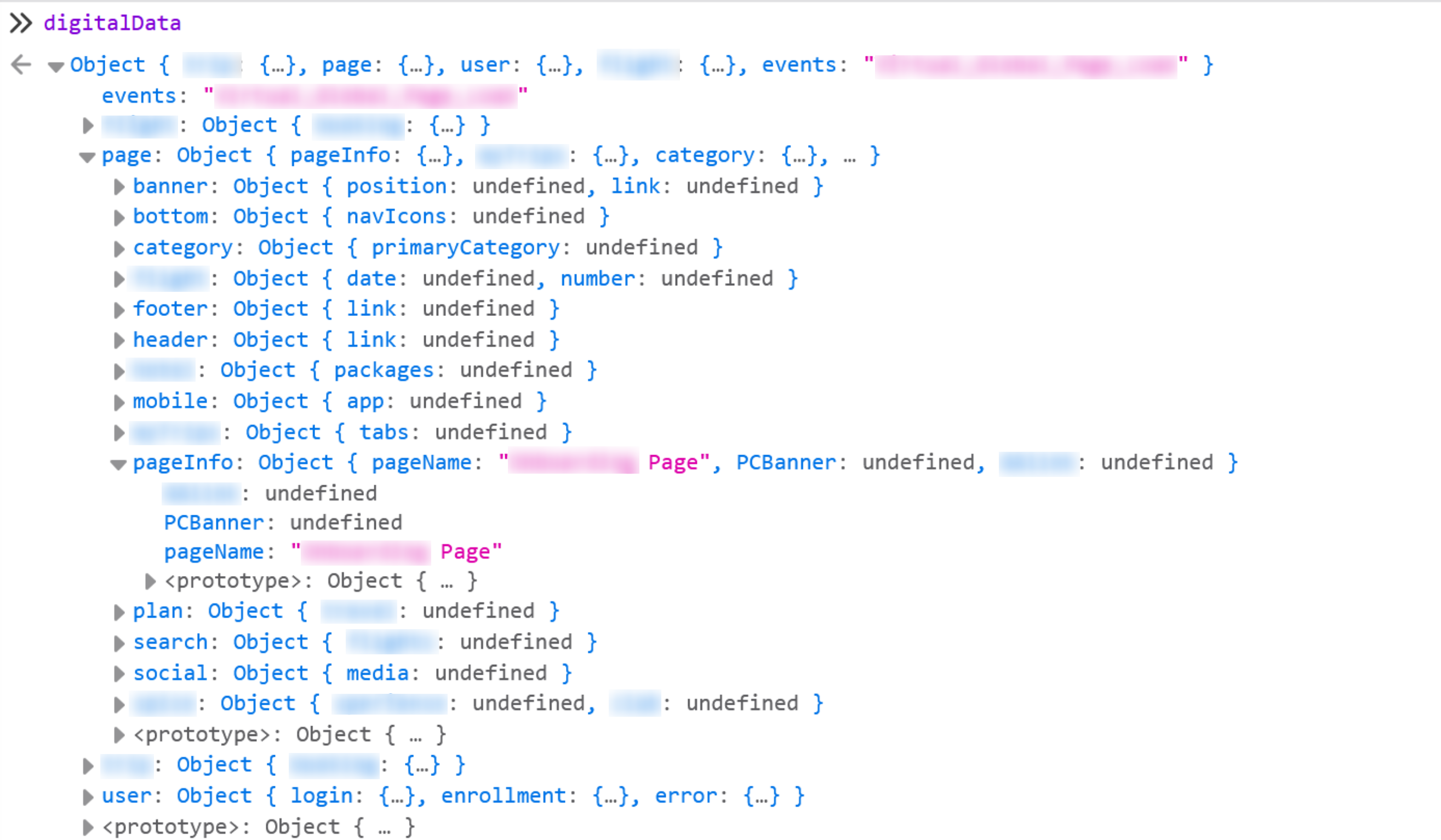
undefined. That is not a broken implementation, it is the normal condition, and it is the thing worth taking away: the shape is declared on every page, and any single page fills in only the branches that apply to it. A data layer is a contract about what could be present, never a promise that it is.Using it: data just sitting there does nothing
Here is the move that trips up almost everyone. A populated data layer, on its own, captures nothing. Analytics is not hovering over your page hungrily swallowing values the moment they appear. It is not a conveyor belt in a factory, with data rolling past and being scooped up automatically. The values can be sitting right there in digitalData, perfect and complete, and not one of them will reach Adobe until something explicitly says: "now. an event happened. go read the layer."
That signal is called a direct call. And the cleanest way to picture it is a torch. Imagine two people standing two kilometers apart. They can see each other but cannot hear a thing, and they have no phones. Person A needs to tell Person B that all is clear. So he raises a torch and flashes it. B sees the light and understands. Armies signaled across distance like this for centuries. A direct call is that torch: the page flashes a signal to analytics that something has happened, without sending any data in the signal itself. The data is already waiting in the layer, the torch just says "read it, now."
In practice you hand the developer a one-line piece of code to run at the moment the thing happens, so that he is not phoning you every time a user searches and you are not answering a million calls. It looks like this:
// Fire this at the moment the event happens
_satellite.track('Internal_Search');
_satellite.track('Link_Click');
_satellite is an object that the Adobe tag manager, Launch, creates for you on the page. For now, treat these calls as the torch and just change the string inside to name the event. _satellite, and the rules that catch these signals, belong with Adobe Launch (Tags). One honest note for currency: Adobe now treats this particular method as a classic one and points new builds toward the event-driven model of the Adobe Client Data Layer. The torch idea holds either way, data still needs a signal, only the wiring gets more modern. How many direct calls will you have? Roughly one per distinct thing you are tracking, search, form submit, download, link click, purchase, which means the count tracks closely with the number of events and KPIs in your SDR.
A point of clarity, and a point of practice. Strictly speaking, the data layer is only the data, the digitalData object. A direct call is a separate thing, a trigger that belongs to the tag manager. On the ground, though, nobody draws that line. In industry everyone loosely calls the whole bundle, the variables the developer populates and the direct calls he fires, "the data layer," because it is all the work the web developer does on analytics' behalf and it all moves together. That usage is technically imprecise and practically fine. Just know which part is which, so that when something breaks you know whether you are looking at missing data or a missing signal.
The one rule you never break
If you remember a single sentence from this section, make it this one: always populate the data layer variables first, and fire the direct call second. Never the other way around.
Picture filling a glass from a tap. You set the empty glass down, then you turn on the water. Do it in the wrong order, water first, glass second, and the water simply runs down the drain while you stand there thirsty, glass still empty. It is the same with tracking. Fire the direct call before the values are in the layer, and analytics reads an empty layer, captures nothing, and moves on. You end up with a data layer that looks perfectly populated a moment later and reports that stubbornly show zero. This is the single most common failure in real implementations, and it has a name everyone uses: a timing issue. Now you know exactly what causes it, and exactly how to avoid it.
Set the variables, then fire _satellite.track(). If the trigger runs before the data is written, the hit goes out empty and the data is gone, there is no second chance for that interaction. When a tag "fires but has no data," this ordering is the first thing to check.
Where this model runs out: the door to ACDL
There is one more thing to understand about CEDDL, and it is the reason the Adobe Client Data Layer exists. The digitalData object is a computed-state model. Think of it as a photograph of the page, painted once, at page load. On a traditional website that is fine, because every click loads a brand new page, which repaints the photograph fresh each time. The state is always current because the page is always new.
But a single-page application does not reload. It swaps views in place, product to cart to checkout, without ever fetching a new page. The instant that happens, the photograph is stale. The user has moved to the cart, but digitalData is still describing the product page, because nothing reloaded to repaint it. CEDDL has no native notion of "something just changed, here is an event," it only knows how to describe a moment frozen at load. That gap, between a static photograph and a live, changing application, is exactly what the Adobe Client Data Layer was built to close, and it is where the Adobe Client Data Layer comes in.
Who owns the contract
One last thing, because it is the theme this whole section started on. A data layer is only ever as trustworthy as the discipline maintaining it. Left unowned, it rots: fields drift, meanings blur, a well-intentioned front-end refactor renames something, and reports die without a sound. Treat the data layer as a living contract with a named owner. Version it, document it in the SDR, and review it when the site changes. The technology will never be your problem. The agreement always will be, so guard it.
This site has a second guide alongside this one, AppMeasurement to Web SDK Migration, focused on moving an older implementation to the modern Web SDK. Its data layer reference covers the same contract from that angle, including how the computed-state and event-driven shapes differ in practice. Worth a look once you have both this section and the next under your belt.
This article focuses on the concepts, architecture, and practical guidance behind the topic. For the latest UI walkthroughs and step-by-step implementation instructions, use the links below. They leave this site and open Adobe's own documentation in a new tab.